# `Emerge.UI.Align`
[🔗](https://github.com/emerge-elixir/emerge/blob/v0.2.1/lib/emerge/ui/align.ex#L1)
Alignment helpers for positioning inside layout parents.
## Basics
Alignment happens inside the parent's content area. Padding and border are
applied before alignment, so these helpers work within the remaining space.
Alignment is visible when the parent has extra space on that axis.
Alignment helpers position the element they are attached to inside its
parent. `el` is the main exception: child content inherits alignment from the
`el`.
## `el`
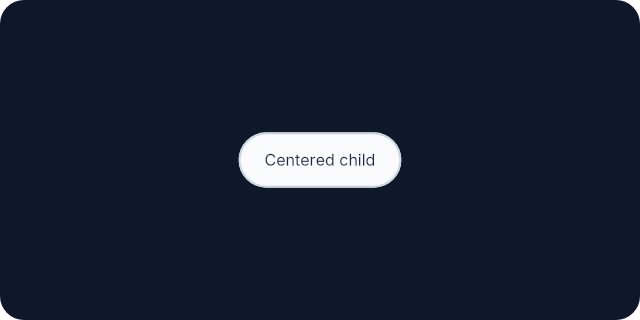
In `el`, child content inherits alignment from the container.
Putting `center_x/0`, `align_right/0`, `center_y/0`, or `align_bottom/0` on
the `el` controls how its child content is positioned inside that `el`.
This example centers a pill inside a larger container:
```elixir
el(
[
width(px(320)),
height(px(160)),
padding(16),
Background.color(color(:slate, 900)),
Border.rounded(12),
center_x(),
center_y()
],
el(
[
padding_xy(12, 8),
Background.color(color(:slate, 50)),
Border.rounded(999),
Border.width(1),
Border.color(color(:slate, 300)),
Font.color(color(:slate, 800))
],
text("Centered child")
)
)
```
 A child can override inherited alignment with its own alignment helper:
```elixir
el(
[width(px(200)), height(px(100)), center_x()],
el([align_right()], text("Child"))
)
```
## `row`
In `row`, children do not inherit alignment from the row. Put alignment
helpers on the children you want to position inside the row.
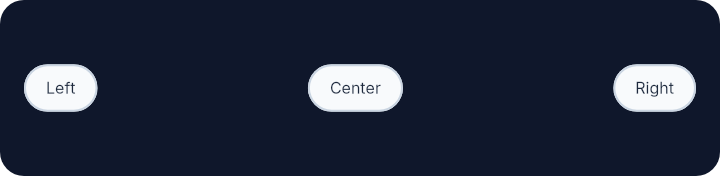
`align_left/0`, `center_x/0`, and `align_right/0` split children into left,
center, and right groups across the row.
`align_top/0`, `center_y/0`, and `align_bottom/0` position each child within
the row height.
If you put an alignment helper on the `row` itself, it positions that `row`
inside its parent. It is not inherited by the row's children.
This row shows left, center, and right grouping across the main axis.
```elixir
row(
[
width(px(360)),
height(px(88)),
padding(12),
Background.color(color(:slate, 900)),
Border.rounded(12)
],
[
el(
[
align_left(),
center_y(),
padding_xy(10, 6),
Background.color(color(:slate, 50)),
Border.rounded(999),
Border.width(1),
Border.color(color(:slate, 300)),
Font.color(color(:slate, 800))
],
text("Left")
),
el(
[
center_x(),
center_y(),
padding_xy(10, 6),
Background.color(color(:slate, 50)),
Border.rounded(999),
Border.width(1),
Border.color(color(:slate, 300)),
Font.color(color(:slate, 800))
],
text("Center")
),
el(
[
align_right(),
center_y(),
padding_xy(10, 6),
Background.color(color(:slate, 50)),
Border.rounded(999),
Border.width(1),
Border.color(color(:slate, 300)),
Font.color(color(:slate, 800))
],
text("Right")
)
]
)
```
A child can override inherited alignment with its own alignment helper:
```elixir
el(
[width(px(200)), height(px(100)), center_x()],
el([align_right()], text("Child"))
)
```
## `row`
In `row`, children do not inherit alignment from the row. Put alignment
helpers on the children you want to position inside the row.
`align_left/0`, `center_x/0`, and `align_right/0` split children into left,
center, and right groups across the row.
`align_top/0`, `center_y/0`, and `align_bottom/0` position each child within
the row height.
If you put an alignment helper on the `row` itself, it positions that `row`
inside its parent. It is not inherited by the row's children.
This row shows left, center, and right grouping across the main axis.
```elixir
row(
[
width(px(360)),
height(px(88)),
padding(12),
Background.color(color(:slate, 900)),
Border.rounded(12)
],
[
el(
[
align_left(),
center_y(),
padding_xy(10, 6),
Background.color(color(:slate, 50)),
Border.rounded(999),
Border.width(1),
Border.color(color(:slate, 300)),
Font.color(color(:slate, 800))
],
text("Left")
),
el(
[
center_x(),
center_y(),
padding_xy(10, 6),
Background.color(color(:slate, 50)),
Border.rounded(999),
Border.width(1),
Border.color(color(:slate, 300)),
Font.color(color(:slate, 800))
],
text("Center")
),
el(
[
align_right(),
center_y(),
padding_xy(10, 6),
Background.color(color(:slate, 50)),
Border.rounded(999),
Border.width(1),
Border.color(color(:slate, 300)),
Font.color(color(:slate, 800))
],
text("Right")
)
]
)
```
 ## `wrapped_row`
In `wrapped_row`, horizontal alignment is evaluated per wrapped line.
After wrapping, `align_left/0`, `center_x/0`, and `align_right/0` split each
line into left, center, and right zones using the remaining width of that
line. A centered or right-aligned child on a later line therefore aligns
within that line, not against the full wrapped row width.
`align_top/0`, `center_y/0`, and `align_bottom/0` still position each child
within the height of its own wrapped line.
## `column`
In `column`, children do not inherit alignment from the column. Put alignment
helpers on the children you want to position inside the column.
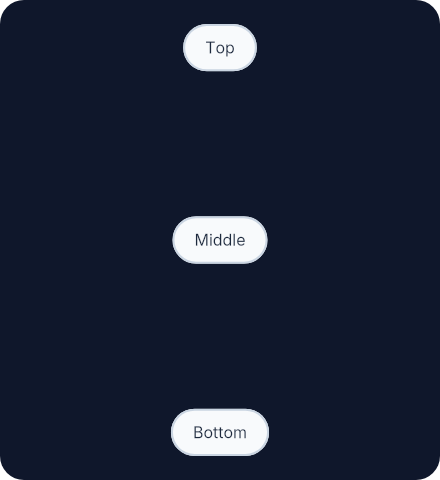
`align_top/0`, `center_y/0`, and `align_bottom/0` split children into top,
center, and bottom groups down the column.
`align_left/0`, `center_x/0`, and `align_right/0` position each child within
the column width.
If you put an alignment helper on the `column` itself, it positions that
`column` inside its parent. It is not inherited by the column's children.
This column shows top, center, and bottom grouping down the main axis.
```elixir
column(
[
width(px(220)),
height(px(240)),
padding(12),
Background.color(color(:slate, 900)),
Border.rounded(12)
],
[
el(
[
align_top(),
center_x(),
padding_xy(10, 6),
Background.color(color(:slate, 50)),
Border.rounded(999),
Border.width(1),
Border.color(color(:slate, 300)),
Font.color(color(:slate, 800))
],
text("Top")
),
el(
[
center_y(),
center_x(),
padding_xy(10, 6),
Background.color(color(:slate, 50)),
Border.rounded(999),
Border.width(1),
Border.color(color(:slate, 300)),
Font.color(color(:slate, 800))
],
text("Middle")
),
el(
[
align_bottom(),
center_x(),
padding_xy(10, 6),
Background.color(color(:slate, 50)),
Border.rounded(999),
Border.width(1),
Border.color(color(:slate, 300)),
Font.color(color(:slate, 800))
],
text("Bottom")
)
]
)
```
## `wrapped_row`
In `wrapped_row`, horizontal alignment is evaluated per wrapped line.
After wrapping, `align_left/0`, `center_x/0`, and `align_right/0` split each
line into left, center, and right zones using the remaining width of that
line. A centered or right-aligned child on a later line therefore aligns
within that line, not against the full wrapped row width.
`align_top/0`, `center_y/0`, and `align_bottom/0` still position each child
within the height of its own wrapped line.
## `column`
In `column`, children do not inherit alignment from the column. Put alignment
helpers on the children you want to position inside the column.
`align_top/0`, `center_y/0`, and `align_bottom/0` split children into top,
center, and bottom groups down the column.
`align_left/0`, `center_x/0`, and `align_right/0` position each child within
the column width.
If you put an alignment helper on the `column` itself, it positions that
`column` inside its parent. It is not inherited by the column's children.
This column shows top, center, and bottom grouping down the main axis.
```elixir
column(
[
width(px(220)),
height(px(240)),
padding(12),
Background.color(color(:slate, 900)),
Border.rounded(12)
],
[
el(
[
align_top(),
center_x(),
padding_xy(10, 6),
Background.color(color(:slate, 50)),
Border.rounded(999),
Border.width(1),
Border.color(color(:slate, 300)),
Font.color(color(:slate, 800))
],
text("Top")
),
el(
[
center_y(),
center_x(),
padding_xy(10, 6),
Background.color(color(:slate, 50)),
Border.rounded(999),
Border.width(1),
Border.color(color(:slate, 300)),
Font.color(color(:slate, 800))
],
text("Middle")
),
el(
[
align_bottom(),
center_x(),
padding_xy(10, 6),
Background.color(color(:slate, 50)),
Border.rounded(999),
Border.width(1),
Border.color(color(:slate, 300)),
Font.color(color(:slate, 800))
],
text("Bottom")
)
]
)
```
 In scrollable columns, `align_bottom/0` stays part of the column's content
flow instead of pinning to the visible bottom edge.
# `horizontal_alignment`
```elixir
@type horizontal_alignment() :: :left | :center | :right
```
# `t`
```elixir
@type t() :: x_attr() | y_attr()
```
# `vertical_alignment`
```elixir
@type vertical_alignment() :: :top | :center | :bottom
```
# `x_attr`
```elixir
@type x_attr() :: {:align_x, horizontal_alignment()}
```
# `y_attr`
```elixir
@type y_attr() :: {:align_y, vertical_alignment()}
```
# `align_bottom`
```elixir
@spec align_bottom() :: y_attr()
```
Align to the bottom within the current layout parent.
# `align_left`
```elixir
@spec align_left() :: x_attr()
```
Align to the left within the current layout parent.
# `align_right`
```elixir
@spec align_right() :: x_attr()
```
Align to the right within the current layout parent.
# `align_top`
```elixir
@spec align_top() :: y_attr()
```
Align to the top within the current layout parent.
# `center_x`
```elixir
@spec center_x() :: x_attr()
```
Center horizontally within the current layout parent.
# `center_y`
```elixir
@spec center_y() :: y_attr()
```
Center vertically within the current layout parent.
---
*Consult [api-reference.md](api-reference.md) for complete listing*
In scrollable columns, `align_bottom/0` stays part of the column's content
flow instead of pinning to the visible bottom edge.
# `horizontal_alignment`
```elixir
@type horizontal_alignment() :: :left | :center | :right
```
# `t`
```elixir
@type t() :: x_attr() | y_attr()
```
# `vertical_alignment`
```elixir
@type vertical_alignment() :: :top | :center | :bottom
```
# `x_attr`
```elixir
@type x_attr() :: {:align_x, horizontal_alignment()}
```
# `y_attr`
```elixir
@type y_attr() :: {:align_y, vertical_alignment()}
```
# `align_bottom`
```elixir
@spec align_bottom() :: y_attr()
```
Align to the bottom within the current layout parent.
# `align_left`
```elixir
@spec align_left() :: x_attr()
```
Align to the left within the current layout parent.
# `align_right`
```elixir
@spec align_right() :: x_attr()
```
Align to the right within the current layout parent.
# `align_top`
```elixir
@spec align_top() :: y_attr()
```
Align to the top within the current layout parent.
# `center_x`
```elixir
@spec center_x() :: x_attr()
```
Center horizontally within the current layout parent.
# `center_y`
```elixir
@spec center_y() :: y_attr()
```
Center vertically within the current layout parent.
---
*Consult [api-reference.md](api-reference.md) for complete listing*