# `Emerge.UI.Font`
[🔗](https://github.com/emerge-elixir/emerge/blob/v0.2.1/lib/emerge/ui/font.ex#L1)
Font styling attributes.
Font attrs control text family, weight, style, decorations, spacing, and text
alignment. They apply to text-bearing elements and inherit through descendants
until overridden.
Use:
- `size/1`, `color/1`, and `family/1` for the core text appearance
- `weight/1` or the named weight helpers for full font-weight coverage
- `italic/0`, `underline/0`, and `strike/0` for emphasis and decoration
- `letter_spacing/1` and `word_spacing/1` to loosen or tighten text rhythm
- `align_left/0`, `align_right/0`, and `center/0` to align text inside the
element content box
## Defaults
Text defaults to:
- family: `"default"`
- weight: `400` (`regular/0`)
- italic: `false`
- size: `16`
- color: black
- alignment: left
## Inheritance
Font attrs inherit through the element tree. For example, setting
`Font.color/1` or `Font.family/1` on a parent element affects descendant text
unless a child overrides that specific font attr.
## Text Alignment
`align_left/0`, `align_right/0`, and `center/0` align text inside the
element's content box after padding and border insets are applied. They do not
change where the element itself is placed in a `row/2` or `column/2`.
## Font Weights
Use `weight/1` for the full `100..900` range in `100` steps, or use the named
helpers for common weights. `regular/0` is the canonical `400` weight.
`normal/0` is an alias for `regular/0`.
## Examples
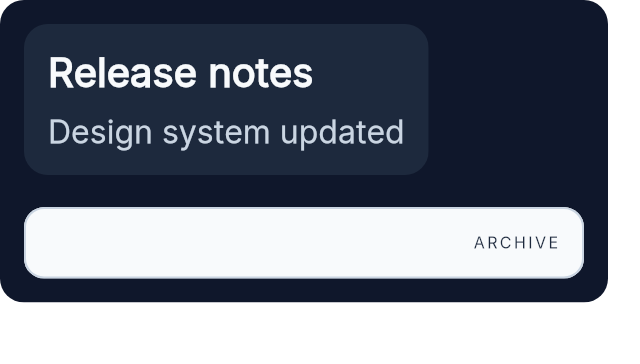
This example shows inherited family, weight, size, and color in the top card,
then a lighter, tracked, right-aligned label below it.
```elixir
column([spacing(16), padding(12), Background.color(color(:slate, 900)), Border.rounded(12)], [
el(
[
padding(12),
Background.color(color(:slate, 800)),
Border.rounded(12),
Font.family("Inter"),
Font.regular(),
Font.size(16),
Font.color(color(:slate, 50))
],
column([spacing(8)], [
el([Font.semi_bold(), Font.size(20)], text("Release notes")),
el([Font.color(color(:slate, 300))], text("Design system updated"))
])
),
el(
[
width(px(280)),
padding(12),
Background.color(color(:slate, 50)),
Border.rounded(10),
Border.width(1),
Border.color(color(:slate, 300)),
Font.color(color(:slate, 800)),
Font.align_right(),
Font.extra_light(),
Font.letter_spacing(1.2)
],
text("ARCHIVE")
)
])
```
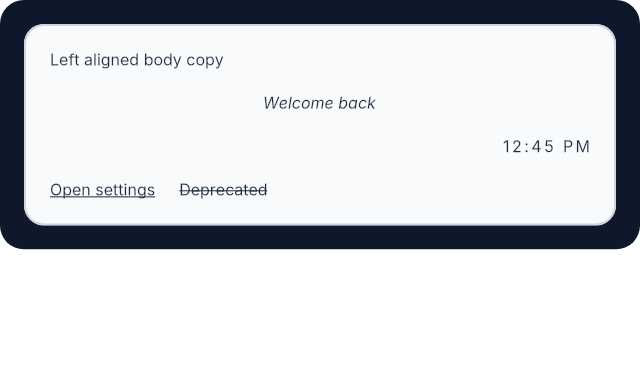
 Text alignment and decoration are easier to understand visually than in a list
of helper names.
```elixir
el(
[
width(px(320)),
padding(12),
Background.color(color(:slate, 900)),
Border.rounded(12)
],
el(
[
width(fill()),
padding(12),
Background.color(color(:slate, 50)),
Border.rounded(10),
Border.width(1),
Border.color(color(:slate, 300)),
Font.color(color(:slate, 800))
],
column([width(fill()), spacing(12)], [
el([width(fill()), Font.align_left()], text("Left aligned body copy")),
el([width(fill()), Font.center(), Font.italic()], text("Welcome back")),
el([width(fill()), Font.align_right(), Font.letter_spacing(1.2)], text("12:45 PM")),
row([spacing(12)], [
el([Font.underline()], text("Open settings")),
el([Font.strike()], text("Deprecated"))
])
])
)
)
```
Text alignment and decoration are easier to understand visually than in a list
of helper names.
```elixir
el(
[
width(px(320)),
padding(12),
Background.color(color(:slate, 900)),
Border.rounded(12)
],
el(
[
width(fill()),
padding(12),
Background.color(color(:slate, 50)),
Border.rounded(10),
Border.width(1),
Border.color(color(:slate, 300)),
Font.color(color(:slate, 800))
],
column([width(fill()), spacing(12)], [
el([width(fill()), Font.align_left()], text("Left aligned body copy")),
el([width(fill()), Font.center(), Font.italic()], text("Welcome back")),
el([width(fill()), Font.align_right(), Font.letter_spacing(1.2)], text("12:45 PM")),
row([spacing(12)], [
el([Font.underline()], text("Open settings")),
el([Font.strike()], text("Deprecated"))
])
])
)
)
```
 # `color_value`
```elixir
@type color_value() :: Emerge.UI.Color.color() | Emerge.UI.Color.t()
```
# `family`
```elixir
@type family() :: atom() | binary()
```
# `t`
```elixir
@type t() ::
{:font_size, number()}
| {:font_color, color_value()}
| {:font, family()}
| {:font_weight, weight_name()}
| {:font_style, :italic}
| {:font_underline, true}
| {:font_strike, true}
| {:font_letter_spacing, number()}
| {:font_word_spacing, number()}
| {:text_align, text_align()}
```
# `text_align`
```elixir
@type text_align() :: :left | :right | :center
```
# `weight_name`
```elixir
@type weight_name() ::
:thin
| :extra_light
| :light
| :regular
| :medium
| :semi_bold
| :bold
| :extra_bold
| :black
```
# `weight_value`
```elixir
@type weight_value() :: 100 | 200 | 300 | 400 | 500 | 600 | 700 | 800 | 900
```
# `align_left`
```elixir
@spec align_left() :: {:text_align, :left}
```
Left-align text within the element content box.
This is the default text alignment.
## Example
```elixir
el([width(px(280)), Font.align_left()], text("Left aligned body copy"))
```
# `align_right`
```elixir
@spec align_right() :: {:text_align, :right}
```
Right-align text within the element content box.
## Example
```elixir
el([width(px(280)), Font.align_right()], text("12:45 PM"))
```
# `black`
```elixir
@spec black() :: {:font_weight, :black}
```
Set black weight (`900`).
Sugar for `weight(900)`.
# `bold`
```elixir
@spec bold() :: {:font_weight, :bold}
```
Set bold weight (`700`).
Sugar for `weight(700)`.
# `center`
```elixir
@spec center() :: {:text_align, :center}
```
Center text within the element content box.
## Example
```elixir
el([width(px(280)), Font.center()], text("Welcome back"))
```
# `color`
```elixir
@spec color(color_value()) :: {:font_color, color_value()}
```
Set font color.
Accepts plain named colors like `:black` and normalized color tuples from
`Emerge.UI.Color`.
## Example
```elixir
el([Font.color(color(:emerald, 600))], text("Saved"))
```
# `extra_bold`
```elixir
@spec extra_bold() :: {:font_weight, :extra_bold}
```
Set extra-bold weight (`800`).
Sugar for `weight(800)`.
# `extra_light`
```elixir
@spec extra_light() :: {:font_weight, :extra_light}
```
Set extra light weight (`200`).
Sugar for `weight(200)`.
# `family`
```elixir
@spec family(family()) :: {:font, family()}
```
Set font family.
Accepts either an atom or a binary family name. The family inherits to
descendant text until overridden.
## Example
```elixir
el(
[Font.family("Inter"), Font.regular(), Font.size(16)],
text("Body copy")
)
```
# `italic`
```elixir
@spec italic() :: {:font_style, :italic}
```
Set italic text style.
## Example
```elixir
el([Font.italic()], text("Draft"))
```
# `letter_spacing`
```elixir
@spec letter_spacing(number()) :: {:font_letter_spacing, number()}
```
Add extra spacing between letters.
This changes both text measurement and final glyph placement.
## Example
```elixir
el([Font.extra_light(), Font.letter_spacing(1.5)], text("TRACKED"))
```
# `light`
```elixir
@spec light() :: {:font_weight, :light}
```
Set light weight (`300`).
Sugar for `weight(300)`.
# `medium`
```elixir
@spec medium() :: {:font_weight, :medium}
```
Set medium weight (`500`).
Sugar for `weight(500)`.
# `normal`
```elixir
@spec normal() :: {:font_weight, :regular}
```
Alias for `regular/0`.
# `regular`
```elixir
@spec regular() :: {:font_weight, :regular}
```
Set regular weight (`400`).
This is the canonical helper for the default text weight.
# `semi_bold`
```elixir
@spec semi_bold() :: {:font_weight, :semi_bold}
```
Set semi-bold weight (`600`).
Sugar for `weight(600)`.
# `size`
```elixir
@spec size(number()) :: {:font_size, number()}
```
Set font size.
The value is in logical pixels and inherits to descendants.
## Example
```elixir
el([Font.size(18)], text("Section heading"))
```
# `strike`
```elixir
@spec strike() :: {:font_strike, true}
```
Strike through text.
## Example
```elixir
el([Font.strike()], text("Deprecated"))
```
# `thin`
```elixir
@spec thin() :: {:font_weight, :thin}
```
Set the thinnest named weight (`100`).
Sugar for `weight(100)`.
# `underline`
```elixir
@spec underline() :: {:font_underline, true}
```
Underline text.
## Example
```elixir
el([Font.underline()], text("Open settings"))
```
# `weight`
```elixir
@spec weight(weight_value()) :: {:font_weight, weight_name()}
```
Set an explicit font weight using the numeric `100..900` scale.
The value must be one of `100, 200, 300, 400, 500, 600, 700, 800, 900`.
Returned attrs use the canonical named weight atoms.
## Examples
```elixir
column([spacing(8)], [
el([Font.weight(400)], text("Body")),
el([Font.weight(600)], text("Section title")),
el([Font.weight(800)], text("Display accent"))
])
```
# `word_spacing`
```elixir
@spec word_spacing(number()) :: {:font_word_spacing, number()}
```
Add extra spacing between words.
This changes both text measurement and final glyph placement.
## Example
```elixir
el([Font.word_spacing(3)], text("Status updated today"))
```
---
*Consult [api-reference.md](api-reference.md) for complete listing*
# `color_value`
```elixir
@type color_value() :: Emerge.UI.Color.color() | Emerge.UI.Color.t()
```
# `family`
```elixir
@type family() :: atom() | binary()
```
# `t`
```elixir
@type t() ::
{:font_size, number()}
| {:font_color, color_value()}
| {:font, family()}
| {:font_weight, weight_name()}
| {:font_style, :italic}
| {:font_underline, true}
| {:font_strike, true}
| {:font_letter_spacing, number()}
| {:font_word_spacing, number()}
| {:text_align, text_align()}
```
# `text_align`
```elixir
@type text_align() :: :left | :right | :center
```
# `weight_name`
```elixir
@type weight_name() ::
:thin
| :extra_light
| :light
| :regular
| :medium
| :semi_bold
| :bold
| :extra_bold
| :black
```
# `weight_value`
```elixir
@type weight_value() :: 100 | 200 | 300 | 400 | 500 | 600 | 700 | 800 | 900
```
# `align_left`
```elixir
@spec align_left() :: {:text_align, :left}
```
Left-align text within the element content box.
This is the default text alignment.
## Example
```elixir
el([width(px(280)), Font.align_left()], text("Left aligned body copy"))
```
# `align_right`
```elixir
@spec align_right() :: {:text_align, :right}
```
Right-align text within the element content box.
## Example
```elixir
el([width(px(280)), Font.align_right()], text("12:45 PM"))
```
# `black`
```elixir
@spec black() :: {:font_weight, :black}
```
Set black weight (`900`).
Sugar for `weight(900)`.
# `bold`
```elixir
@spec bold() :: {:font_weight, :bold}
```
Set bold weight (`700`).
Sugar for `weight(700)`.
# `center`
```elixir
@spec center() :: {:text_align, :center}
```
Center text within the element content box.
## Example
```elixir
el([width(px(280)), Font.center()], text("Welcome back"))
```
# `color`
```elixir
@spec color(color_value()) :: {:font_color, color_value()}
```
Set font color.
Accepts plain named colors like `:black` and normalized color tuples from
`Emerge.UI.Color`.
## Example
```elixir
el([Font.color(color(:emerald, 600))], text("Saved"))
```
# `extra_bold`
```elixir
@spec extra_bold() :: {:font_weight, :extra_bold}
```
Set extra-bold weight (`800`).
Sugar for `weight(800)`.
# `extra_light`
```elixir
@spec extra_light() :: {:font_weight, :extra_light}
```
Set extra light weight (`200`).
Sugar for `weight(200)`.
# `family`
```elixir
@spec family(family()) :: {:font, family()}
```
Set font family.
Accepts either an atom or a binary family name. The family inherits to
descendant text until overridden.
## Example
```elixir
el(
[Font.family("Inter"), Font.regular(), Font.size(16)],
text("Body copy")
)
```
# `italic`
```elixir
@spec italic() :: {:font_style, :italic}
```
Set italic text style.
## Example
```elixir
el([Font.italic()], text("Draft"))
```
# `letter_spacing`
```elixir
@spec letter_spacing(number()) :: {:font_letter_spacing, number()}
```
Add extra spacing between letters.
This changes both text measurement and final glyph placement.
## Example
```elixir
el([Font.extra_light(), Font.letter_spacing(1.5)], text("TRACKED"))
```
# `light`
```elixir
@spec light() :: {:font_weight, :light}
```
Set light weight (`300`).
Sugar for `weight(300)`.
# `medium`
```elixir
@spec medium() :: {:font_weight, :medium}
```
Set medium weight (`500`).
Sugar for `weight(500)`.
# `normal`
```elixir
@spec normal() :: {:font_weight, :regular}
```
Alias for `regular/0`.
# `regular`
```elixir
@spec regular() :: {:font_weight, :regular}
```
Set regular weight (`400`).
This is the canonical helper for the default text weight.
# `semi_bold`
```elixir
@spec semi_bold() :: {:font_weight, :semi_bold}
```
Set semi-bold weight (`600`).
Sugar for `weight(600)`.
# `size`
```elixir
@spec size(number()) :: {:font_size, number()}
```
Set font size.
The value is in logical pixels and inherits to descendants.
## Example
```elixir
el([Font.size(18)], text("Section heading"))
```
# `strike`
```elixir
@spec strike() :: {:font_strike, true}
```
Strike through text.
## Example
```elixir
el([Font.strike()], text("Deprecated"))
```
# `thin`
```elixir
@spec thin() :: {:font_weight, :thin}
```
Set the thinnest named weight (`100`).
Sugar for `weight(100)`.
# `underline`
```elixir
@spec underline() :: {:font_underline, true}
```
Underline text.
## Example
```elixir
el([Font.underline()], text("Open settings"))
```
# `weight`
```elixir
@spec weight(weight_value()) :: {:font_weight, weight_name()}
```
Set an explicit font weight using the numeric `100..900` scale.
The value must be one of `100, 200, 300, 400, 500, 600, 700, 800, 900`.
Returned attrs use the canonical named weight atoms.
## Examples
```elixir
column([spacing(8)], [
el([Font.weight(400)], text("Body")),
el([Font.weight(600)], text("Section title")),
el([Font.weight(800)], text("Display accent"))
])
```
# `word_spacing`
```elixir
@spec word_spacing(number()) :: {:font_word_spacing, number()}
```
Add extra spacing between words.
This changes both text measurement and final glyph placement.
## Example
```elixir
el([Font.word_spacing(3)], text("Status updated today"))
```
---
*Consult [api-reference.md](api-reference.md) for complete listing*