# `Emerge.UI.Scroll`
[🔗](https://github.com/emerge-elixir/emerge/blob/v0.2.1/lib/emerge/ui/scroll.ex#L1)
Overflow helpers for scrollable layouts.
Use `scrollbar_y/0` and `scrollbar_x/0` on a bounded container when its child
content may exceed the available space.
These helpers do not create layout on their own. They simply enable scrolling
on the container you attach them to.
## Behavior
- `scrollbar_y/0` enables vertical scrolling when content is taller than the container
- `scrollbar_x/0` enables horizontal scrolling when content is wider than the container
- you can enable both axes on the same element
- scrollbars only appear when content actually overflows
Use scrolling on containers that already have a size constraint, such as a
fixed `height(px(...))`, a fixed `width(px(...))`, or a parent that gives the
element bounded `fill()` space.
Style the container normally with helpers such as `Background.color/1`,
`Border.rounded/1`, `padding/1`, and `spacing/1`.
## Examples
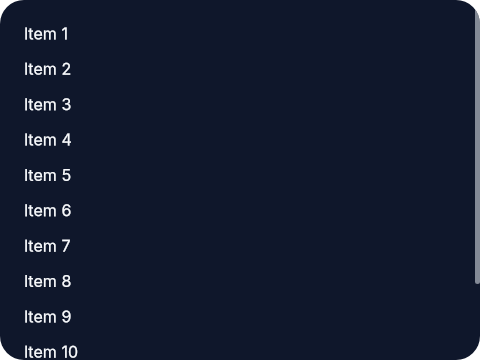
A vertical scroll panel:
The panel itself is fixed at `180px` tall, so once the column grows past that
height the user can scroll through the list.
```elixir
el(
[
width(px(240)),
height(px(180)),
padding(12),
scrollbar_y(),
Background.color(color(:slate, 900)),
Border.rounded(12),
Font.color(color(:slate, 50))
],
column([spacing(8)], [
text("Item 1"),
text("Item 2"),
text("Item 3"),
text("Item 4"),
text("Item 5"),
text("Item 6"),
text("Item 7"),
text("Item 8"),
text("Item 9"),
text("Item 10"),
text("Item 11"),
text("Item 12")
])
)
```
 A horizontal chip row:
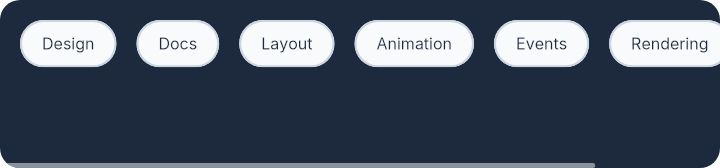
This keeps the chip row on one line and lets the user scroll sideways once the
row becomes wider than the container.
```elixir
el(
[
width(px(360)),
height(px(84)),
padding(10),
scrollbar_x(),
Background.color(color(:slate, 800)),
Border.rounded(10)
],
row([spacing(10)], [
el(
[
padding_xy(10, 6),
Background.color(color(:slate, 50)),
Border.rounded(999),
Border.width(1),
Border.color(color(:slate, 300)),
Font.color(color(:slate, 800))
],
text("Design")
),
el(
[
padding_xy(10, 6),
Background.color(color(:slate, 50)),
Border.rounded(999),
Border.width(1),
Border.color(color(:slate, 300)),
Font.color(color(:slate, 800))
],
text("Docs")
),
el(
[
padding_xy(10, 6),
Background.color(color(:slate, 50)),
Border.rounded(999),
Border.width(1),
Border.color(color(:slate, 300)),
Font.color(color(:slate, 800))
],
text("Layout")
),
el(
[
padding_xy(10, 6),
Background.color(color(:slate, 50)),
Border.rounded(999),
Border.width(1),
Border.color(color(:slate, 300)),
Font.color(color(:slate, 800))
],
text("Animation")
),
el(
[
padding_xy(10, 6),
Background.color(color(:slate, 50)),
Border.rounded(999),
Border.width(1),
Border.color(color(:slate, 300)),
Font.color(color(:slate, 800))
],
text("Events")
),
el(
[
padding_xy(10, 6),
Background.color(color(:slate, 50)),
Border.rounded(999),
Border.width(1),
Border.color(color(:slate, 300)),
Font.color(color(:slate, 800))
],
text("Rendering")
),
el(
[
padding_xy(10, 6),
Background.color(color(:slate, 50)),
Border.rounded(999),
Border.width(1),
Border.color(color(:slate, 300)),
Font.color(color(:slate, 800))
],
text("Testing")
)
])
)
```
A horizontal chip row:
This keeps the chip row on one line and lets the user scroll sideways once the
row becomes wider than the container.
```elixir
el(
[
width(px(360)),
height(px(84)),
padding(10),
scrollbar_x(),
Background.color(color(:slate, 800)),
Border.rounded(10)
],
row([spacing(10)], [
el(
[
padding_xy(10, 6),
Background.color(color(:slate, 50)),
Border.rounded(999),
Border.width(1),
Border.color(color(:slate, 300)),
Font.color(color(:slate, 800))
],
text("Design")
),
el(
[
padding_xy(10, 6),
Background.color(color(:slate, 50)),
Border.rounded(999),
Border.width(1),
Border.color(color(:slate, 300)),
Font.color(color(:slate, 800))
],
text("Docs")
),
el(
[
padding_xy(10, 6),
Background.color(color(:slate, 50)),
Border.rounded(999),
Border.width(1),
Border.color(color(:slate, 300)),
Font.color(color(:slate, 800))
],
text("Layout")
),
el(
[
padding_xy(10, 6),
Background.color(color(:slate, 50)),
Border.rounded(999),
Border.width(1),
Border.color(color(:slate, 300)),
Font.color(color(:slate, 800))
],
text("Animation")
),
el(
[
padding_xy(10, 6),
Background.color(color(:slate, 50)),
Border.rounded(999),
Border.width(1),
Border.color(color(:slate, 300)),
Font.color(color(:slate, 800))
],
text("Events")
),
el(
[
padding_xy(10, 6),
Background.color(color(:slate, 50)),
Border.rounded(999),
Border.width(1),
Border.color(color(:slate, 300)),
Font.color(color(:slate, 800))
],
text("Rendering")
),
el(
[
padding_xy(10, 6),
Background.color(color(:slate, 50)),
Border.rounded(999),
Border.width(1),
Border.color(color(:slate, 300)),
Font.color(color(:slate, 800))
],
text("Testing")
)
])
)
```
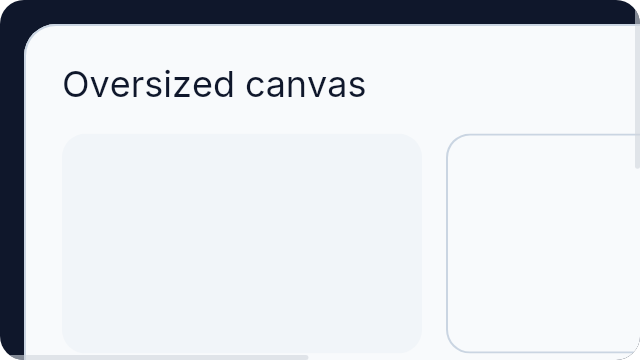
 A panel that can scroll in both directions:
This is useful for oversized content such as previews, canvases, or debug
surfaces that may exceed the container in both axes.
```elixir
el(
[
width(px(320)),
height(px(180)),
padding(12),
scrollbar_x(),
scrollbar_y(),
Background.color(color(:slate, 900)),
Border.rounded(12)
],
el(
[
width(px(640)),
height(px(360)),
padding(18),
Background.color(color(:slate, 50)),
Border.rounded(16),
Border.width(1),
Border.color(color(:slate, 300))
],
column([spacing(14)], [
el([Font.size(18), Font.color(color(:slate, 900))], text("Oversized canvas")),
row([spacing(12)], [
el(
[
width(px(180)),
height(px(110)),
Background.color(color(:slate, 100)),
Border.rounded(12)
],
none()
),
el(
[
width(px(220)),
height(px(110)),
Background.color(color(:slate, 50)),
Border.rounded(12),
Border.width(1),
Border.color(color(:slate, 300))
],
none()
)
]),
row([spacing(12)], [
el(
[
width(px(280)),
height(px(140)),
Background.color(color(:slate, 100)),
Border.rounded(12)
],
none()
),
el(
[
width(px(240)),
height(px(140)),
Background.color(color(:slate, 50)),
Border.rounded(12),
Border.width(1),
Border.color(color(:slate, 300))
],
none()
)
])
])
)
)
```
A panel that can scroll in both directions:
This is useful for oversized content such as previews, canvases, or debug
surfaces that may exceed the container in both axes.
```elixir
el(
[
width(px(320)),
height(px(180)),
padding(12),
scrollbar_x(),
scrollbar_y(),
Background.color(color(:slate, 900)),
Border.rounded(12)
],
el(
[
width(px(640)),
height(px(360)),
padding(18),
Background.color(color(:slate, 50)),
Border.rounded(16),
Border.width(1),
Border.color(color(:slate, 300))
],
column([spacing(14)], [
el([Font.size(18), Font.color(color(:slate, 900))], text("Oversized canvas")),
row([spacing(12)], [
el(
[
width(px(180)),
height(px(110)),
Background.color(color(:slate, 100)),
Border.rounded(12)
],
none()
),
el(
[
width(px(220)),
height(px(110)),
Background.color(color(:slate, 50)),
Border.rounded(12),
Border.width(1),
Border.color(color(:slate, 300))
],
none()
)
]),
row([spacing(12)], [
el(
[
width(px(280)),
height(px(140)),
Background.color(color(:slate, 100)),
Border.rounded(12)
],
none()
),
el(
[
width(px(240)),
height(px(140)),
Background.color(color(:slate, 50)),
Border.rounded(12),
Border.width(1),
Border.color(color(:slate, 300))
],
none()
)
])
])
)
)
```
 # `scrollbar_x_attr`
```elixir
@type scrollbar_x_attr() :: {:scrollbar_x, true}
```
# `scrollbar_y_attr`
```elixir
@type scrollbar_y_attr() :: {:scrollbar_y, true}
```
Scroll attribute returned by this module.
# `t`
```elixir
@type t() :: scrollbar_y_attr() | scrollbar_x_attr()
```
# `scrollbar_x`
```elixir
@spec scrollbar_x() :: scrollbar_x_attr()
```
Enable horizontal scrolling when the child content is wider than the container.
Use this on fixed-height containers whose child is a wide `row/2`.
## Example
Here the container is short and the row can keep growing horizontally without
wrapping, so the user scrolls left and right to see the rest.
```elixir
el(
[
height(px(84)),
padding(10),
scrollbar_x(),
Background.color(color(:slate, 100)),
Border.rounded(10)
],
row([spacing(10)], [
text("Alpha"),
text("Beta"),
text("Gamma"),
text("Delta")
])
)
```
# `scrollbar_y`
```elixir
@spec scrollbar_y() :: scrollbar_y_attr()
```
Enable vertical scrolling when the child content is taller than the container.
Use this on fixed-height or fill-height panels whose child is a long
`column/2`.
## Example
Here the panel height is bounded, so the log can grow while remaining usable
inside a fixed area.
```elixir
el(
[
height(px(220)),
padding(12),
scrollbar_y(),
Background.color(color(:slate, 900)),
Border.rounded(12)
],
column([spacing(8)], [
text("Log line 1"),
text("Log line 2"),
text("Log line 3")
])
)
```
---
*Consult [api-reference.md](api-reference.md) for complete listing*
# `scrollbar_x_attr`
```elixir
@type scrollbar_x_attr() :: {:scrollbar_x, true}
```
# `scrollbar_y_attr`
```elixir
@type scrollbar_y_attr() :: {:scrollbar_y, true}
```
Scroll attribute returned by this module.
# `t`
```elixir
@type t() :: scrollbar_y_attr() | scrollbar_x_attr()
```
# `scrollbar_x`
```elixir
@spec scrollbar_x() :: scrollbar_x_attr()
```
Enable horizontal scrolling when the child content is wider than the container.
Use this on fixed-height containers whose child is a wide `row/2`.
## Example
Here the container is short and the row can keep growing horizontally without
wrapping, so the user scrolls left and right to see the rest.
```elixir
el(
[
height(px(84)),
padding(10),
scrollbar_x(),
Background.color(color(:slate, 100)),
Border.rounded(10)
],
row([spacing(10)], [
text("Alpha"),
text("Beta"),
text("Gamma"),
text("Delta")
])
)
```
# `scrollbar_y`
```elixir
@spec scrollbar_y() :: scrollbar_y_attr()
```
Enable vertical scrolling when the child content is taller than the container.
Use this on fixed-height or fill-height panels whose child is a long
`column/2`.
## Example
Here the panel height is bounded, so the log can grow while remaining usable
inside a fixed area.
```elixir
el(
[
height(px(220)),
padding(12),
scrollbar_y(),
Background.color(color(:slate, 900)),
Border.rounded(12)
],
column([spacing(8)], [
text("Log line 1"),
text("Log line 2"),
text("Log line 3")
])
)
```
---
*Consult [api-reference.md](api-reference.md) for complete listing*