# `Emerge.UI.Transform`
[🔗](https://github.com/emerge-elixir/emerge/blob/v0.2.1/lib/emerge/ui/transform.ex#L1)
Transform and opacity helpers.
`Emerge.UI.Transform` changes how an element is painted without changing how a
row, column, or generic container measures and places that element.
Use:
- `move_x/1` and `move_y/1` to offset the painted element in logical pixels
- `rotate/1` to turn an element around its center
- `scale/1` to grow or shrink an element around its center
- `alpha/1` to reduce opacity for the rendered element subtree
## Layout vs Paint
Transforms do not reserve extra layout space. The element keeps its normal
layout slot, then the transform is applied when rendering.
This is useful for lifted cards, pressed states, emphasis, decorative tilt,
and motion styles that should not push siblings around.
## Interaction
Pointer hit testing follows the transformed shape that the user sees on screen,
not the pre-transform slot. Hover, press, and move handlers stay attached to
the painted result.
## Opacity
`alpha/1` affects the rendered element subtree. Background, border, text,
images, and children all inherit that opacity while layout stays unchanged.
## Examples
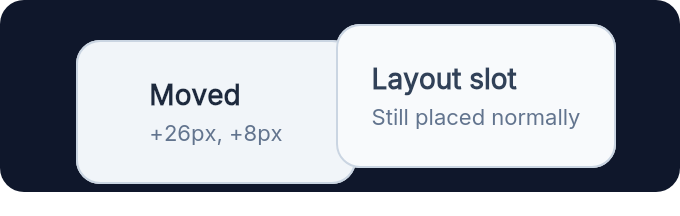
Translation moves the painted element while the row still keeps its original
slot:
```elixir
row(
[
width(px(340)),
spacing(16),
padding(12),
Background.color(color(:slate, 900)),
Border.rounded(12)
],
[
el(
[
width(px(140)),
height(px(72)),
Transform.move_x(26),
Transform.move_y(8),
Background.color(color(:slate, 100)),
Border.rounded(12),
Border.width(1),
Border.color(color(:slate, 300)),
Font.color(color(:slate, 800))
],
column([center_x(), center_y(), spacing(4)], [
el([Font.size(14), Font.semi_bold()], text("Moved")),
el([Font.size(11), Font.color(color(:slate, 500))], text("+26px, +8px"))
])
),
el(
[
width(px(140)),
height(px(72)),
Background.color(color(:slate, 50)),
Border.rounded(12),
Border.width(1),
Border.color(color(:slate, 300)),
Font.color(color(:slate, 700))
],
column([center_x(), center_y(), spacing(4)], [
el([Font.size(14), Font.semi_bold()], text("Layout slot")),
el([Font.size(11), Font.color(color(:slate, 500))], text("Still placed normally"))
])
)
]
)
```
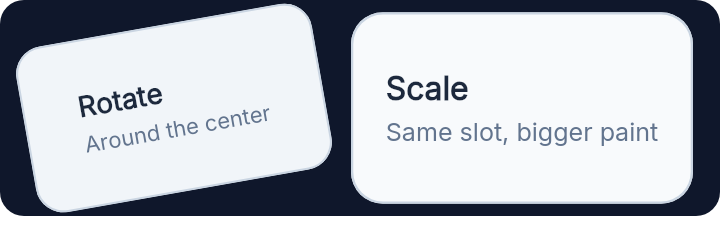
 Rotation and scale both happen around the element center:
```elixir
row(
[
width(px(360)),
spacing(24),
padding(12),
Background.color(color(:slate, 900)),
Border.rounded(12)
],
[
el(
[
width(px(150)),
height(px(84)),
Transform.rotate(-10),
Background.color(color(:slate, 100)),
Border.rounded(14),
Border.width(1),
Border.color(color(:slate, 300)),
Font.color(color(:slate, 800))
],
column([center_x(), center_y(), spacing(4)], [
el([Font.size(14), Font.semi_bold()], text("Rotate")),
el([Font.size(11), Font.color(color(:slate, 500))], text("Around the center"))
])
),
el(
[
width(px(150)),
height(px(84)),
Transform.scale(1.14),
Background.color(color(:slate, 50)),
Border.rounded(14),
Border.width(1),
Border.color(color(:slate, 300)),
Font.color(color(:slate, 800))
],
column([center_x(), center_y(), spacing(4)], [
el([Font.size(14), Font.semi_bold()], text("Scale")),
el(
[Font.size(11), Font.color(color(:slate, 500))],
text("Same slot, bigger paint")
)
])
)
]
)
```
Rotation and scale both happen around the element center:
```elixir
row(
[
width(px(360)),
spacing(24),
padding(12),
Background.color(color(:slate, 900)),
Border.rounded(12)
],
[
el(
[
width(px(150)),
height(px(84)),
Transform.rotate(-10),
Background.color(color(:slate, 100)),
Border.rounded(14),
Border.width(1),
Border.color(color(:slate, 300)),
Font.color(color(:slate, 800))
],
column([center_x(), center_y(), spacing(4)], [
el([Font.size(14), Font.semi_bold()], text("Rotate")),
el([Font.size(11), Font.color(color(:slate, 500))], text("Around the center"))
])
),
el(
[
width(px(150)),
height(px(84)),
Transform.scale(1.14),
Background.color(color(:slate, 50)),
Border.rounded(14),
Border.width(1),
Border.color(color(:slate, 300)),
Font.color(color(:slate, 800))
],
column([center_x(), center_y(), spacing(4)], [
el([Font.size(14), Font.semi_bold()], text("Scale")),
el(
[Font.size(11), Font.color(color(:slate, 500))],
text("Same slot, bigger paint")
)
])
)
]
)
```
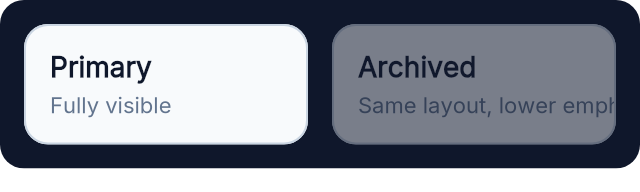
 Opacity is useful for de-emphasized branches without changing layout:
```elixir
row(
[
width(px(320)),
spacing(12),
padding(12),
Background.color(color(:slate, 900)),
Border.rounded(12)
],
[
el(
[
width(fill()),
padding(12),
Background.color(color(:slate, 50)),
Border.rounded(12),
Border.width(1),
Border.color(color(:slate, 300)),
Font.color(color(:slate, 900))
],
column([spacing(4)], [
el([Font.size(14), Font.semi_bold()], text("Primary")),
el([Font.size(11), Font.color(color(:slate, 500))], text("Fully visible"))
])
),
el(
[
width(fill()),
padding(12),
Background.color(color(:slate, 50)),
Border.rounded(12),
Border.width(1),
Border.color(color(:slate, 300)),
Transform.alpha(0.45),
Font.color(color(:slate, 900))
],
column([spacing(4)], [
el([Font.size(14), Font.semi_bold()], text("Archived")),
el([Font.size(11), Font.color(color(:slate, 500))], text("Same layout, lower emphasis"))
])
)
]
)
```
Opacity is useful for de-emphasized branches without changing layout:
```elixir
row(
[
width(px(320)),
spacing(12),
padding(12),
Background.color(color(:slate, 900)),
Border.rounded(12)
],
[
el(
[
width(fill()),
padding(12),
Background.color(color(:slate, 50)),
Border.rounded(12),
Border.width(1),
Border.color(color(:slate, 300)),
Font.color(color(:slate, 900))
],
column([spacing(4)], [
el([Font.size(14), Font.semi_bold()], text("Primary")),
el([Font.size(11), Font.color(color(:slate, 500))], text("Fully visible"))
])
),
el(
[
width(fill()),
padding(12),
Background.color(color(:slate, 50)),
Border.rounded(12),
Border.width(1),
Border.color(color(:slate, 300)),
Transform.alpha(0.45),
Font.color(color(:slate, 900))
],
column([spacing(4)], [
el([Font.size(14), Font.semi_bold()], text("Archived")),
el([Font.size(11), Font.color(color(:slate, 500))], text("Same layout, lower emphasis"))
])
)
]
)
```
 The faint outline below marks the original slot. The transformed card is what
the user sees and what pointer hit testing follows:
```elixir
el(
[
width(px(360)),
height(px(180)),
padding(20),
Background.color(color(:slate, 900)),
Border.rounded(14)
],
el(
[
width(px(128)),
height(px(76)),
center_x(),
center_y(),
Background.color(color_rgba(248, 250, 252, 0.72)),
Border.rounded(12),
Border.width(1),
Border.color(color(:slate, 300)),
Border.dashed(),
Font.color(color(:slate, 400)),
Nearby.in_front(
el(
[
width(fill()),
height(fill()),
Transform.move_x(40),
Transform.move_y(-8),
Transform.rotate(-10),
Background.color(color(:slate, 100)),
Border.rounded(12),
Border.width(1),
Border.color(color(:slate, 300)),
Font.color(color(:slate, 800))
],
column([center_x(), center_y(), spacing(4)], [
el([Font.size(14), Font.semi_bold()], text("Painted card")),
el(
[Font.size(11), Font.color(color(:slate, 500))],
text("Hit testing follows this")
)
])
)
)
],
el([center_x(), center_y(), Font.size(11)], text("Original slot"))
)
)
```
The faint outline below marks the original slot. The transformed card is what
the user sees and what pointer hit testing follows:
```elixir
el(
[
width(px(360)),
height(px(180)),
padding(20),
Background.color(color(:slate, 900)),
Border.rounded(14)
],
el(
[
width(px(128)),
height(px(76)),
center_x(),
center_y(),
Background.color(color_rgba(248, 250, 252, 0.72)),
Border.rounded(12),
Border.width(1),
Border.color(color(:slate, 300)),
Border.dashed(),
Font.color(color(:slate, 400)),
Nearby.in_front(
el(
[
width(fill()),
height(fill()),
Transform.move_x(40),
Transform.move_y(-8),
Transform.rotate(-10),
Background.color(color(:slate, 100)),
Border.rounded(12),
Border.width(1),
Border.color(color(:slate, 300)),
Font.color(color(:slate, 800))
],
column([center_x(), center_y(), spacing(4)], [
el([Font.size(14), Font.semi_bold()], text("Painted card")),
el(
[Font.size(11), Font.color(color(:slate, 500))],
text("Hit testing follows this")
)
])
)
)
],
el([center_x(), center_y(), Font.size(11)], text("Original slot"))
)
)
```
 # `numeric_attr`
```elixir
@type numeric_attr() ::
{:move_x, number()}
| {:move_y, number()}
| {:rotate, number()}
| {:scale, number()}
| {:alpha, number()}
```
# `t`
```elixir
@type t() :: numeric_attr()
```
# `alpha`
```elixir
@spec alpha(number()) :: {:alpha, number()}
```
Set opacity for the rendered element subtree.
Use values between `0.0` and `1.0`, where `0.0` is fully transparent and
`1.0` is fully opaque.
## Example
This dims the whole card, including its text and border.
```elixir
el(
[
padding(12),
Transform.alpha(0.45),
Background.color(color(:white)),
Border.rounded(12),
Border.width(1),
Border.color(color(:slate, 200))
],
text("Archived")
)
```
# `move_x`
```elixir
@spec move_x(number()) :: {:move_x, number()}
```
Move the painted element on the X axis.
Positive values move right. Negative values move left. The layout slot does
not move.
## Example
```elixir
el(
[
width(px(120)),
height(px(64)),
Transform.move_x(18),
Background.color(color(:sky, 600)),
Border.rounded(12),
Font.color(color(:white))
],
text("Shifted")
)
```
# `move_y`
```elixir
@spec move_y(number()) :: {:move_y, number()}
```
Move the painted element on the Y axis.
Positive values move down. Negative values move up. The layout slot does not
move.
## Example
A subtle downward nudge is useful for pressed or resting floating-card states.
```elixir
el(
[
width(px(120)),
height(px(64)),
Transform.move_y(6),
Background.color(color(:emerald, 600)),
Border.rounded(12),
Font.color(color(:white))
],
text("Lowered")
)
```
# `rotate`
```elixir
@spec rotate(number()) :: {:rotate, number()}
```
Rotate the painted element in degrees around its center.
Rotation does not change the element's layout slot.
## Example
```elixir
el(
[
width(px(140)),
height(px(72)),
Transform.rotate(-8),
Background.color(color(:violet, 600)),
Border.rounded(12),
Font.color(color(:white))
],
text("Tilted note")
)
```
# `scale`
```elixir
@spec scale(number()) :: {:scale, number()}
```
Scale the painted element uniformly around its center.
`1.0` keeps the original size, values above `1.0` enlarge, and values between
`0.0` and `1.0` shrink.
## Example
```elixir
el(
[
width(px(140)),
height(px(72)),
Transform.scale(1.1),
Background.color(color(:amber, 500)),
Border.rounded(12),
Font.color(color(:slate, 950))
],
text("Emphasized")
)
```
---
*Consult [api-reference.md](api-reference.md) for complete listing*
# `numeric_attr`
```elixir
@type numeric_attr() ::
{:move_x, number()}
| {:move_y, number()}
| {:rotate, number()}
| {:scale, number()}
| {:alpha, number()}
```
# `t`
```elixir
@type t() :: numeric_attr()
```
# `alpha`
```elixir
@spec alpha(number()) :: {:alpha, number()}
```
Set opacity for the rendered element subtree.
Use values between `0.0` and `1.0`, where `0.0` is fully transparent and
`1.0` is fully opaque.
## Example
This dims the whole card, including its text and border.
```elixir
el(
[
padding(12),
Transform.alpha(0.45),
Background.color(color(:white)),
Border.rounded(12),
Border.width(1),
Border.color(color(:slate, 200))
],
text("Archived")
)
```
# `move_x`
```elixir
@spec move_x(number()) :: {:move_x, number()}
```
Move the painted element on the X axis.
Positive values move right. Negative values move left. The layout slot does
not move.
## Example
```elixir
el(
[
width(px(120)),
height(px(64)),
Transform.move_x(18),
Background.color(color(:sky, 600)),
Border.rounded(12),
Font.color(color(:white))
],
text("Shifted")
)
```
# `move_y`
```elixir
@spec move_y(number()) :: {:move_y, number()}
```
Move the painted element on the Y axis.
Positive values move down. Negative values move up. The layout slot does not
move.
## Example
A subtle downward nudge is useful for pressed or resting floating-card states.
```elixir
el(
[
width(px(120)),
height(px(64)),
Transform.move_y(6),
Background.color(color(:emerald, 600)),
Border.rounded(12),
Font.color(color(:white))
],
text("Lowered")
)
```
# `rotate`
```elixir
@spec rotate(number()) :: {:rotate, number()}
```
Rotate the painted element in degrees around its center.
Rotation does not change the element's layout slot.
## Example
```elixir
el(
[
width(px(140)),
height(px(72)),
Transform.rotate(-8),
Background.color(color(:violet, 600)),
Border.rounded(12),
Font.color(color(:white))
],
text("Tilted note")
)
```
# `scale`
```elixir
@spec scale(number()) :: {:scale, number()}
```
Scale the painted element uniformly around its center.
`1.0` keeps the original size, values above `1.0` enlarge, and values between
`0.0` and `1.0` shrink.
## Example
```elixir
el(
[
width(px(140)),
height(px(72)),
Transform.scale(1.1),
Background.color(color(:amber, 500)),
Border.rounded(12),
Font.color(color(:slate, 950))
],
text("Emphasized")
)
```
---
*Consult [api-reference.md](api-reference.md) for complete listing*