Ecosystem Integration
GnuplotEx integrates seamlessly with the Elixir machine learning and data science ecosystem, providing direct plotting support for Nx tensors, Explorer DataFrames, and specialized ML visualization helpers.
Installation
All ecosystem integrations are optional. Add the dependencies you need to your mix.exs:
def deps do
  [
    {:gnuplot_ex, "~> 0.1"},
    # Optional: For Nx tensor support
    {:nx, "~> 0.7"},
    # Optional: For DataFrame support (uses Polars backend)
    {:explorer, "~> 0.8"}
  ]
end
Nx Tensor Support
GnuplotEx can directly plot Nx tensors with automatic dimension handling.
1D Tensors (Line Plots)
1D tensors are treated as y-values with auto-generated x indices:
tensor = Nx.tensor([1.0, 4.0, 2.0, 8.0, 5.0, 7.0, 3.0, 6.0, 4.0, 9.0])

GnuplotEx.line(tensor, label: "Signal", color: "#3daee9", line_width: 2)
|> GnuplotEx.title("1D Tensor as Line Plot")
|> GnuplotEx.x_label("Index")
|> GnuplotEx.y_label("Value")
|> GnuplotEx.to_svg("guides/examples/ecosystem_nx_1d.svg")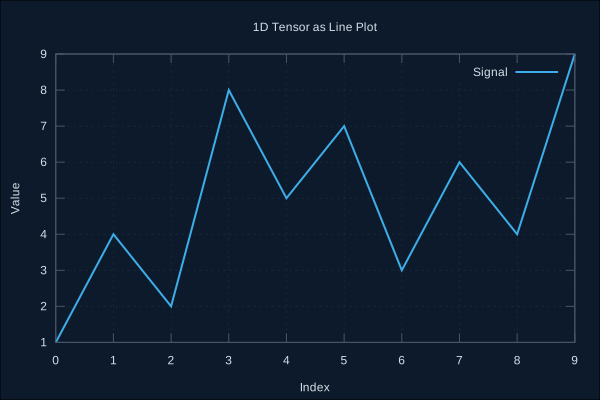
2D Tensors (Scatter/Line Plots)
2D tensors with 2 columns are treated as [x, y] points:
tensor = Nx.tensor([
  [1.0, 2.0],
  [2.0, 4.1],
  [3.0, 5.8],
  [4.0, 8.2],
  [5.0, 9.9],
  [6.0, 12.1],
  [7.0, 14.0],
  [8.0, 16.2]
])

GnuplotEx.scatter(tensor, label: "Linear Relationship", color: "#E95420", point_size: 1.2)
|> GnuplotEx.title("2D Tensor Scatter Plot")
|> GnuplotEx.x_label("X")
|> GnuplotEx.y_label("Y")
|> GnuplotEx.to_svg("guides/examples/ecosystem_nx_2d_scatter.svg")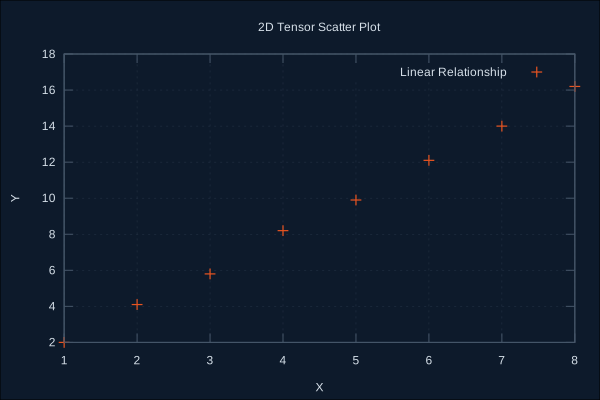
2D Tensors as Heatmaps
2D tensors with more than 3 columns are treated as grid data for heatmaps:
matrix = Nx.tensor([
  [1, 2, 3, 4, 5],
  [2, 4, 6, 8, 10],
  [3, 6, 9, 12, 15],
  [4, 8, 12, 16, 20],
  [5, 10, 15, 20, 25]
])

GnuplotEx.surface(Nx.to_list(matrix), [])
|> GnuplotEx.palette(:viridis)
|> GnuplotEx.title("2D Matrix Heatmap")
|> GnuplotEx.to_svg("guides/examples/ecosystem_nx_heatmap.svg")
3D Tensors (Scatter Plots)
2D tensors with 3 columns are treated as [x, y, z] points:
tensor = Nx.tensor([
  [1.0, 2.0, 3.0],
  [2.0, 3.0, 4.0],
  [3.0, 4.0, 5.0],
  [4.0, 5.0, 6.0],
  [2.0, 4.0, 3.0],
  [3.0, 5.0, 4.0],
  [4.0, 6.0, 5.0],
  [5.0, 7.0, 6.0]
])

GnuplotEx.scatter3d(tensor, label: "3D Points", color: "#E95420")
|> GnuplotEx.title("3D Tensor Scatter")
|> GnuplotEx.view_angle(60, 30)
|> GnuplotEx.to_svg("guides/examples/ecosystem_nx_3d.svg")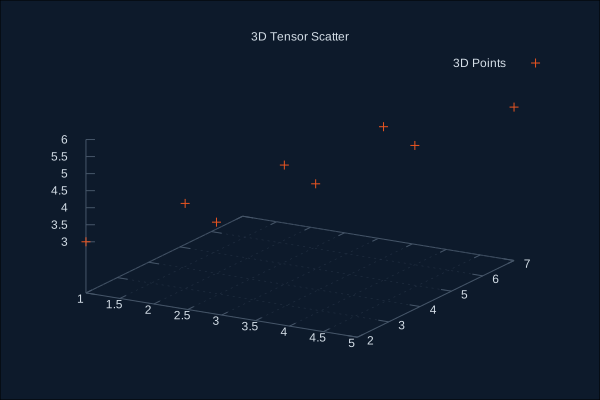
Explorer DataFrame Support
Explorer DataFrames can be plotted directly with automatic column type detection.
Basic Usage
alias Explorer.DataFrame

df = DataFrame.new(%{
  x: [1, 2, 3, 4, 5, 6, 7, 8],
  y: [2.1, 3.9, 6.2, 7.8, 10.1, 12.0, 13.9, 16.1]
})

GnuplotEx.scatter(df, label: "DataFrame Points", color: "#3daee9", point_size: 1.2)
|> GnuplotEx.title("DataFrame Scatter Plot")
|> GnuplotEx.x_label("X")
|> GnuplotEx.y_label("Y")
|> GnuplotEx.to_svg("guides/examples/ecosystem_explorer_scatter.svg")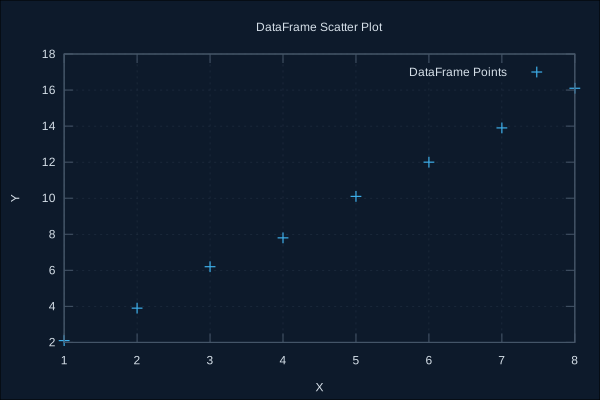
Column Selection
Explicitly specify which columns to use:
alias Explorer.DataFrame

df = DataFrame.new(%{
  time: [1, 2, 3, 4, 5, 6, 7, 8, 9, 10],
  temperature: [20, 22, 21, 23, 25, 24, 26, 25, 23, 22]
})

GnuplotEx.line(df, x: :time, y: :temperature, label: "Temperature", color: "#E95420")
|> GnuplotEx.title("Temperature Over Time")
|> GnuplotEx.x_label("Time (hours)")
|> GnuplotEx.y_label("Temperature (°C)")
|> GnuplotEx.to_svg("guides/examples/ecosystem_explorer_timeseries.svg")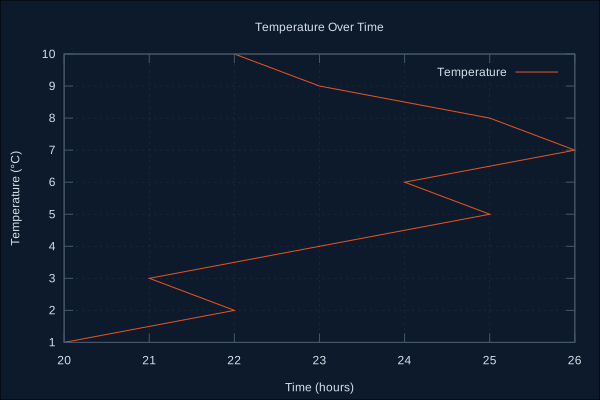
Working with Real Data
# Load CSV data
df = Explorer.DataFrame.from_csv!("data.csv")

# Auto-detect columns (uses first two numeric columns)
GnuplotEx.new()
|> GnuplotEx.scatter(df)
|> GnuplotEx.title("Data Analysis")
|> GnuplotEx.render(:svg)
ML Visualization Helpers
GnuplotEx includes specialized helpers for common machine learning visualization tasks.
Loss Curves
Plot training and validation loss over epochs:
alias GnuplotEx.ML.Loss

train_loss = [0.9, 0.7, 0.5, 0.35, 0.25, 0.18, 0.12, 0.08, 0.06, 0.05]
val_loss = [0.95, 0.75, 0.55, 0.42, 0.35, 0.30, 0.28, 0.27, 0.26, 0.26]

Loss.plot(train_loss, val_loss,
  title: "Model Training Progress",
  x_label: "Epoch",
  y_label: "Cross-Entropy Loss"
)
|> GnuplotEx.to_svg("guides/examples/ecosystem_ml_loss.svg")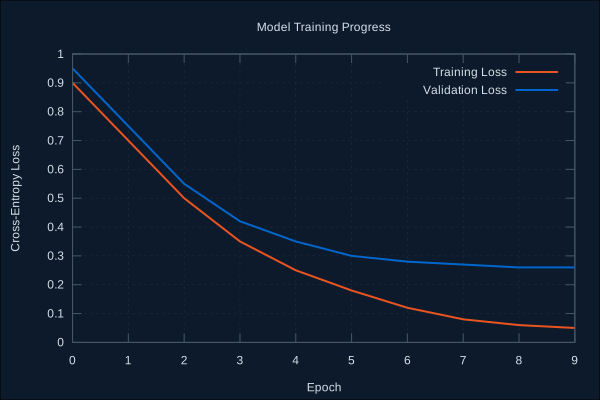
Plot multiple metrics:
alias GnuplotEx.ML.Loss

metrics = %{
  train_loss: [0.9, 0.7, 0.5, 0.3, 0.2, 0.15, 0.1, 0.08],
  val_loss: [0.95, 0.75, 0.55, 0.4, 0.35, 0.32, 0.30, 0.29],
  train_acc: [0.6, 0.7, 0.8, 0.88, 0.92, 0.95, 0.97, 0.98],
  val_acc: [0.55, 0.68, 0.78, 0.82, 0.85, 0.86, 0.87, 0.87]
}

Loss.plot_metrics(metrics,
  title: "Training Metrics",
  x_label: "Epoch"
)
|> GnuplotEx.to_svg("guides/examples/ecosystem_ml_metrics.svg")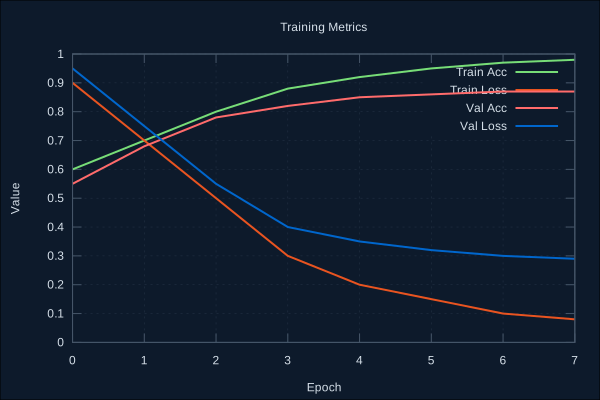
Confusion Matrix
Visualize classification results:
alias GnuplotEx.ML.Confusion

matrix = [
  [50, 3, 2],
  [4, 45, 1],
  [2, 2, 46]
]
classes = ["Cat", "Dog", "Bird"]

Confusion.plot(matrix, classes,
  normalize: true,
  title: "Normalized Confusion Matrix"
)
|> GnuplotEx.to_svg("guides/examples/ecosystem_ml_confusion.svg")
Multi-class with normalization:
alias GnuplotEx.ML.Confusion

matrix = [
  [50, 3, 2],
  [4, 45, 1],
  [2, 2, 46]
]
classes = ["Cat", "Dog", "Bird"]

Confusion.plot(matrix, classes,
  normalize: true,
  title: "Normalized Confusion Matrix"
)
|> GnuplotEx.to_svg("guides/examples/ecosystem_ml_confusion_multiclass.svg")
Calculate metrics from confusion matrix:
accuracy = Confusion.accuracy(matrix)    # Overall accuracy
precision = Confusion.precision(matrix)  # Per-class precision
recall = Confusion.recall(matrix)        # Per-class recall
f1 = Confusion.f1_score(matrix)          # Per-class F1 score
ROC Curves
Plot Receiver Operating Characteristic curves:
alias GnuplotEx.ML.ROC

fpr = [0.0, 0.05, 0.1, 0.2, 0.3, 0.4, 0.6, 0.8, 1.0]
tpr = [0.0, 0.4, 0.6, 0.75, 0.85, 0.9, 0.95, 0.98, 1.0]
auc = ROC.calculate_auc(fpr, tpr)

ROC.plot(fpr, tpr,
  auc: auc,
  title: "ROC Curve"
)
|> GnuplotEx.to_svg("guides/examples/ecosystem_ml_roc.svg")
Calculate ROC curve from scores and labels:
scores = [0.9, 0.8, 0.7, 0.6, 0.4, 0.3, 0.2, 0.1]
labels = [1, 1, 0, 1, 0, 1, 0, 0]

{fpr, tpr, _thresholds} = ROC.calculate_curve(scores, labels)
auc = ROC.calculate_auc(fpr, tpr)

ROC.plot(fpr, tpr, auc: auc)
|> GnuplotEx.render(:svg)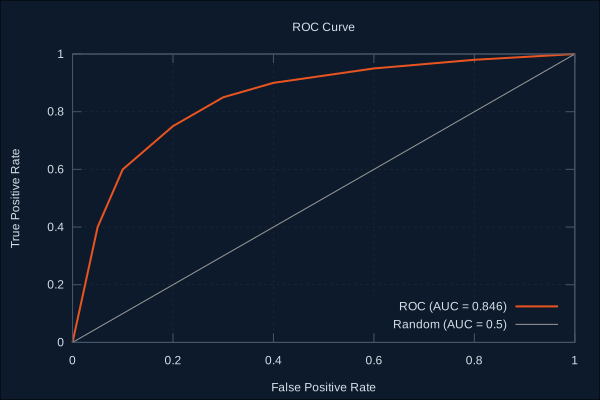
Multi-class ROC curves:
roc_data = %{
  "Cat" => {fpr_cat, tpr_cat, 0.92},
  "Dog" => {fpr_dog, tpr_dog, 0.88},
  "Bird" => {fpr_bird, tpr_bird, 0.95}
}

ROC.plot_multiclass(roc_data,
  title: "One-vs-Rest ROC Curves"
)
|> GnuplotEx.render(:svg)
Embedding Visualization
Visualize dimensionality reduction results (t-SNE, UMAP, PCA):
alias GnuplotEx.ML.Embeddings

# 2D embeddings with labels
embeddings = [
  # Cluster A (bottom-left)
  [1.2, 1.4], [1.5, 1.1], [1.3, 1.8], [0.9, 1.5], [1.1, 1.2],
  # Cluster B (top-right)
  [5.2, 5.1], [5.5, 5.3], [5.1, 4.9], [5.3, 5.5], [4.9, 5.0],
  # Cluster C (center-right)
  [4.0, 2.2], [4.2, 2.5], [3.8, 2.1], [4.1, 2.8], [3.9, 2.4]
]
labels = [0, 0, 0, 0, 0, 1, 1, 1, 1, 1, 2, 2, 2, 2, 2]

Embeddings.plot(embeddings, labels,
  label_names: ["Cluster A", "Cluster B", "Cluster C"],
  title: "t-SNE Visualization"
)
|> GnuplotEx.to_svg("guides/examples/ecosystem_ml_embeddings_2d.svg")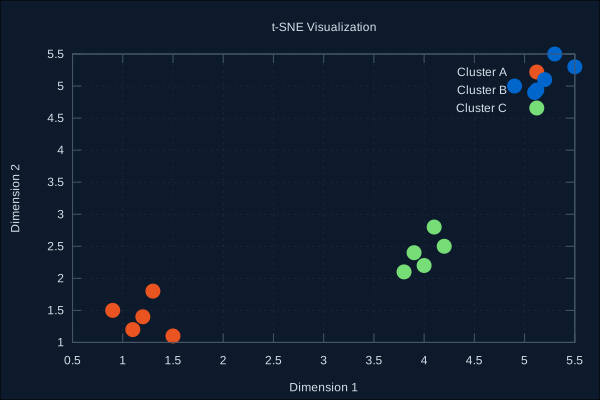
3D embeddings:
alias GnuplotEx.ML.Embeddings

embeddings = [
  # Class 0
  [1, 2, 1], [1.2, 2.3, 1.1], [0.9, 1.8, 0.9], [1.1, 2.1, 1.2],
  # Class 1
  [5, 5, 5], [5.2, 5.3, 5.1], [4.9, 4.8, 5.2], [5.1, 5.0, 4.9]
]
labels = [0, 0, 0, 0, 1, 1, 1, 1]

Embeddings.plot(embeddings, labels,
  label_names: ["Group A", "Group B"],
  title: "3D Embedding Visualization"
)
|> GnuplotEx.to_svg("guides/examples/ecosystem_ml_embeddings_3d.svg")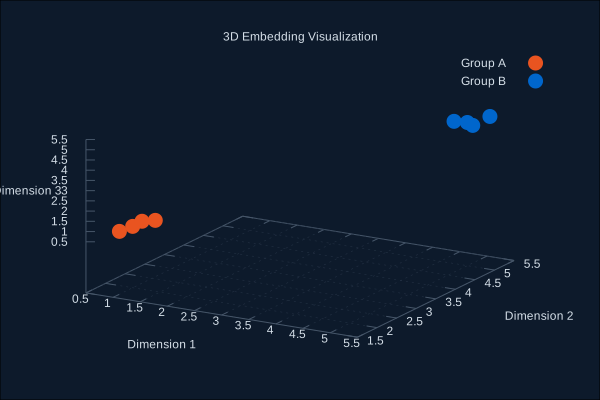
Complete ML Training Example
Here's a complete example showing how to visualize a training loop:
defmodule TrainingVisualizer do
  alias GnuplotEx.ML.{Loss, Confusion, ROC}

  def visualize_training(history, predictions, labels) do
    # 1. Plot training curves
    loss_plot = Loss.plot(
      history.train_loss,
      history.val_loss,
      title: "Training Progress"
    )
    GnuplotEx.save(loss_plot, "training_loss.svg")

    # 2. Plot all metrics
    metrics_plot = Loss.plot_metrics(%{
      train_loss: history.train_loss,
      val_loss: history.val_loss,
      train_acc: history.train_acc,
      val_acc: history.val_acc
    })
    GnuplotEx.save(metrics_plot, "training_metrics.svg")

    # 3. Confusion matrix
    cm = build_confusion_matrix(predictions, labels)
    cm_plot = Confusion.plot(cm, ["Class A", "Class B", "Class C"],
      normalize: true
    )
    GnuplotEx.save(cm_plot, "confusion_matrix.svg")

    # 4. ROC curve
    {fpr, tpr, _} = ROC.calculate_curve(predictions, labels)
    auc = ROC.calculate_auc(fpr, tpr)
    roc_plot = ROC.plot(fpr, tpr, auc: auc)
    GnuplotEx.save(roc_plot, "roc_curve.svg")

    :ok
  end

  defp build_confusion_matrix(predictions, labels) do
    # Build confusion matrix from predictions and labels
    # ... implementation
  end
end
Integration with Axon
If you're using Axon for neural networks, you can integrate GnuplotEx for visualization:
defmodule AxonTrainer do
  require Axon

  def train_with_visualization(model, train_data, val_data) do
    history = %{train_loss: [], val_loss: [], train_acc: [], val_acc: []}

    model
    |> Axon.Loop.trainer(:mean_squared_error, Axon.Optimizers.adam(0.001))
    |> Axon.Loop.metric(:accuracy)
    |> Axon.Loop.handle_event(:epoch_completed, fn state ->
      # Collect metrics each epoch
      history = update_history(history, state)

      # Live plot every 10 epochs
      if rem(state.epoch, 10) == 0 do
        plot_live(history)
      end

      {:continue, state}
    end)
    |> Axon.Loop.run(train_data, epochs: 100)

    history
  end

  defp plot_live(history) do
    GnuplotEx.ML.Loss.plot(history.train_loss, history.val_loss)
    |> GnuplotEx.render(:svg)
    |> then(fn {:ok, svg} -> File.write!("live_training.svg", svg) end)
  end
end
Performance Tips
Use streams for large datasets: GnuplotEx uses streaming to handle large Nx tensors and DataFrames efficiently.
Cache rendered plots: When using LiveView, enable caching to avoid re-rendering unchanged plots:
<.live_gnuplot plot={@plot} cache={true} cache_ttl={60_000} />Batch updates: When plotting real-time data, batch multiple points before updating the plot.
Choose appropriate formats: Use
:svgfor vector graphics (web),:pngfor raster images.
Troubleshooting
"No numeric columns found" Error
Explorer DataFrames need at least one numeric column for plotting. Check your column types:
Explorer.DataFrame.dtypes(df)Nx Tensor Shape Errors
Ensure your tensor has the expected shape:
Nx.shape(tensor) # Should be {n}, {n, 2}, {n, 3}, or {rows, cols}Memory Issues with Large Datasets
For very large datasets, consider downsampling before plotting:
# Downsample Nx tensor
tensor
|> Nx.to_list()
|> Enum.take_every(10)
|> Nx.tensor()

# Downsample DataFrame
df
|> Explorer.DataFrame.sample(1000)