IO ANSI Table v0.1.20 IO.ANSI.Table.Formatter
Prints a table applying a table style. Each row is a list of values identified by successive headers.
Summary
Functions
Takes a list of key-value collections and a list of keys
Takes a key-value collection and a list of keys
Takes a list of key-value collections, the (maximum) number of
collections to format, whether to ring the bell, a table style and
up to five options
Takes a list of key-value collections and a list of keys
Uppercases the first letter of every “word” of a title (must be
convertible to a string)
Given a list of columns (string sublists), returns a list containing
the maximum width of each column capped by maximum width
Types
Functions
Takes a list of key-value collections and a list of keys.
Returns a list of columns, each column being a list of string values
selected from each collection on a given key and repeatedly on
successive keys in order.
Examples
iex> alias IO.ANSI.Table.Formatter
iex> list = [
...>   %{"a" => "1", "b" => "2", "c" => "3"},
...>   %{"a" => "4", "b" => "5", "c" => "6"}
...> ]
iex> Formatter.columns(list, ["c", "a"])
[["3", "6"], ["1", "4"]]

iex> alias IO.ANSI.Table.Formatter
iex> list = [
...>   %{:one => "1", '2' => 2.0, 3 => :three},
...>   %{:one => '4', '2' => "5", 3 => 000006}
...> ]
iex> Formatter.columns(list, [3, :one, '2'])
[["three", "6"], ["1", "4"], ["2.0", "5"]]Takes a key-value collection and a list of keys.
Returns a sort key for the collection.
Examples
iex> alias IO.ANSI.Table.Formatter
iex> collection = [one: '1', two: "2", three: 3.0, four: 4]
iex> keys = [:three, :one, :four]
iex> Formatter.key_for(collection, keys)
"3.014"print_table([collection], integer, boolean, IO.ANSI.Table.Style.t, Keyword.t) :: :ok
Takes a list of key-value collections, the (maximum) number of
collections to format, whether to ring the bell, a table style and
up to five options:
headers- to identify each column (keys)key headers- to sort thecollectionsonheader fixes- to alter theheadersmargins- to position the tablemax width- to cap column widths
Prints a table to STDOUT of the values in each selected collection.
The columns are identified by successive headers in order.
We calculate the width of each column to fit the longest element
in that column, also considering the header itself. However, the
max width option prevails.
If the number of collections given is positive, we format
the first n collections in the list, once sorted. If negative,
the last n ones.
Parameters
collections- list of collections (maps or keywords)count- number of collections to format (integer)bell- ring the bell? (boolean)style- table style (atom)options- up to five options as described (keyword)
Options
:headers- defaults to config value:headers(list):key_headers- defaults to config value:key_headers(list):header_fixes- defaults to config value:header_fixes(map):margins- defaults to config value:margins(keyword):max_width- defaults to config value:max_width(non neg integer)
Table styles
:light- light colors:light_alt- light colors, alternating row colors:light_mult- light colors, 3 repeating row colors:medium- medium colors:medium_alt- medium colors, alternating row colors:medium_mult- medium colors, 3 repeating row colors:dark- dark colors:dark_alt- dark colors, alternating row colors:dark_mult- dark colors, 3 repeating row colors:pretty- multicolored:pretty_alt- multicolored, alternating row colors:pretty_mult- multicolored, 3 repeating row colors:cyan- light cyan background:yellow- light yellow background:green- light green background:CYAN- light cyan border:YELLOW- light yellow border:GREEN- light green border:mixed- fillers revealed:dotted- slightly colored:dotted_alt- slightly colored, alternating row colors:dotted_mult- slightly colored, 3 repeating row colors:dashed- no colors:plain- slightly colored:test- no colors:bare- no colors:barish- like bare but colored:green_padded- like green but with extra padding:green_unpadded- like green but without padding:GREEN_PADDED- like GREEN but with extra padding:GREEN_UNPADDED- like GREEN but without padding:blue_alt- blue header, alternating row colors:blue_mult- blue header, 3 repeating row colors:green_alt- green header, alternating row colors:green_mult- green header, 3 repeating row colors
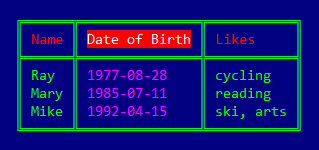
Examples
alias IO.ANSI.Table.Formatter
people = [
  %{name: "Mike", likes: "ski, arts", date_of_birth: "1992-04-15"},
  %{name: "Mary", likes: "reading"  , date_of_birth: "1985-07-11"},
  %{name: "Ray" , likes: "cycling"  , date_of_birth: "1977-08-28"}
]
Formatter.print_table(
  people, 3, true, :dark,
  headers: [:name, :date_of_birth, :likes],
  key_headers: [:date_of_birth],
  header_fixes: %{~r[ of ]i => " of "},
  margins: [top: 2, bottom: 2, left: 2]
)
iex> alias IO.ANSI.Table.Formatter
iex> alias ExUnit.CaptureIO
iex> people = [
...>   %{name: "Mike", likes: "ski, arts", date_of_birth: "1992-04-15"},
...>   %{name: "Mary", likes: "reading"  , date_of_birth: "1985-07-11"},
...>   %{name: "Ray" , likes: "cycling"  , date_of_birth: "1977-08-28"}
...> ]
iex> CaptureIO.capture_io fn ->
...>   Formatter.print_table(
...>     people, 3, false, :dashed,
...>     headers: [:name, :date_of_birth, :likes],
...>     key_headers: [:date_of_birth],
...>     header_fixes: %{~r[ of ]i => " of "},
...>     margins: [top: 0, bottom: 0, left: 0]
...>   )
...> end
"""
+------+---------------+-----------+
| Name | Date of Birth | Likes     |
+------+---------------+-----------+
| Ray  | 1977-08-28    | cycling   |
| Mary | 1985-07-11    | reading   |
| Mike | 1992-04-15    | ski, arts |
+------+---------------+-----------+
"""Takes a list of key-value collections and a list of keys.
Returns a list of rows, each row being a list of string values
orderly selected on successive keys from a given collection and
repeatedly for each collection in turn.
Examples
iex> alias IO.ANSI.Table.Formatter
iex> list = [
...>   %{"a" => "1", "b" => "2", "c" => "3"},
...>   %{"a" => "4", "b" => "5", "c" => "6"}
...> ]
iex> Formatter.rows(list, ["c", "a"])
[["3", "1"], ["6", "4"]]

iex> alias IO.ANSI.Table.Formatter
iex> list = [
...>   %{:one => "1", '2' => 2.0, 3 => :three},
...>   %{:one => '4', '2' => "5", 3 => 000006}
...> ]
iex> Formatter.rows(list, [3, :one, '2'])
[["three", "1", "2.0"], ["6", "4", "5"]]Uppercases the first letter of every “word” of a title (must be
convertible to a string).
Any underscore is considered a space and consecutive whitespace characters are treated as a single occurrence. Leading and trailing whitespace characters are removed.
If a map of fixes is given, all occurrences of each fix key in the
title will be replaced with the corresponding fix value.
Examples
iex> alias IO.ANSI.Table.Formatter
iex> Formatter.titlecase(" son   of a gun ", %{
...>   ~r[ of ]i => " of ",
...>   ~r[ a ]i  => " a "
...> })
"Son of a Gun"

iex> alias IO.ANSI.Table.Formatter
iex> Formatter.titlecase("_date___of_birth_", %{
...>   ~r[ of ]i => " of "
...> })
"Date of Birth"

iex> alias IO.ANSI.Table.Formatter
iex> Formatter.titlecase(:" _an_ _oDD case_ ")
"An ODD Case"Given a list of columns (string sublists), returns a list containing
the maximum width of each column capped by maximum width.
Examples
iex> alias IO.ANSI.Table.Formatter
iex> data = [["cat", "wombat", "elk"], ["mongoose", "ant", "gnu"]]
iex> Formatter.widths(data)
[6, 8]

iex> alias IO.ANSI.Table.Formatter
iex> data = [[":cat", "{1, 2}", "007"], ["mongoose", ":ant", "3.1416"]]
iex> Formatter.widths(data)
[6, 8]

iex> alias IO.ANSI.Table.Formatter
iex> data = [[":cat", "{1, 2}", "007"], ["mongoose", ":ant", "3.1416"]]
iex> Formatter.widths(data, 7)
[6, 7]