IO ANSI Table v0.3.27 IO.ANSI.Table View Source
Prints data to STDOUT in a table with borders and colors.
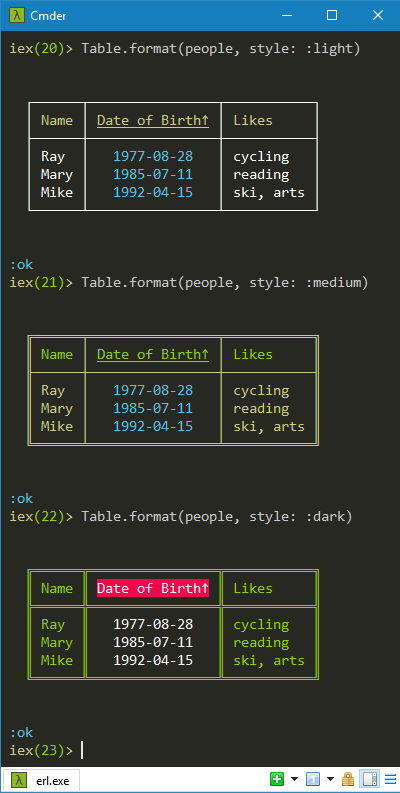
Can choose a table style to change the look of the table.
Link to this section Summary
Functions
Prints data from maps to STDOUT in a table tailored by options
Link to this section Functions
format([Access.container()], Keyword.t()) :: :ok
Prints data from maps to STDOUT in a table tailored by options.
All options can be configured and/or passed as a keyword argument.
Each option of the keyword will override its configured counterpart.
You should however configure all options except possibly
bell, count and style.
The columns are identified by the :headers option (map keys).
We calculate the width of each column to fit the longest element
in that column, also considering the column heading.
However, the :max_width option prevails.
If the :count option is positive, we format the first n
maps in the list, once sorted. If negative, the last n ones.
See IO.ANSI.Table.Options for examples of all options.
Parameters
maps- list of maps/keywords/structs (list)options- up to 10 options all configurable (keyword)
Options
:align_specs- to align column elements (list):bell- ring the bell? (boolean):count- number ofmapsto format (integer):headers- to identify each column (list):header_fixes- to alter theheaders(map):margins- to position the table (keyword):max_width- to cap column widths (non_neg_integer):sort_specs- to sort themaps(list):sort_symbols- to denote sort direction (keyword):style- table style (atom)
Table styles
:bare- no colors:barish- like bare but colored:cyan- cyan background:cyan_alt- cyan header, alternating row colors:cyan_border- light cyan border:cyan_mult- cyan header, 3 repeating row colors:dark- dark colors:dark_alt- dark colors, alternating row colors:dark_mult- dark colors, 3 repeating row colors:dashed- no colors:dotted- slightly colored:dotted_alt- slightly colored, alternating row colors:dotted_mult- slightly colored, 3 repeating row colors:game- game board:green- green background:green_alt- green header, alternating row colors:green_border- light green border:green_border_padded- light green border with extra padding:green_border_unpadded- light green border without padding:green_mult- green header, 3 repeating row colors:green_padded- like green but with extra padding:green_unpadded- like green but without padding:light- light colors:light_alt- light colors, alternating row colors:light_mult- light colors, 3 repeating row colors:medium- medium colors:medium_alt- medium colors, alternating row colors:medium_mult- medium colors, 3 repeating row colors:mixed- fillers revealed:plain- slightly colored:pretty- multicolored:pretty_alt- multicolored, alternating row colors:pretty_mult- multicolored, 3 repeating row colors:test- no colors:yellow- light yellow background:yellow_border- light yellow border
Examples
alias IO.ANSI.Table
alias IO.ANSI.Table.Server

header_fixes = %{~r[dob]i => "Date of Birth"}

Application.put_env(:io_ansi_table, :headers, [:name, :dob, :likes])
Application.put_env(:io_ansi_table, :header_fixes, header_fixes)
Application.put_env(:io_ansi_table, :sort_specs, [asc: :dob])
Application.put_env(:io_ansi_table, :align_specs, [center: :dob])
Application.put_env(:io_ansi_table, :margins, [top: 2, bottom: 2])

people = [
  %{name: "Mike", likes: "ski, arts", dob: "1992-04-15"},
  %{name: "Mary", likes: "reading"  , dob: "1985-07-11"},
  %{name: "Ray" , likes: "cycling"  , dob: "1977-08-28"}
]

GenServer.stop(Server, :shutdown)

Table.format(people, style: :light)
Table.format(people, style: :medium)
Table.format(people, style: :dark)