Kno Elixir
Go Passwordless
Use trykno.com for the simplest way to add passwordless authentication to your application.
Installation
Add Kno to your list of dependencies in mix.exs.
defp deps do
  [
    # ...
    {:kno, "~> 0.1.0"}
  ]
end
Run mix deps.get to install it.
Get started with Phoenix
Configure Kno
Add Kno.Plug.Session to you applications endpoint file, found at lib/my_app_web/endpoint.exs.
Must be added after Plug.Session.
defmodule MyAppWeb.Endpoint do
  # ...

  plug Plug.Session, # session config

  # Must be added after Plug.Session
  plug Kno.Plug.Session,
    success_redirect: "/users"

  # ...
end
Modify templates
Add the sign in and out buttons to your template. To have the buttons on every page add them to the app template found in lib/my_app_web/templates/layout/app.html.eex.
<!-- ... -->
  <%= Kno.Plug.session_buttons(@conn) %>
<!-- ... -->
Check user is authenticated
Controllers can fetch the persona_id that identifies the user. nil is returned if unauthenticated.
case Kno.Plug.persona_id(conn) do
  nil ->
    # User is unauthenticated
  persona_id ->
    # ...
end
Local development
Authentication is now setup for local development. Restart your phoenix application and click the sign in button.
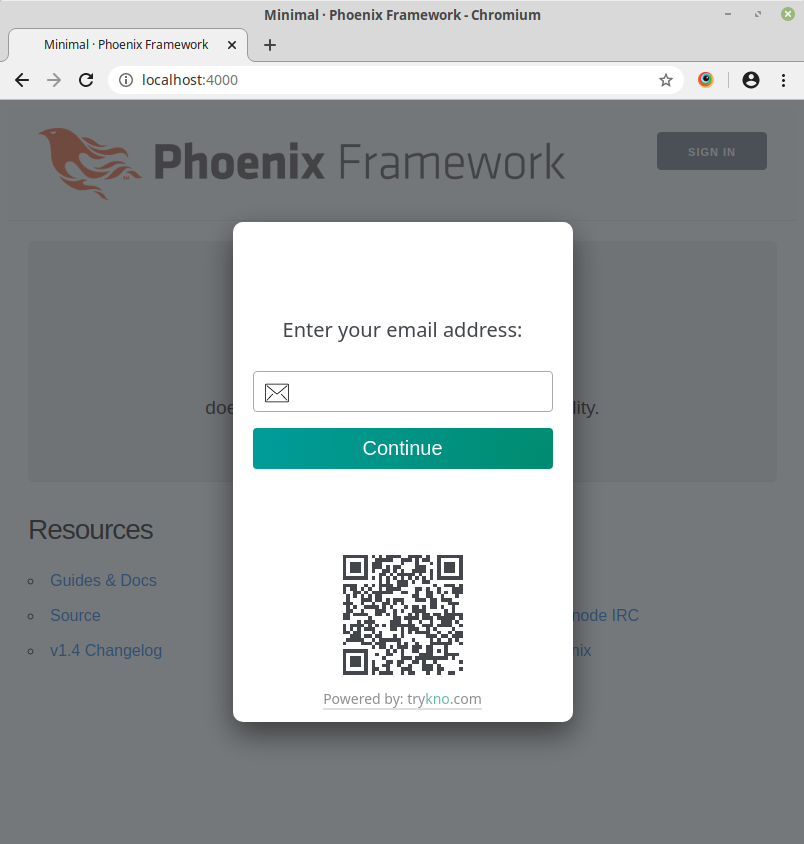
Enter your real email address. Kno runs a service for local development that sends a limited number of emails.
Get production keys
Create an account at trykno.com and follow the guidance to create your first space.
This will direct you to create a site_token and api_token.
Add these to your environment and edit the configuration in your endpoint file.
  plug Kno.Plug.Session,
    success_redirect: "/users",
    site_token: System.get_env("KNO_SITE_TOKEN"),
    api_token: System.get_env("KNO_API_TOKEN")
NOTE: The tokens do not have to be stored in the environment. However the api token MUST be kept secure and should not be committed to your applications source code.
Questions
If you have any further questions or want to find out more about Kno, visit trykno.com or contact us at team@trykno.com.