# Getting Started
Now that you have LiveVue installed, let's create your first Vue component and integrate it with LiveView.
## Creating Your First Component
Let's create a simple counter component that demonstrates the reactivity between Vue and LiveView.
1. Create `assets/vue/Counter.vue`:
```html
Current count: {{ props.count }}
```
2. Create a LiveView to handle the counter state (`lib/my_app_web/live/counter_live.ex`):
```elixir
defmodule MyAppWeb.CounterLive do
use MyAppWeb, :live_view
def render(assigns) do
~H"""
<.vue count={@count} v-component="Counter" v-socket={@socket} />
"""
end
def mount(_params, _session, socket) do
{:ok, assign(socket, count: 0)}
end
def handle_event("inc", %{"diff" => value}, socket) do
{:noreply, update(socket, :count, &(&1 + value))}
end
end
```
3. Add the route in your `router.ex`:
```elixir
live "/counter", CounterLive
```
Start server and visit `http://localhost:4000/counter` to see your counter in action!
If it's not working correctly, see [Troubleshooting](troubleshooting.md).
## Adding Smooth Transitions
One of Vue's strengths is its built-in transition system. Let's enhance our counter with smooth animations and nice tailwind styling:
1. Create `assets/vue/AnimatedCounter.vue`:
```html
{{ props.count }}
{{ diff }}
```
2. Update your LiveView to use the animated version:
```elixir
def render(assigns) do
~H"""
"""
end
```
Now your counter will smoothly animate when the value changes! This showcases how Vue's transition system can add polish to your LiveView apps without any server-side complexity.
## Key Concepts
This example demonstrates several key LiveVue features:
- **Props Flow**: LiveView sends the `count` value to Vue as a prop
- **Event Handling**: Vue emits an `inc` event with `phx-click` and `phx-value-diff` attributes
- **State Management**: LiveView maintains the source of truth (the counter value)
- **Local UI State**: Vue maintains the slider value locally without server involvement
- **Transitions**: Vue handles smooth animations purely on the client side
Basic diagram of the flow:
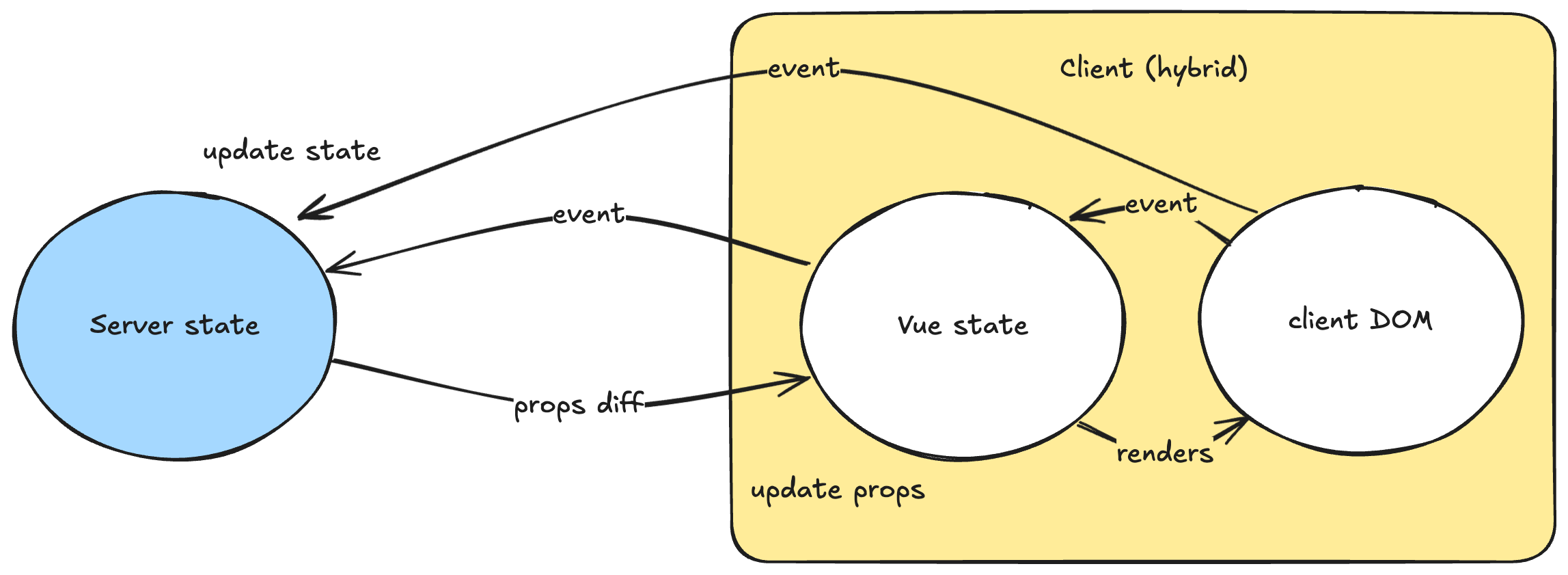
If you want to understand how it works in depth, see [Architecture](architecture.md).
### Working with Custom Structs
When you start passing more complex data structures as props, you'll need to implement the `LiveVue.Encoder` protocol:
```elixir
# For any custom structs you want to pass as props
defmodule User do
@derive LiveVue.Encoder
defstruct [:name, :email, :age]
end
# Use in your LiveView
def render(assigns) do
~H"""
<.vue user={@current_user} v-component="UserProfile" v-socket={@socket} />
"""
end
```
This protocol ensures that:
- Only specified fields are sent to the client
- Sensitive data is protected from accidental exposure
- Props can be efficiently diffed for optimal performance
For more details, see [Component Reference](component_reference.md#custom-structs-with-livevue-encoder).
> #### Good to know {: .info}
>
> - Install the [Vue DevTools browser extension](https://devtools.vuejs.org/getting-started/installation) for debugging
> - In development, LiveVue enables Hot Module Replacement for instant component updates
> - Structure your app with LiveView managing application state and Vue handling UI interactions
> - For complex UIs with lots of local state, prefer Vue components over LiveView hooks
## Next Steps
Now that you have your first component working, explore:
- [Live Examples](https://livevue.skalecki.dev) - Interactive demos to see LiveVue in action
- [Basic Usage](basic_usage.md) for more patterns and the ~VUE sigil
- [Component Reference](component_reference.md) for complete syntax documentation
- [FAQ](faq.md) for common questions and troubleshooting
- [Troubleshooting](troubleshooting.md) for common issues