# `NotionSDK.DataSources`
[🔗](https://github.com/nshkrdotcom/notion_sdk/blob/v0.2.1/lib/notion_sdk/generated/data_sources.ex#L1)
Generated Notion Sdk operations for data sources.
# `create`
```elixir
@spec create(term(), map(), keyword()) :: {:ok, term()} | {:error, term()}
```
Create a data source
## Source Context
### Resources
* [Create a data source](https://developers.notion.com/reference/create-a-data-source)
## Code Samples
TypeScript SDK
```javascript
import { Client } from "@notionhq/client"
const notion = new Client({ auth: process.env.NOTION_API_KEY })
const response = await notion.dataSources.create({
parent: {
database_id: "a1b2c3d4-e5f6-7890-abcd-ef1234567890"
},
title: [{ text: { content: "My Data Source" } }],
properties: {
Name: { title: {} },
Status: {
select: {
options: [
{ name: "To Do", color: "red" },
{ name: "Done", color: "green" }
]
}
}
}
})
```
# `list_templates`
```elixir
@spec list_templates(term(), map(), keyword()) :: {:ok, term()} | {:error, term()}
```
List data source templates
## Source Context
### Resources
* [List data source templates](https://developers.notion.com/reference/list-data-source-templates)
## Code Samples
TypeScript SDK
```javascript
import { Client } from "@notionhq/client"
const notion = new Client({ auth: process.env.NOTION_API_KEY })
const response = await notion.dataSources.listTemplates({
data_source_id: "d9824bdc-8445-4327-be8b-5b47500af6ce"
})
```
# `query`
```elixir
@spec query(term(), map(), keyword()) :: {:ok, term()} | {:error, term()}
```
Query a data source
## Source Context
### Warnings
Formula and rollup limitations
* If a formula depends on a page property that is a relation, and that relation has more than 25 references, only 25 will be evaluated as part of the formula.
* Rollups and formulas that depend on multiple layers of relations may not return correct results.
* Notion recommends individually [retrieving each page property item](https://developers.notion.com/reference/retrieve-a-page-property) to get the most accurate result.
### Notes
Databases, data sources, and wikis
[Wiki](https://www.notion.so/help/wikis-and-verified-pages) data sources can contain either pages or databases as children. In all other cases, the children can only be pages.
For wikis, instead of directly returning any [database](https://developers.notion.com/reference/database) results, this API returns all [data sources](https://developers.notion.com/reference/data-source) that are children of *that* database. Surfacing the data source instead of the direct database child helps make it easier to craft your next API request (for example, retrieving the data source or listing its children.)
Another tip for wikis is to use the `result_type` filter of `"page"` or `"data_source"` if you're only looking for query results that are one of those two types instead of both.
Permissions
Before an integration can query a data source, its parent database must be shared with the integration. Attempting to query a data source in a database that has not been shared will return an HTTP response with a 404 status code.
To share a database with an integration, click the ••• menu at the top right of a database page, scroll to `Add connections`, and use the search bar to find and select the integration from the dropdown list.
Integration capabilities
This endpoint requires an integration to have read content capabilities. Attempting to call this API without read content capabilities will return an HTTP response with a 403 status code. For more information on integration capabilities, see the [capabilities guide](https://developers.notion.com/reference/capabilities).
To display the page titles of related pages rather than just the ID:
1. Add a rollup property to the data source which uses a formula to get the related page's title. This works well if you have access to [update](https://developers.notion.com/reference/update-a-data-source) the data source's schema.
2. Otherwise, [retrieve the individual related pages](https://developers.notion.com/reference/retrieve-a-page) using each page ID.
### Overview
Gets a list of [pages](https://developers.notion.com/reference/page) contained in the data source, filtered and ordered according to the filter conditions and sort criteria provided in the request. The response may contain fewer than `page_size` of results. If the response includes a `next_cursor` value, refer to the [pagination reference](https://developers.notion.com/reference/intro#pagination) for details about how to use a cursor to iterate through the list.
### Filtering
[**Filters**](https://developers.notion.com/reference/filter-data-source-entries) are similar to the [filters provided in the Notion UI](https://www.notion.so/help/views-filters-and-sorts) where the set of filters and filter groups chained by "And" in the UI is equivalent to having each filter in the array of the compound `"and"` filter. Similar a set of filters chained by "Or" in the UI would be represented as filters in the array of the `"or"` compound filter.
Filters operate on data source properties and can be combined. If no filter is provided, all the pages in the data source will be returned with pagination.
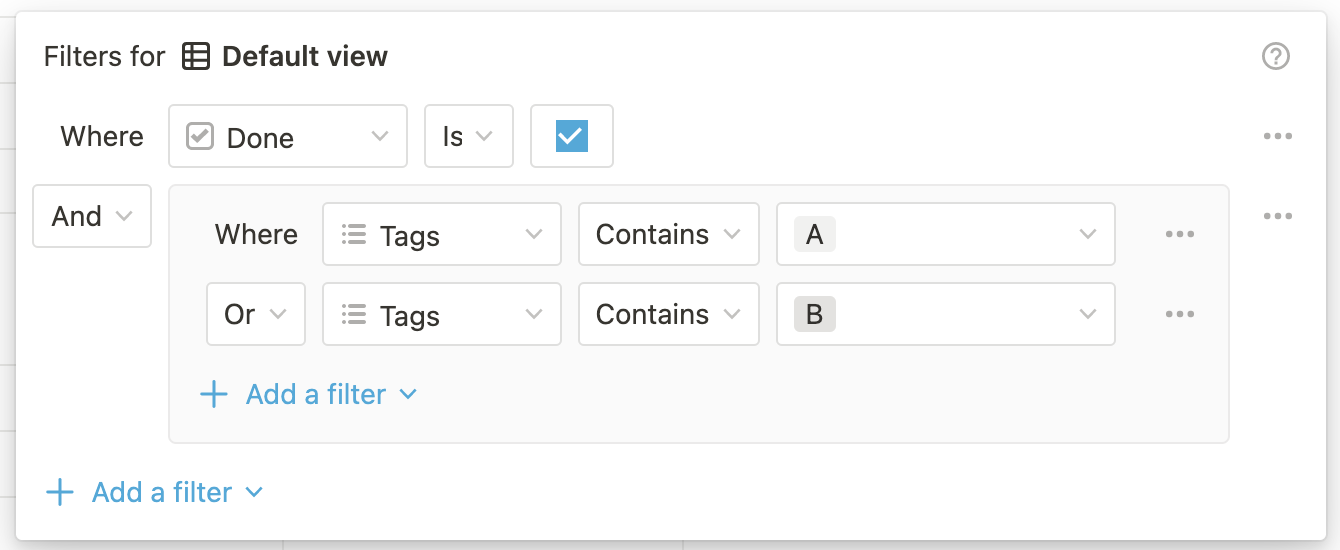 ```json Filter object expandable theme={null}
{
"and": [
{
"property": "Done",
"checkbox": {
"equals": true
}
},
{
"or": [
{
"property": "Tags",
"contains": "A"
},
{
"property": "Tags",
"contains": "B"
}
]
}
]
}
```
In addition to chained filters, data sources can be queried with single filters.
```json JSON theme={null}
{
"property": "Done",
"checkbox": {
"equals": true
}
}
```
### Sorting
[**Sorts**](https://developers.notion.com/reference/sort-data-source-entries) are similar to the [sorts provided in the Notion UI](https://notion.so/notion/Intro-to-databases-fd8cd2d212f74c50954c11086d85997e#0eb303043b1742468e5aff2f3f670505). Sorts operate on database properties or page timestamps and can be combined. The order of the sorts in the request matter, with earlier sorts taking precedence over later ones.
Notion doesn't guarantee any particular sort order when no sort parameters are provided.
### Recommendations for performance
Use the `filter_properties` query parameter to filter only the properties of the data source schema you need from the response items. For example:
```bash theme={null}
https://api.notion.com/v1/data_sources/[DATA_SOURCE_ID]/query?filter_properties[]=title
```
Multiple filter properties can be provided by chaining the `filter_properties` query param. For example:
```bash theme={null}
https://api.notion.com/v1/data_sources/[DATA_SOURCE_ID]/query?filter_properties[]=title&filter_properties[]=status
```
This parameter accepts property IDs or property names. Property IDs can be determined with the [Retrieve a data source](https://developers.notion.com/reference/retrieve-a-data-source) endpoint.
If you are using the [Notion JavaScript SDK](https://github.com/makenotion/notion-sdk-js), the `filter_properties` endpoint expects an array of strings. For example:
```typescript TypeScript theme={null}
notion.dataSources.query({
data_source_id: id,
filter_properties: ["title", "status"]
})
```
Using `filter_properties` can make a significant improvement to the speed of the API and size of the JSON objects in the results, especially for databases with lots of properties, some of which might be rollups, relations, or formulas. If you need additional properties from each returned page, you can make subsequent calls to the [Retrieve page property item](https://developers.notion.com/changelog/retrieve-page-property-values) or [Retrieve a page](https://developers.notion.com/reference/retrieve-a-page) APIs.
If you're still running into long query times with this API, other tips include:
For more information, visit our [help center article on optimizing database load times](https://www.notion.com/help/optimize-database-load-times-and-performance).
* Using more specific filter conditions to reduce the result set, e.g. a more specific title query or a shorter time window.
* Dividing large data sources (ones with more than several dozen thousand pages) into multiple; e.g. splitting a "tasks" database into "Tasks" and "Bugs".
* Pruning data source schemas to remove any complex formulas, rollups, two-way relations, or other properties that are no longer in use.
* Setting up [integration webhooks](https://developers.notion.com/reference/webhooks) to reduce the need for polling this API by instead automatically notifying your system of incremental workspace events.
### Other important details and tips
### Errors
Returns a 404 HTTP response if the data source doesn't exist, or if the integration doesn't have access to the data source.
Returns a 400 or a 429 HTTP response if the request exceeds the [request limits](https://developers.notion.com/reference/request-limits).
Returns a 503 HTTP response if the data source query is temporarily unavailable due to backend datastore timeouts. The response body includes an `additional_data` object with retry guidance:
```json 503 response example theme={null}
{
"object": "error",
"status": 503,
"code": "service_unavailable",
"message": "Public API data source query is temporarily unavailable due to backend datastore timeouts. Retry with exponential backoff; if retries continue to fail, reduce page_size or narrow filters/sorts.",
"additional_data": {
"endpoint_name": "public_queryDataSource",
"notion_error_name": "PgPoolWaitConnectionTimeout",
"retry_guidance": [
"Use exponential backoff with jitter",
"Reduce page_size",
"Narrow query filters/sorts"
]
}
}
```
**Note**: Each Public API endpoint can return several possible error codes. See the [Error codes section](https://developers.notion.com/reference/status-codes#error-codes) of the Status codes documentation for more information.
### Resources
* [pages](https://developers.notion.com/reference/page)
* [pagination reference](https://developers.notion.com/reference/intro#pagination)
* [Wiki](https://www.notion.so/help/wikis-and-verified-pages)
* [database](https://developers.notion.com/reference/database)
* [data sources](https://developers.notion.com/reference/data-source)
* [**Filters**](https://developers.notion.com/reference/filter-data-source-entries)
* [filters provided in the Notion UI](https://www.notion.so/help/views-filters-and-sorts)
* [**Sorts**](https://developers.notion.com/reference/sort-data-source-entries)
* [sorts provided in the Notion UI](https://notion.so/notion/Intro-to-databases-fd8cd2d212f74c50954c11086d85997e#0eb303043b1742468e5aff2f3f670505)
* [Retrieve a data source](https://developers.notion.com/reference/retrieve-a-data-source)
* [Notion JavaScript SDK](https://github.com/makenotion/notion-sdk-js)
* [Retrieve page property item](https://developers.notion.com/changelog/retrieve-page-property-values)
* [Retrieve a page](https://developers.notion.com/reference/retrieve-a-page)
* [integration webhooks](https://developers.notion.com/reference/webhooks)
* [help center article on optimizing database load times](https://www.notion.com/help/optimize-database-load-times-and-performance)
* [capabilities guide](https://developers.notion.com/reference/capabilities)
* [update](https://developers.notion.com/reference/update-a-data-source)
* [retrieve the individual related pages](https://developers.notion.com/reference/retrieve-a-page)
* [retrieving each page property item](https://developers.notion.com/reference/retrieve-a-page-property)
* [request limits](https://developers.notion.com/reference/request-limits)
* [Error codes section](https://developers.notion.com/reference/status-codes#error-codes)
* [Query a data source](https://developers.notion.com/reference/query-a-data-source)
## Code Samples
TypeScript SDK
```javascript
import { Client } from "@notionhq/client"
const notion = new Client({ auth: process.env.NOTION_API_KEY })
const response = await notion.dataSources.query({
data_source_id: "d9824bdc-8445-4327-be8b-5b47500af6ce",
filter: {
property: "Status",
select: { equals: "Done" }
},
sorts: [
{
property: "Created",
direction: "descending"
}
]
})
```
# `retrieve`
```elixir
@spec retrieve(term(), map(), keyword()) :: {:ok, term()} | {:error, term()}
```
Retrieve a data source
## Source Context
### Warnings
The Notion API does not support retrieving linked data sources
To fetch the information in a [linked data source](https://www.notion.so/help/guides/using-linked-databases), share the original source database with your Notion integration.
### Notes
Data source relations must be shared with your integration
To retrieve data source properties from [database relations](https://www.notion.so/help/relations-and-rollups#what-is-a-database-relation), the related database must be shared with your integration in addition to the database being retrieved. If the related database is not shared, properties based on relations will not be included in the API response.
### Finding a data source ID
Navigate to the database URL in your Notion workspace. The ID is the string of characters in the URL that is between the slash following the workspace name (if applicable) and the question mark. The ID is a 32 characters alphanumeric string.
```json Filter object expandable theme={null}
{
"and": [
{
"property": "Done",
"checkbox": {
"equals": true
}
},
{
"or": [
{
"property": "Tags",
"contains": "A"
},
{
"property": "Tags",
"contains": "B"
}
]
}
]
}
```
In addition to chained filters, data sources can be queried with single filters.
```json JSON theme={null}
{
"property": "Done",
"checkbox": {
"equals": true
}
}
```
### Sorting
[**Sorts**](https://developers.notion.com/reference/sort-data-source-entries) are similar to the [sorts provided in the Notion UI](https://notion.so/notion/Intro-to-databases-fd8cd2d212f74c50954c11086d85997e#0eb303043b1742468e5aff2f3f670505). Sorts operate on database properties or page timestamps and can be combined. The order of the sorts in the request matter, with earlier sorts taking precedence over later ones.
Notion doesn't guarantee any particular sort order when no sort parameters are provided.
### Recommendations for performance
Use the `filter_properties` query parameter to filter only the properties of the data source schema you need from the response items. For example:
```bash theme={null}
https://api.notion.com/v1/data_sources/[DATA_SOURCE_ID]/query?filter_properties[]=title
```
Multiple filter properties can be provided by chaining the `filter_properties` query param. For example:
```bash theme={null}
https://api.notion.com/v1/data_sources/[DATA_SOURCE_ID]/query?filter_properties[]=title&filter_properties[]=status
```
This parameter accepts property IDs or property names. Property IDs can be determined with the [Retrieve a data source](https://developers.notion.com/reference/retrieve-a-data-source) endpoint.
If you are using the [Notion JavaScript SDK](https://github.com/makenotion/notion-sdk-js), the `filter_properties` endpoint expects an array of strings. For example:
```typescript TypeScript theme={null}
notion.dataSources.query({
data_source_id: id,
filter_properties: ["title", "status"]
})
```
Using `filter_properties` can make a significant improvement to the speed of the API and size of the JSON objects in the results, especially for databases with lots of properties, some of which might be rollups, relations, or formulas. If you need additional properties from each returned page, you can make subsequent calls to the [Retrieve page property item](https://developers.notion.com/changelog/retrieve-page-property-values) or [Retrieve a page](https://developers.notion.com/reference/retrieve-a-page) APIs.
If you're still running into long query times with this API, other tips include:
For more information, visit our [help center article on optimizing database load times](https://www.notion.com/help/optimize-database-load-times-and-performance).
* Using more specific filter conditions to reduce the result set, e.g. a more specific title query or a shorter time window.
* Dividing large data sources (ones with more than several dozen thousand pages) into multiple; e.g. splitting a "tasks" database into "Tasks" and "Bugs".
* Pruning data source schemas to remove any complex formulas, rollups, two-way relations, or other properties that are no longer in use.
* Setting up [integration webhooks](https://developers.notion.com/reference/webhooks) to reduce the need for polling this API by instead automatically notifying your system of incremental workspace events.
### Other important details and tips
### Errors
Returns a 404 HTTP response if the data source doesn't exist, or if the integration doesn't have access to the data source.
Returns a 400 or a 429 HTTP response if the request exceeds the [request limits](https://developers.notion.com/reference/request-limits).
Returns a 503 HTTP response if the data source query is temporarily unavailable due to backend datastore timeouts. The response body includes an `additional_data` object with retry guidance:
```json 503 response example theme={null}
{
"object": "error",
"status": 503,
"code": "service_unavailable",
"message": "Public API data source query is temporarily unavailable due to backend datastore timeouts. Retry with exponential backoff; if retries continue to fail, reduce page_size or narrow filters/sorts.",
"additional_data": {
"endpoint_name": "public_queryDataSource",
"notion_error_name": "PgPoolWaitConnectionTimeout",
"retry_guidance": [
"Use exponential backoff with jitter",
"Reduce page_size",
"Narrow query filters/sorts"
]
}
}
```
**Note**: Each Public API endpoint can return several possible error codes. See the [Error codes section](https://developers.notion.com/reference/status-codes#error-codes) of the Status codes documentation for more information.
### Resources
* [pages](https://developers.notion.com/reference/page)
* [pagination reference](https://developers.notion.com/reference/intro#pagination)
* [Wiki](https://www.notion.so/help/wikis-and-verified-pages)
* [database](https://developers.notion.com/reference/database)
* [data sources](https://developers.notion.com/reference/data-source)
* [**Filters**](https://developers.notion.com/reference/filter-data-source-entries)
* [filters provided in the Notion UI](https://www.notion.so/help/views-filters-and-sorts)
* [**Sorts**](https://developers.notion.com/reference/sort-data-source-entries)
* [sorts provided in the Notion UI](https://notion.so/notion/Intro-to-databases-fd8cd2d212f74c50954c11086d85997e#0eb303043b1742468e5aff2f3f670505)
* [Retrieve a data source](https://developers.notion.com/reference/retrieve-a-data-source)
* [Notion JavaScript SDK](https://github.com/makenotion/notion-sdk-js)
* [Retrieve page property item](https://developers.notion.com/changelog/retrieve-page-property-values)
* [Retrieve a page](https://developers.notion.com/reference/retrieve-a-page)
* [integration webhooks](https://developers.notion.com/reference/webhooks)
* [help center article on optimizing database load times](https://www.notion.com/help/optimize-database-load-times-and-performance)
* [capabilities guide](https://developers.notion.com/reference/capabilities)
* [update](https://developers.notion.com/reference/update-a-data-source)
* [retrieve the individual related pages](https://developers.notion.com/reference/retrieve-a-page)
* [retrieving each page property item](https://developers.notion.com/reference/retrieve-a-page-property)
* [request limits](https://developers.notion.com/reference/request-limits)
* [Error codes section](https://developers.notion.com/reference/status-codes#error-codes)
* [Query a data source](https://developers.notion.com/reference/query-a-data-source)
## Code Samples
TypeScript SDK
```javascript
import { Client } from "@notionhq/client"
const notion = new Client({ auth: process.env.NOTION_API_KEY })
const response = await notion.dataSources.query({
data_source_id: "d9824bdc-8445-4327-be8b-5b47500af6ce",
filter: {
property: "Status",
select: { equals: "Done" }
},
sorts: [
{
property: "Created",
direction: "descending"
}
]
})
```
# `retrieve`
```elixir
@spec retrieve(term(), map(), keyword()) :: {:ok, term()} | {:error, term()}
```
Retrieve a data source
## Source Context
### Warnings
The Notion API does not support retrieving linked data sources
To fetch the information in a [linked data source](https://www.notion.so/help/guides/using-linked-databases), share the original source database with your Notion integration.
### Notes
Data source relations must be shared with your integration
To retrieve data source properties from [database relations](https://www.notion.so/help/relations-and-rollups#what-is-a-database-relation), the related database must be shared with your integration in addition to the database being retrieved. If the related database is not shared, properties based on relations will not be included in the API response.
### Finding a data source ID
Navigate to the database URL in your Notion workspace. The ID is the string of characters in the URL that is between the slash following the workspace name (if applicable) and the question mark. The ID is a 32 characters alphanumeric string.
 Then, use the [Retrieve a database](https://developers.notion.com/reference/retrieve-a-database) API to get a list of `data_sources` for that database. There is often only one data source, but when there are multiple, you may have the ID or name of the one you want to retrieve in mind (or you can retrieve each of them). Use that data source ID with this endpoint to get its `properties`.
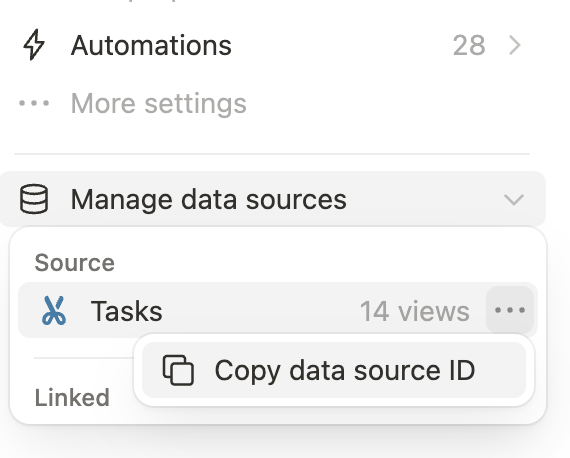
To get a data source ID from the Notion app directly, the settings menu for a database includes a "Copy data source ID" button under "Manage data sources":
Then, use the [Retrieve a database](https://developers.notion.com/reference/retrieve-a-database) API to get a list of `data_sources` for that database. There is often only one data source, but when there are multiple, you may have the ID or name of the one you want to retrieve in mind (or you can retrieve each of them). Use that data source ID with this endpoint to get its `properties`.
To get a data source ID from the Notion app directly, the settings menu for a database includes a "Copy data source ID" button under "Manage data sources":
 Refer to the [Build your first integration guide](https://developers.notion.com/guides/get-started/create-a-notion-integration#step-3-save-the-database-id) for more details.
### Additional resources
* [How to share a database with your integration](https://developers.notion.com/guides/get-started/create-a-notion-integration#give-your-integration-page-permissions)
* [Working with databases guide](https://developers.notion.com/guides/data-apis/working-with-databases)
### Errors
ErrorsEach Public API endpoint can return several possible error codes. See the [Error codes section](https://developers.notion.com/reference/status-codes#error-codes) of the Status codes documentation for more information.
### Resources
* [Retrieve a database](https://developers.notion.com/reference/retrieve-a-database)
* [Build your first integration guide](https://developers.notion.com/guides/get-started/create-a-notion-integration#step-3-save-the-database-id)
* [Error codes section](https://developers.notion.com/reference/status-codes#error-codes)
* [How to share a database with your integration](https://developers.notion.com/guides/get-started/create-a-notion-integration#give-your-integration-page-permissions)
* [Working with databases guide](https://developers.notion.com/guides/data-apis/working-with-databases)
* [database relations](https://www.notion.so/help/relations-and-rollups#what-is-a-database-relation)
* [linked data source](https://www.notion.so/help/guides/using-linked-databases)
* [Retrieve a data source](https://developers.notion.com/reference/retrieve-a-data-source)
## Code Samples
TypeScript SDK
```javascript
import { Client } from "@notionhq/client"
const notion = new Client({ auth: process.env.NOTION_API_KEY })
const response = await notion.dataSources.retrieve({
data_source_id: "d9824bdc-8445-4327-be8b-5b47500af6ce"
})
```
# `stream_list_templates`
```elixir
@spec stream_list_templates(term(), map(), keyword()) :: Enumerable.t()
```
# `stream_query`
```elixir
@spec stream_query(term(), map(), keyword()) :: Enumerable.t()
```
# `update`
```elixir
@spec update(term(), map(), keyword()) :: {:ok, term()} | {:error, term()}
```
Update a data source
## Source Context
### Warnings
The following data source properties cannot be updated via the API:
* `formula`
* `status`
* [Synced content](https://www.notion.so/help/guides/synced-databases-bridge-different-tools)
* `place`
### Notes
Data source relations must be shared with your integration
To update a data source [relation](https://www.notion.so/help/relations-and-rollups#what-is-a-database-relation) property, the related database must also be shared with your integration.
### How data sources property type changes work
All properties in pages are stored as rich text. Notion will convert that rich text based on the types defined in a data source's schema. When a type is changed using the API, the data will continue to be available, it is just presented differently.
For example, a multi select property value is represented as a comma-separated list of strings (eg. "1, 2, 3") and a people property value is represented as a comma-separated list of IDs. These are compatible and the type can be converted.
Note: Not all type changes work. In some cases data will no longer be returned, such as people type → file type.
### Interacting with data source rows
This endpoint cannot be used to update data source rows.
To update the properties of a data source row — rather than a column — use the [Update page](https://developers.notion.com/reference/patch-page) endpoint. To add a new row to a database, use the [Create a page](https://developers.notion.com/reference/post-page) endpoint.
### Recommended data source schema size limit
Developers are encouraged to keep their data source schema size to a maximum of **50KB**. To stay within this schema size limit, the number of properties (or columns) added to a data source should be managed.
Data source schema updates that are too large will be blocked by the REST API to help developers keep their data source queries performant. When a schema update is blocked, the error response includes a `validation_error` code with a message identifying the largest property by name, ID, and byte size to help you reduce your schema size.
### Errors
Each Public API endpoint can return several possible error codes. See the [Error codes section](https://developers.notion.com/reference/status-codes#error-codes) of the Status codes documentation for more information.
### Resources
* [Update page](https://developers.notion.com/reference/patch-page)
* [Create a page](https://developers.notion.com/reference/post-page)
* [Error codes section](https://developers.notion.com/reference/status-codes#error-codes)
* [Synced content](https://www.notion.so/help/guides/synced-databases-bridge-different-tools)
* [relation](https://www.notion.so/help/relations-and-rollups#what-is-a-database-relation)
* [Update a data source](https://developers.notion.com/reference/update-a-data-source)
## Code Samples
TypeScript SDK
```javascript
import { Client } from "@notionhq/client"
const notion = new Client({ auth: process.env.NOTION_API_KEY })
const response = await notion.dataSources.update({
data_source_id: "d9824bdc-8445-4327-be8b-5b47500af6ce",
title: [{ text: { content: "Updated Data Source Name" } }]
})
```
---
*Consult [api-reference.md](api-reference.md) for complete listing*
Refer to the [Build your first integration guide](https://developers.notion.com/guides/get-started/create-a-notion-integration#step-3-save-the-database-id) for more details.
### Additional resources
* [How to share a database with your integration](https://developers.notion.com/guides/get-started/create-a-notion-integration#give-your-integration-page-permissions)
* [Working with databases guide](https://developers.notion.com/guides/data-apis/working-with-databases)
### Errors
ErrorsEach Public API endpoint can return several possible error codes. See the [Error codes section](https://developers.notion.com/reference/status-codes#error-codes) of the Status codes documentation for more information.
### Resources
* [Retrieve a database](https://developers.notion.com/reference/retrieve-a-database)
* [Build your first integration guide](https://developers.notion.com/guides/get-started/create-a-notion-integration#step-3-save-the-database-id)
* [Error codes section](https://developers.notion.com/reference/status-codes#error-codes)
* [How to share a database with your integration](https://developers.notion.com/guides/get-started/create-a-notion-integration#give-your-integration-page-permissions)
* [Working with databases guide](https://developers.notion.com/guides/data-apis/working-with-databases)
* [database relations](https://www.notion.so/help/relations-and-rollups#what-is-a-database-relation)
* [linked data source](https://www.notion.so/help/guides/using-linked-databases)
* [Retrieve a data source](https://developers.notion.com/reference/retrieve-a-data-source)
## Code Samples
TypeScript SDK
```javascript
import { Client } from "@notionhq/client"
const notion = new Client({ auth: process.env.NOTION_API_KEY })
const response = await notion.dataSources.retrieve({
data_source_id: "d9824bdc-8445-4327-be8b-5b47500af6ce"
})
```
# `stream_list_templates`
```elixir
@spec stream_list_templates(term(), map(), keyword()) :: Enumerable.t()
```
# `stream_query`
```elixir
@spec stream_query(term(), map(), keyword()) :: Enumerable.t()
```
# `update`
```elixir
@spec update(term(), map(), keyword()) :: {:ok, term()} | {:error, term()}
```
Update a data source
## Source Context
### Warnings
The following data source properties cannot be updated via the API:
* `formula`
* `status`
* [Synced content](https://www.notion.so/help/guides/synced-databases-bridge-different-tools)
* `place`
### Notes
Data source relations must be shared with your integration
To update a data source [relation](https://www.notion.so/help/relations-and-rollups#what-is-a-database-relation) property, the related database must also be shared with your integration.
### How data sources property type changes work
All properties in pages are stored as rich text. Notion will convert that rich text based on the types defined in a data source's schema. When a type is changed using the API, the data will continue to be available, it is just presented differently.
For example, a multi select property value is represented as a comma-separated list of strings (eg. "1, 2, 3") and a people property value is represented as a comma-separated list of IDs. These are compatible and the type can be converted.
Note: Not all type changes work. In some cases data will no longer be returned, such as people type → file type.
### Interacting with data source rows
This endpoint cannot be used to update data source rows.
To update the properties of a data source row — rather than a column — use the [Update page](https://developers.notion.com/reference/patch-page) endpoint. To add a new row to a database, use the [Create a page](https://developers.notion.com/reference/post-page) endpoint.
### Recommended data source schema size limit
Developers are encouraged to keep their data source schema size to a maximum of **50KB**. To stay within this schema size limit, the number of properties (or columns) added to a data source should be managed.
Data source schema updates that are too large will be blocked by the REST API to help developers keep their data source queries performant. When a schema update is blocked, the error response includes a `validation_error` code with a message identifying the largest property by name, ID, and byte size to help you reduce your schema size.
### Errors
Each Public API endpoint can return several possible error codes. See the [Error codes section](https://developers.notion.com/reference/status-codes#error-codes) of the Status codes documentation for more information.
### Resources
* [Update page](https://developers.notion.com/reference/patch-page)
* [Create a page](https://developers.notion.com/reference/post-page)
* [Error codes section](https://developers.notion.com/reference/status-codes#error-codes)
* [Synced content](https://www.notion.so/help/guides/synced-databases-bridge-different-tools)
* [relation](https://www.notion.so/help/relations-and-rollups#what-is-a-database-relation)
* [Update a data source](https://developers.notion.com/reference/update-a-data-source)
## Code Samples
TypeScript SDK
```javascript
import { Client } from "@notionhq/client"
const notion = new Client({ auth: process.env.NOTION_API_KEY })
const response = await notion.dataSources.update({
data_source_id: "d9824bdc-8445-4327-be8b-5b47500af6ce",
title: [{ text: { content: "Updated Data Source Name" } }]
})
```
---
*Consult [api-reference.md](api-reference.md) for complete listing*