Markdown Rendering
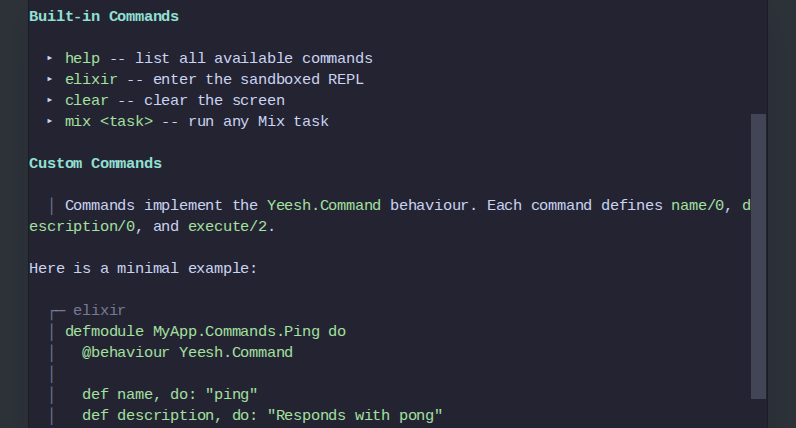
View SourceYeesh can render CommonMark Markdown directly in the browser terminal, translating document structure into ANSI escape sequences that xterm.js displays with color and style — no HTML, no CSS, no browser rendering pipeline involved.
How it works
The Yeesh.Markdown module is the sole entry point:
output = Yeesh.Markdown.render(markdown_string)The string returned contains ANSI escape sequences and \r\n line
endings, ready to be returned from any Yeesh.Command.execute/2
callback.
Internally the pipeline is three steps:
Markdown string
    |
    | MDEx.parse_document!/2   (CommonMark parser, Rust NIF)
    v
MDEx.Document  (AST of typed node structs)
    |
    | Yeesh.Markdown  (recursive block/inline renderer)
    v
ANSI string  (printed by xterm.js in the browser)
MDEx (:mdex) is the underlying CommonMark parser. It is a Rust
NIF that exposes a typed Elixir AST — MDEx.Document, MDEx.Heading,
MDEx.Paragraph, MDEx.CodeBlock, MDEx.List, and so on. Yeesh
walks this AST in two passes:
render_block/1— handles block-level nodes (headings, paragraphs, lists, code blocks, block quotes, thematic breaks).render_inline/1/render_inline_node/1— handles inline spans (bold, italic, strikethrough, inline code, links, images, soft/hard breaks, emoji shortcodes).
Blocks are separated by \r\n\r\n; inlines are concatenated directly.
Every styled span opens an ANSI sequence and closes it with \e[0m
(reset), so styles do not bleed across elements.
Supported elements
Headings
Three levels of heading are distinguished by color:
| Level | Style |
|---|---|
| h1 | bold yellow |
| h2 | bold cyan |
| h3+ | bold white |
Text emphasis
| Markdown | Rendering |
|---|---|
**bold** | \e[1m bold |
*italic* | \e[3m italic |
~~strike~~ | \e[9m strikethrough |
`code` | green (\e[32m) |
Lists
Bullet lists render each item with a ▸ marker. Ordered lists use
circled Unicode digits (①, ②, …, ⑳) for the first twenty items and
fall back to (n) beyond that. Task list items use ☑ / ☐
checkbox markers.
Code blocks
Fenced code blocks are rendered with a box-drawing frame and a language label on the top rail:
  ┌─ elixir
  │ def greet(name), do: IO.puts("Hello, #{name}!")
  └─
The frame is dimmed (\e[2m) and the code body is green, making it
visually distinct from surrounding prose without requiring a color
theme.
Block quotes
Each line of a block quote is prefixed with a dimmed vertical bar:
│ Commands implement the `Yeesh.Command` behaviour.Links and images
Links are rendered underlined and blue, with the URL appended in
dimmed parentheses. Images are represented as a [image: alt text]
placeholder with the URL alongside, since pixel data cannot be
displayed in a text terminal.
Thematic breaks
A --- horizontal rule renders as a 40-character dimmed ─ line.
Using Markdown in a command
Return Yeesh.Markdown.render/1 from any command's Yeesh.Command.execute/2:
defmodule MyApp.Commands.About do
  @behaviour Yeesh.Command

  @markdown """
  # My App

  A short description with **bold** and *italic* text.

  ## Commands

  - `ping` -- check connectivity
  - `status` -- show current status

  Learn more at [hexdocs.pm/yeesh](https://hexdocs.pm/yeesh).
  """

  def name, do: "about"
  def description, do: "Show project info"
  def usage, do: "about"

  def execute(_args, session) do
    {:ok, Yeesh.Markdown.render(@markdown), session}
  end
end
Register the command on the terminal component and users can type
about to see the rendered output.
The example application (examples/phx_app) ships a working version
of this command in PhxApp.Commands.About.
Extensions enabled
MDEx is configured with the following CommonMark extensions:
| Extension | Effect |
|---|---|
strikethrough | ~~text~~ renders with strikethrough style |
tasklist | - [ ] / - [x] render as ☐ / ☑ |
table | GFM tables are parsed (rendered as prose) |
autolink | Bare URLs are turned into links automatically |
shortcodes | :emoji: shortcodes are expanded |