README
View SourceEarly Development — Ready for experimentation. Start with staging or low-risk services. We welcome feedback from early adopters.
Beamlens
Adaptive runtime intelligence for the BEAM.



Move beyond static supervision. Give your application the capability to self-diagnose incidents, analyze traffic patterns, and optimize its own performance.
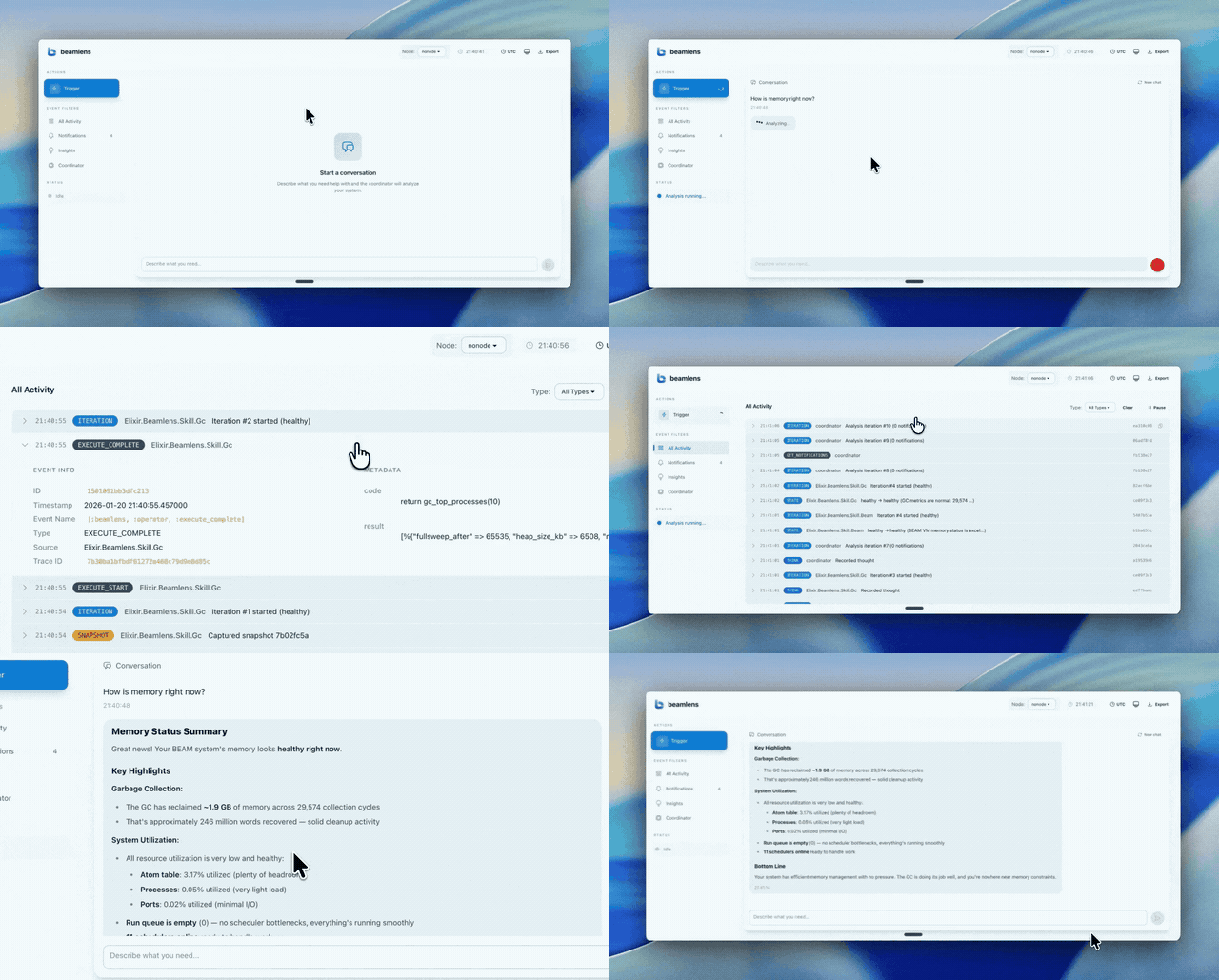
Why Beamlens?
Static rules miss context. Threshold alerts fire on symptoms, not causes. When memory spikes, you get an alert—but you still need to figure out whether it's a memory leak, ETS bloat, or a stuck process. Beamlens investigates the why.
External monitors miss internals. APM tools see requests and traces, but they can't peer into ETS distributions, scheduler utilization, or allocator fragmentation. Beamlens captures the runtime state that external tools miss.
Manual debugging is reactive. By the time you SSH in and attach a remote shell, the incident may have passed. Beamlens investigates while it happens, capturing the state you need for diagnosis.
Supported Providers
Beamlens works with any LLM provider. Anthropic is the default. See the providers guide for configuration details.
| Provider |
|---|
| Anthropic |
| OpenAI |
| Google AI (Gemini) |
| Google Vertex AI |
| AWS Bedrock |
| Azure OpenAI |
| Ollama (Local) |
| OpenRouter |
| OpenAI Compatible APIs |
How It Works
Beamlens lives inside your supervision tree. It captures runtime state and uses an LLM to explain why your metrics look the way they do.
- Production-safe: All analysis is read-only. No side effects.
- Privacy-first: Data stays in your infrastructure. You choose the LLM provider.
- Extensible: Built-in skills + custom skills for your domain.
- Auto or on-demand: Trigger manually, on schedule, or let the Anomaly skill auto-trigger on statistical anomalies.
Installation
Igniter (Recommended)
Install igniter:
mix archive.install hex igniter_new
Install Beamlens:
# Choose your provider, model is optional
mix igniter.install beamlens --provider openai --model "gpt-5-mini"
Supported providers: anthropic (default), openai, ollama, google-ai, vertex-ai, aws-bedrock, azure-openai, openrouter, openai-generic.
Manual
Add to mix.exs:
def deps do
  [
    {:beamlens, "~> 0.3"}
  ]
end
Add to your supervision tree in application.ex:
def start(_type, _args) do
  children = [
    # ... your other children
    Beamlens
  ]

  Supervisor.start_link(children, strategy: :one_for_one)
end
You can also configure which skills to enable:
{Beamlens, skills: [
  Beamlens.Skill.Beam,
  {Beamlens.Skill.Anomaly, [collection_interval_ms: 60_000]}
]}
Configure your LLM provider. Set an API key for the default Anthropic provider:
export ANTHROPIC_API_KEY="sk-ant-..."
Or configure a custom provider in your supervision tree:
{Beamlens, client_registry: %{
  primary: "Anthropic",
  clients: [
    %{name: "Anthropic", provider: "anthropic",
      options: %{model: "claude-haiku-4-5-20251001"}}
  ]
}}
Usage
Run Beamlens (from an alert handler, Oban job, or IEx):
{:ok, result} = Beamlens.Coordinator.run(%{reason: "memory alert..."})Handle automatic insights
The Anomaly skill is enabled by default. It learns your baseline, then auto-triggers investigations when it detects statistical anomalies.
:telemetry.attach(
  "beamlens-insights",
  [:beamlens, :coordinator, :insight_produced],
  fn _event, _measurements, metadata, _config ->
    Logger.warning("Beamlens: #{metadata.insight.summary}")
  end,
  nil
)
Built-in Skills
Beamlens includes skills for common BEAM runtime monitoring:
| Skill | Description | Default |
|---|---|---|
Beamlens.Skill.Beam | BEAM VM health (memory, processes, schedulers, atoms, ports) | ✓ |
Beamlens.Skill.Allocator | Memory allocator fragmentation monitoring | ✓ |
Beamlens.Skill.Anomaly | Statistical anomaly detection with auto-trigger | ✓ |
Beamlens.Skill.Ets | ETS table monitoring (counts, memory, top tables) | ✓ |
Beamlens.Skill.Gc | Garbage collection statistics | ✓ |
Beamlens.Skill.Logger | Application log analysis (error rates, patterns) | ✓ |
Beamlens.Skill.Os | OS-level metrics (CPU, memory, disk via os_mon) | ✓ |
Beamlens.Skill.Overload | Message queue overload and bottleneck detection | ✓ |
Beamlens.Skill.Ports | Port and socket monitoring | ✓ |
Beamlens.Skill.Supervisor | Supervisor tree inspection | ✓ |
Beamlens.Skill.Tracer | Production-safe function tracing via Recon | ✓ |
Beamlens.Skill.VmEvents | System event monitoring (long GC, large heap, etc.) | ✓ |
Beamlens.Skill.Ecto | Database monitoring (requires ecto_psql_extras) | |
Beamlens.Skill.Exception | Exception tracking (requires tower) |
Examples
Triggering from Telemetry
# In your Telemetry handler
def handle_event([:my_app, :memory, :high], _measurements, _metadata, _config) do
  # Trigger an investigation immediately
  {:ok, result} = Beamlens.Coordinator.run(%{reason: "memory alert..."})

  # Log the insights
  Logger.error("Memory Alert Diagnosis: #{inspect(result.insights)}")
end
Creating Custom Skills
Teach Beamlens to understand your specific business logic. For example, if you use a GenServer to batch requests, generic metrics won't help—you need a custom skill.
defmodule MyApp.Skills.Batcher do
  @behaviour Beamlens.Skill

  # Shortened for brevity, see the Beamlens.Skill behaviour for full implementation details.

  @impl true
  def system_prompt do
    "You are checking the Batcher process. Watch for 'queue_size' > 5000."
  end

  @impl true
  def snapshot do
    %{
      queue_size: MyApp.Batcher.queue_size(),
      pending_jobs: MyApp.Batcher.pending_count()
    }
  end
end
See the Beamlens.Skill behaviour for full custom skill documentation including callbacks.
FAQ
Is it safe to run in production?
Beamlens is read-only and designed to run alongside your app. This is still early. Start with a low-risk service or staging, validate, then add more skills as you need.How much does it cost to run?
Based on our test suite, a typical investigation uses around 10K tokens and costs about one to three cents with Haiku. If you're running continuous monitoring with auto-trigger at its default rate limit (3 per hour), expect roughly $1-3 per day. You control the costs through model choice, which skills you enable, and how often investigations run. Auto-trigger is rate-limited by default to prevent runaway costs.Which model do you recommend?
Haiku-level intelligence or higher. Haiku is a solid baseline for routine monitoring and runs well. Use a larger model for complex investigations.Where does my data go?
Beamlens has no backend. Runtime data stays in your infrastructure and goes only to the LLM provider you configure. You bring your own API keys.Get Involved
- Early Access — Join the waitlist for the free web dashboard
- Roadmap — See planned features including Phoenix integration and continuous monitoring
- GitHub Issues — Report bugs or request features
- Partner with us — We're looking for early partners
License
Apache-2.0