Font styling attributes.
Font attrs control text family, weight, style, decorations, spacing, and text alignment. They apply to text-bearing elements and inherit through descendants until overridden.
Use:
size/1,color/1, andfamily/1for the core text appearanceweight/1or the named weight helpers for full font-weight coverageitalic/0,underline/0, andstrike/0for emphasis and decorationletter_spacing/1andword_spacing/1to loosen or tighten text rhythmalign_left/0,align_right/0, andcenter/0to align text inside the element content box
Defaults
Text defaults to:
- family:
"default" - weight:
400(regular/0) - italic:
false - size:
16 - color: black
- alignment: left
Inheritance
Font attrs inherit through the element tree. For example, setting
Font.color/1 or Font.family/1 on a parent element affects descendant text
unless a child overrides that specific font attr.
Text Alignment
align_left/0, align_right/0, and center/0 align text inside the
element's content box after padding and border insets are applied. They do not
change where the element itself is placed in a row/2 or column/2.
Font Weights
Use weight/1 for the full 100..900 range in 100 steps, or use the named
helpers for common weights. regular/0 is the canonical 400 weight.
normal/0 is an alias for regular/0.
Examples
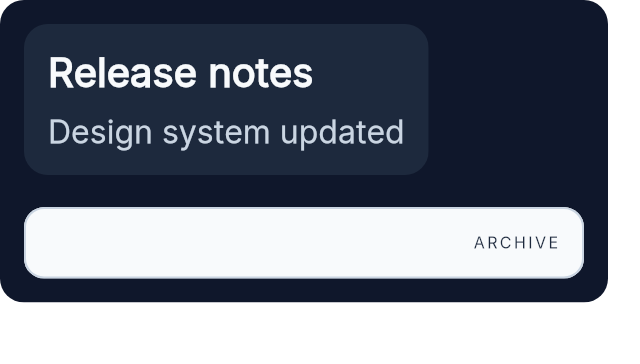
This example shows inherited family, weight, size, and color in the top card, then a lighter, tracked, right-aligned label below it.
column([spacing(16), padding(12), Background.color(color(:slate, 900)), Border.rounded(12)], [
  el(
    [
      padding(12),
      Background.color(color(:slate, 800)),
      Border.rounded(12),
      Font.family("Inter"),
      Font.regular(),
      Font.size(16),
      Font.color(color(:slate, 50))
    ],
    column([spacing(8)], [
      el([Font.semi_bold(), Font.size(20)], text("Release notes")),
      el([Font.color(color(:slate, 300))], text("Design system updated"))
    ])
  ),
  el(
    [
      width(px(280)),
      padding(12),
      Background.color(color(:slate, 50)),
      Border.rounded(10),
      Border.width(1),
      Border.color(color(:slate, 300)),
      Font.color(color(:slate, 800)),
      Font.align_right(),
      Font.extra_light(),
      Font.letter_spacing(1.2)
    ],
    text("ARCHIVE")
  )
])
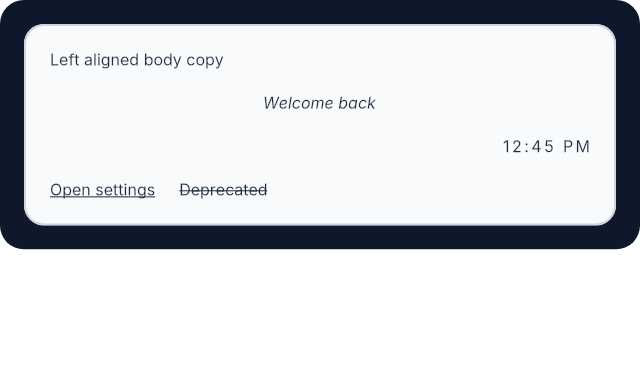
Text alignment and decoration are easier to understand visually than in a list of helper names.
el(
  [
    width(px(320)),
    padding(12),
    Background.color(color(:slate, 900)),
    Border.rounded(12)
  ],
  el(
    [
      width(fill()),
      padding(12),
      Background.color(color(:slate, 50)),
      Border.rounded(10),
      Border.width(1),
      Border.color(color(:slate, 300)),
      Font.color(color(:slate, 800))
    ],
    column([width(fill()), spacing(12)], [
      el([width(fill()), Font.align_left()], text("Left aligned body copy")),
      el([width(fill()), Font.center(), Font.italic()], text("Welcome back")),
      el([width(fill()), Font.align_right(), Font.letter_spacing(1.2)], text("12:45 PM")),
      row([spacing(12)], [
        el([Font.underline()], text("Open settings")),
        el([Font.strike()], text("Deprecated"))
      ])
    ])
  )
)
Summary
Functions
Left-align text within the element content box.
Right-align text within the element content box.
Set black weight (900).
Set bold weight (700).
Center text within the element content box.
Set font color.
Set extra-bold weight (800).
Set extra light weight (200).
Set font family.
Set italic text style.
Add extra spacing between letters.
Set light weight (300).
Set medium weight (500).
Set regular weight (400).
Set semi-bold weight (600).
Set font size.
Strike through text.
Set the thinnest named weight (100).
Underline text.
Set an explicit font weight using the numeric 100..900 scale.
Add extra spacing between words.
Types
@type color_value() :: Emerge.UI.Color.color() | Emerge.UI.Color.t()
@type t() ::
  {:font_size, number()}
  | {:font_color, color_value()}
  | {:font, family()}
  | {:font_weight, weight_name()}
  | {:font_style, :italic}
  | {:font_underline, true}
  | {:font_strike, true}
  | {:font_letter_spacing, number()}
  | {:font_word_spacing, number()}
  | {:text_align, text_align()}
@type text_align() :: :left | :right | :center
@type weight_name() ::
  :thin
  | :extra_light
  | :light
  | :regular
  | :medium
  | :semi_bold
  | :bold
  | :extra_bold
  | :black
@type weight_value() :: 100 | 200 | 300 | 400 | 500 | 600 | 700 | 800 | 900
Functions
@spec align_left() :: {:text_align, :left}
Left-align text within the element content box.
This is the default text alignment.
Example
el([width(px(280)), Font.align_left()], text("Left aligned body copy"))@spec align_right() :: {:text_align, :right}
Right-align text within the element content box.
Example
el([width(px(280)), Font.align_right()], text("12:45 PM"))@spec black() :: {:font_weight, :black}
Set black weight (900).
Sugar for weight(900).
@spec bold() :: {:font_weight, :bold}
Set bold weight (700).
Sugar for weight(700).
@spec center() :: {:text_align, :center}
Center text within the element content box.
Example
el([width(px(280)), Font.center()], text("Welcome back"))@spec color(color_value()) :: {:font_color, color_value()}
Set font color.
Accepts plain named colors like :black and normalized color tuples from
Emerge.UI.Color.
Example
el([Font.color(color(:emerald, 600))], text("Saved"))@spec extra_bold() :: {:font_weight, :extra_bold}
Set extra-bold weight (800).
Sugar for weight(800).
@spec extra_light() :: {:font_weight, :extra_light}
Set extra light weight (200).
Sugar for weight(200).
Set font family.
Accepts either an atom or a binary family name. The family inherits to descendant text until overridden.
Example
el(
  [Font.family("Inter"), Font.regular(), Font.size(16)],
  text("Body copy")
)@spec italic() :: {:font_style, :italic}
Set italic text style.
Example
el([Font.italic()], text("Draft"))Add extra spacing between letters.
This changes both text measurement and final glyph placement.
Example
el([Font.extra_light(), Font.letter_spacing(1.5)], text("TRACKED"))@spec light() :: {:font_weight, :light}
Set light weight (300).
Sugar for weight(300).
@spec medium() :: {:font_weight, :medium}
Set medium weight (500).
Sugar for weight(500).
@spec normal() :: {:font_weight, :regular}
Alias for regular/0.
@spec regular() :: {:font_weight, :regular}
Set regular weight (400).
This is the canonical helper for the default text weight.
@spec semi_bold() :: {:font_weight, :semi_bold}
Set semi-bold weight (600).
Sugar for weight(600).
Set font size.
The value is in logical pixels and inherits to descendants.
Example
el([Font.size(18)], text("Section heading"))@spec strike() :: {:font_strike, true}
Strike through text.
Example
el([Font.strike()], text("Deprecated"))@spec thin() :: {:font_weight, :thin}
Set the thinnest named weight (100).
Sugar for weight(100).
@spec underline() :: {:font_underline, true}
Underline text.
Example
el([Font.underline()], text("Open settings"))@spec weight(weight_value()) :: {:font_weight, weight_name()}
Set an explicit font weight using the numeric 100..900 scale.
The value must be one of 100, 200, 300, 400, 500, 600, 700, 800, 900.
Returned attrs use the canonical named weight atoms.
Examples
column([spacing(8)], [
  el([Font.weight(400)], text("Body")),
  el([Font.weight(600)], text("Section title")),
  el([Font.weight(800)], text("Display accent"))
])Add extra spacing between words.
This changes both text measurement and final glyph placement.
Example
el([Font.word_spacing(3)], text("Status updated today"))