In the previous tutorial you learned how to describe UI with Emerge.UI.
The next step is to bring real media into that UI: images, SVGs, background images, and custom fonts.
Assets in Emerge are still declarative. You describe a source in your UI tree, and the renderer resolves it for you.
Static assets live under priv/
Logical asset paths resolve from your app's priv/ directory.
For example:
priv/images/logo.pngpriv/images/hero.jpgpriv/icons/check.svgpriv/fonts/Inter-Regular.ttf
You can refer to those files by logical path string, or you can use the ~m
sigil for compile-time verification.
Start with logical path strings
The simplest source form is a logical path string:
image([width(px(120)), height(px(120))], "images/logo.png")

svg([width(px(24)), height(px(24))], "icons/check.svg")

el(
  [
    width(px(320)),
    height(px(180)),
    Background.image("images/hero.jpg", fit: :cover)
  ],
  none()
)
Logical paths are resolved from the otp_app you pass to EmergeSkia.start/1
or that the viewport infers for you.
Prefer ~m in app code
Import Emerge.Assets.Path in the module where you describe UI:
defmodule MyApp.UI do
  use Emerge.Assets.Path, otp_app: :my_app
  use Emerge.UI
end
Then you can write compile-time verified paths:
~m"images/logo.png"
~m"images/hero.jpg"
~m"icons/check.svg"
~m verifies that the file exists under priv/ at compile time and tracks it
as an external resource.
Show an image and a background image
This example uses a normal image element and a background image on a framed element:
column(
  [
    width(fill()),
    height(fill()),
    padding(16),
    spacing(16),
    Background.color(color(:slate, 900)),
    Border.rounded(14)
  ],
  [
    column([spacing(8)], [
      el([Font.color(color(:slate, 50)), Font.size(14)], text("image/2")),
      el(
        [
          padding(10),
          Background.color(color(:slate, 800)),
          Border.rounded(12)
        ],
        image([width(px(120)), height(px(120)), Border.rounded(10)], "sample_assets/static.jpg")
      )
    ]),
    column([spacing(8)], [
      el([Font.color(color(:slate, 50)), Font.size(14)], text("Background.image/2")),
      el(
        [
          width(px(288)),
          height(px(160)),
          padding(12),
          Background.image("sample_assets/fallback.jpg", fit: :cover),
          Border.rounded(12)
        ],
        column([height(fill()), spacing(8)], [
          el(
            [
              padding_xy(10, 6),
              Background.color(color_rgba(15, 23, 42, 0.7)),
              Border.rounded(999),
              Font.color(color(:slate, 50))
            ],
            text("Featured trail")
          ),
          el(
            [
              align_bottom(),
              padding(10),
              Background.color(color_rgba(15, 23, 42, 0.58)),
              Border.rounded(10),
              Font.color(color(:slate, 50))
            ],
            column([spacing(4)], [
              el([Font.size(18)], text("Background image host")),
              el([Font.size(12), Font.color(color(:slate, 200))], text("Foreground content sits on top."))
            ])
          )
        ])
      )
    ])
  ]
)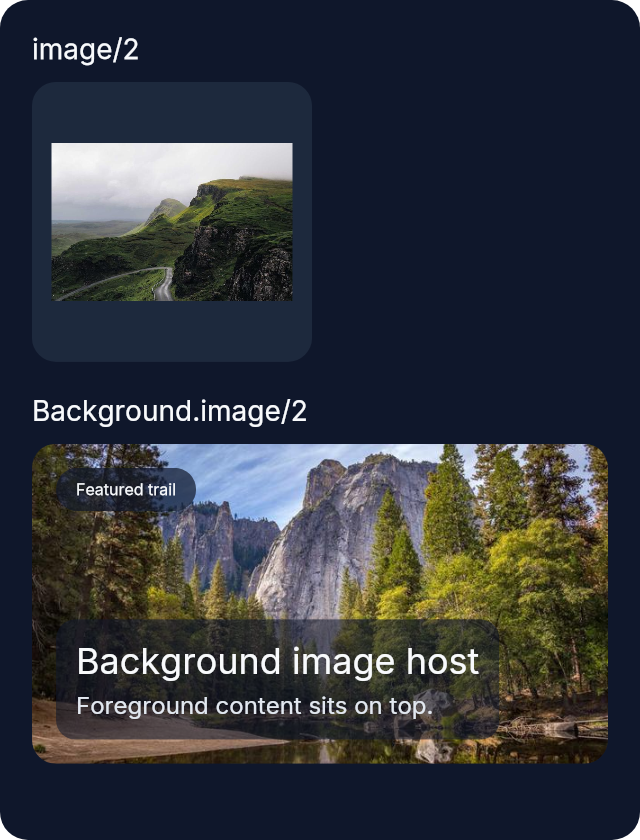
image/2 creates an image element.
Background.image/2 paints an image inside another element's frame.
Use SVG files
Use svg/2 when the source is an SVG:
row(
  [
    width(fill()),
    height(fill()),
    padding(16),
    spacing(12),
    Background.color(color(:slate, 900)),
    Border.rounded(14)
  ],
  [
    el(
      [
        width(fill()),
        padding(12),
        Background.color(color(:slate, 800)),
        Border.rounded(12)
      ],
      column([center_x(), spacing(8)], [
        svg([width(px(48)), height(px(48))], "sample_assets/template_cloud.svg"),
        el([Font.color(color(:slate, 50)), Font.size(13)], text("Original SVG"))
      ])
    ),
    el(
      [
        width(fill()),
        padding(12),
        Background.color(color(:slate, 800)),
        Border.rounded(12)
      ],
      column([center_x(), spacing(8)], [
        svg(
          [width(px(48)), height(px(48)), Svg.color(color(:sky, 500))],
          "sample_assets/template_cloud.svg"
        ),
        el([Font.color(color(:slate, 50)), Font.size(13)], text("Svg.color/1"))
      ])
    )
  ]
)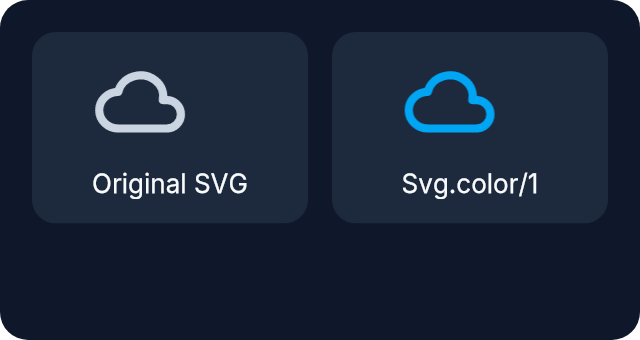
By default, SVGs keep their original colors.
Use Svg.color/1 when you want template-style tinting.
Background image fit modes
Background.image/2 defaults to fit: :cover.
Use:
fit: :coverto fill the frame and crop if neededfit: :containto keep the whole image visibleBackground.tiled/1,Background.tiled_x/1, andBackground.tiled_y/1for repeat modes
Example:
el(
  [
    width(px(220)),
    height(px(120)),
    Background.image("images/logo.png", fit: :contain),
    Border.rounded(12)
  ],
  none()
)
Configure fonts at renderer startup
Fonts work a little differently from images.
Images and SVGs are referenced directly in the UI tree.
Fonts are registered once when the renderer starts, and then selected in UI code
by family, weight, and italic.
If you want multiple variants of the same family, register each variant:
{:ok, renderer} =
  EmergeSkia.start(
    otp_app: :my_app,
    title: "My App",
    assets: [
      fonts: [
        [family: "Inter", source: "fonts/Inter-Regular.ttf", weight: 400],
        [family: "Inter", source: "fonts/Inter-Bold.ttf", weight: 700],
        [family: "Inter", source: "fonts/Inter-Italic.ttf", weight: 400, italic: true]
      ]
    ]
  )
After that, use the configured family in UI code:
column([spacing(8)], [
  el([Font.family("Inter"), Font.size(22), Font.bold()], text("Release notes")),
  el([Font.family("Inter"), Font.regular()], text("Design system updated")),
  el([Font.family("Inter"), Font.italic(), Font.color(color(:slate, 300))], text("Beta"))
])
The key idea is:
familyselects the registered familyFont.bold/0orFont.weight(700)selects the bold variantFont.italic/0selects the italic variant
If you want a family to support multiple weights or italics, register those
variants in assets.fonts.
Runtime filesystem paths
Emerge also supports runtime filesystem paths:
image([width(px(160)), height(px(96))], {:path, "/data/photos/photo.jpg"})Runtime path loading is disabled by default.
Enable it only when needed, and use an explicit allowlist in
EmergeSkia.start/1:
assets: [
  runtime_paths: [
    enabled: true,
    allowlist: ["/data/photos"],
    follow_symlinks: false
  ]
]
What happens while assets load
Asset loading is asynchronous.
While a source is still loading, Emerge shows a loading placeholder. If loading fails, Emerge shows a failed placeholder.
You do not need to block rendering while assets are being resolved.