Declarative UI tree API.
Emerge.UI is the root DSL for building the element tree returned from
render/0 or render/1.
These examples assume use Emerge.UI.
Tree Model
UI is expressed as a tree of elements.
Each element has:
- a constructor such as
el/2,row/2,column/2, ortext/1 - attrs that configure layout, styling, behavior, or media
- zero or more child elements
el/2 accepts exactly one child. Layout containers such as row/2,
wrapped_row/2, column/2, text_column/2, and paragraph/2 accept child
lists. Leaf elements such as text/1, image/2, svg/2, video/2, and
none/0 have no children.
Core Constructors
The root module provides the core element constructors:
el/2for a single framed or aligned childrow/2for a horizontal line of childrenwrapped_row/2for horizontal flow that wraps onto new linescolumn/2for vertical stackstext_column/2andparagraph/2for wrapped text flowstext/1,image/2,svg/2,video/2, andnone/0for content leaves
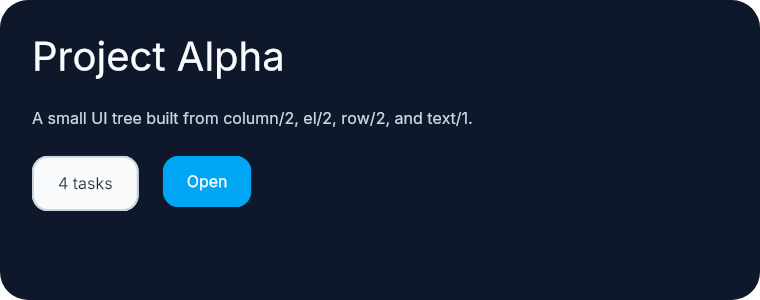
This small tree uses column/2 as the root, el/2 for framed content, and
row/2 for a horizontal action area.
column(
  [
    width(px(380)),
    height(fill()),
    padding(16),
    spacing(14),
    Background.color(color(:slate, 900)),
    Border.rounded(14)
  ],
  [
    el([Font.size(20), Font.color(color(:slate, 50))], text("Project Alpha")),
    el(
      [Font.color(color(:slate, 300))],
      text("A small UI tree built from column/2, el/2, row/2, and text/1.")
    ),
    row([spacing(12)], [
      el(
        [
          padding_xy(12, 8),
          Background.color(color(:slate, 50)),
          Border.rounded(8),
          Border.width(1),
          Border.color(color(:slate, 300)),
          Font.color(color(:slate, 800))
        ],
        text("4 tasks")
      ),
      el(
        [
          padding_xy(12, 8),
          Background.color(color(:sky, 500)),
          Border.rounded(8),
          Font.color(color(:slate, 50))
        ],
        text("Open")
      )
    ])
  ]
)
Choosing A Layout
Choose the container that matches the child flow:
el/2when there is exactly one childrow/2when children stay on one horizontal linewrapped_row/2when horizontal content should wrap onto additional linescolumn/2when children stack verticallytext_column/2andparagraph/2when the content is prose rather than generic layout blocks
This comparison shows the difference between row/2, wrapped_row/2, and
column/2.
column(
  [
    width(px(420)),
    height(fill()),
    padding(16),
    spacing(14),
    Background.color(color(:slate, 900)),
    Border.rounded(14)
  ],
  [
    el([Font.size(14), Font.color(color(:slate, 50))], text("row/2 keeps children on one line")),
    row([spacing(8)], [
      el(
        [
          padding_xy(10, 6),
          Background.color(color(:slate, 50)),
          Border.rounded(999),
          Border.width(1),
          Border.color(color(:slate, 300)),
          Font.color(color(:slate, 800))
        ],
        text("One")
      ),
      el(
        [
          padding_xy(10, 6),
          Background.color(color(:slate, 50)),
          Border.rounded(999),
          Border.width(1),
          Border.color(color(:slate, 300)),
          Font.color(color(:slate, 800))
        ],
        text("Two")
      ),
      el(
        [
          padding_xy(10, 6),
          Background.color(color(:slate, 50)),
          Border.rounded(999),
          Border.width(1),
          Border.color(color(:slate, 300)),
          Font.color(color(:slate, 800))
        ],
        text("Three")
      )
    ]),
    el(
      [Font.size(14), Font.color(color(:slate, 50))],
      text("wrapped_row/2 wraps horizontal content onto new lines")
    ),
    wrapped_row([width(px(320)), spacing_xy(8, 8)], [
      el(
        [
          padding_xy(10, 6),
          Background.color(color(:slate, 50)),
          Border.rounded(999),
          Border.width(1),
          Border.color(color(:slate, 300)),
          Font.color(color(:slate, 800))
        ],
        text("Docs")
      ),
      el(
        [
          padding_xy(10, 6),
          Background.color(color(:slate, 50)),
          Border.rounded(999),
          Border.width(1),
          Border.color(color(:slate, 300)),
          Font.color(color(:slate, 800))
        ],
        text("Layout")
      ),
      el(
        [
          padding_xy(10, 6),
          Background.color(color(:slate, 50)),
          Border.rounded(999),
          Border.width(1),
          Border.color(color(:slate, 300)),
          Font.color(color(:slate, 800))
        ],
        text("Nearby")
      ),
      el(
        [
          padding_xy(10, 6),
          Background.color(color(:slate, 50)),
          Border.rounded(999),
          Border.width(1),
          Border.color(color(:slate, 300)),
          Font.color(color(:slate, 800))
        ],
        text("Animation")
      ),
      el(
        [
          padding_xy(10, 6),
          Background.color(color(:slate, 50)),
          Border.rounded(999),
          Border.width(1),
          Border.color(color(:slate, 300)),
          Font.color(color(:slate, 800))
        ],
        text("Input")
      ),
      el(
        [
          padding_xy(10, 6),
          Background.color(color(:slate, 50)),
          Border.rounded(999),
          Border.width(1),
          Border.color(color(:slate, 300)),
          Font.color(color(:slate, 800))
        ],
        text("Scroll")
      )
    ]),
    el(
      [Font.size(14), Font.color(color(:slate, 50))],
      text("column/2 stacks children vertically")
    ),
    column([spacing(8)], [
      el(
        [
          padding(10),
          Background.color(color(:slate, 50)),
          Border.rounded(10),
          Border.width(1),
          Border.color(color(:slate, 300)),
          Font.color(color(:slate, 800))
        ],
        text("Header")
      ),
      el(
        [
          padding(10),
          Background.color(color(:slate, 100)),
          Border.rounded(10),
          Border.width(1),
          Border.color(color(:slate, 300)),
          Font.color(color(:slate, 800))
        ],
        text("Body")
      ),
      el(
        [
          padding(10),
          Background.color(color(:slate, 50)),
          Border.rounded(10),
          Border.width(1),
          Border.color(color(:slate, 300)),
          Font.color(color(:slate, 800))
        ],
        text("Footer")
      )
    ])
  ]
)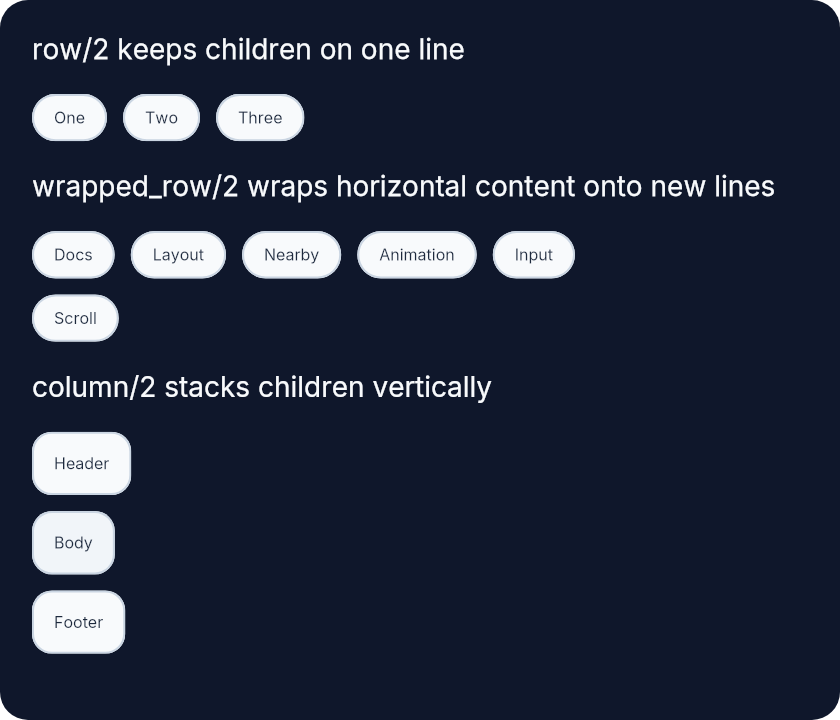
wrapped_row/2 wraps against the width it resolves from its parent,
including nested fill-driven layouts. Its height grows to match the tallest
child on each wrapped line, so multiline or reflowed children push following
content down instead of clipping. Horizontal child alignment also stays
line-local after wrapping, which means center_x/0 and align_right/0
position children within the remaining width of their wrapped line rather
than across the full container width.
use Emerge.UI
use Emerge.UI imports:
It also aliases the grouped helper modules:
AnimationBackgroundBorderEventFontInputInteractiveNearbySvgTransform
Using use Emerge for a viewport also calls use Emerge.UI.
Top-Level Attrs
The root module also defines a small set of attrs that are not grouped into submodules:
key/1for stable sibling identityfocus_on_mount/0to focus an element on first mountclip_nearby/0to clip nearby escapes under the hostimage_fit/1forimage/2andvideo/2
Input.text([key(:search), focus_on_mount()], state.query)

image([width(px(160)), height(px(96)), image_fit(:cover)], "images/hero.jpg")
Submodules
The rest of the API is organized by concern:
Emerge.UI.Colorfor named and explicit colorsEmerge.UI.Sizefor width, height, and length helpersEmerge.UI.Spacefor padding and spacingEmerge.UI.Scrollfor scroll-related attrsEmerge.UI.Alignfor alignment helpersEmerge.UI.Background,Emerge.UI.Border, andEmerge.UI.Fontfor decorative stylingEmerge.UI.Input,Emerge.UI.Event, andEmerge.UI.Interactivefor inputs, event handlers, and interaction stylingEmerge.UI.TransformandEmerge.UI.Animationfor paint-time movement and animationEmerge.UI.Nearbyfor overlays and attached nearby elementsEmerge.UI.Svgfor SVG-specific styling helpers

As trees grow, extract regular Elixir functions that return Emerge.UI.t().
Summary
Types
A single public UI attribute tuple.
A list of public UI attribute tuples.
A single child element.
A list of child elements.
An Emerge UI element.
Image fit modes accepted by image_fit/1.
A stable key used to retain identity among siblings.
A tree of UI returned by DSL helpers.
A video target accepted by video/2.
Functions
Import the root element DSL and the most common UI helper modules.
Clip nearby escape overlays attached under this host.
Lay out children vertically.
Build a single-child container.
Focus this element once when it is first mounted into the tree.
An image element.
Provide a stable sibling key for identity in lists.
Build an empty element that takes up no space.
A paragraph lays out inline text children with word wrapping.
Lay out children horizontally in one line.
An SVG element.
Build a text leaf element.
A text column lays out paragraph-oriented content vertically.
A video element backed by a renderer-owned video target.
Lay out children horizontally and wrap onto new lines as needed.
Types
A single public UI attribute tuple.
@type attrs() :: [attr()]
A list of public UI attribute tuples.
@type child() :: element()
A single child element.
@type children() :: [child()]
A list of child elements.
@type clip_nearby_attr() :: {:clip_nearby, true}
@type element() :: Emerge.Engine.Element.t()
An Emerge UI element.
@type focus_on_mount_attr() :: {:focus_on_mount, true}
@type image_fit_attr() :: {:image_fit, image_fit_mode()}
@type image_fit_mode() :: :contain | :cover
Image fit modes accepted by image_fit/1.
@type image_source() ::
  binary()
  | atom()
  | {:id, binary()}
  | {:path, binary()}
  | Emerge.Assets.Ref.t()
@type key() :: term()
A stable key used to retain identity among siblings.
@type key_attr() :: {:key, key()}
@type t() :: element()
A tree of UI returned by DSL helpers.
@type video_target() :: EmergeSkia.VideoTarget.t()
A video target accepted by video/2.
Functions
Import the root element DSL and the most common UI helper modules.
This imports the core constructors from Emerge.UI and the frequently used
helpers from Color, Size, Space, Scroll, and Align. It also aliases
the grouped styling and behavior modules such as Background, Border,
Font, Input, Event, and Nearby.
@spec clip_nearby() :: clip_nearby_attr()
Clip nearby escape overlays attached under this host.
Use this on hosts or scroll containers when nearby content should be clipped to the host bounds instead of escaping freely.
Lay out children vertically.
Use column/2 for stacks of content where each child sits below the previous
one.
Example
column([spacing(10)], [
  text("Line 1"),
  text("Line 2")
])Build a single-child container.
el/2 is the fundamental framing element. Use it when you need one child and
want to apply styling, alignment, nearby elements, or sizing around that
child.
Font attrs applied to an el/2 are inherited by text descendants.
Example
el(
  [
    padding(12),
    Background.color(color(:slate, 900)),
    Border.rounded(12),
    Font.color(color(:slate, 50))
  ],
  text("Hello")
)@spec focus_on_mount() :: focus_on_mount_attr()
Focus this element once when it is first mounted into the tree.
The focus request is tied to first mount, not to every rerender.
@spec image(attrs(), image_source()) :: t()
An image element.
source can be a verified ~m"..." reference, logical asset path,
runtime file path, or {:id, image_id}.
Use image_fit/1 to choose between :contain and :cover.
Example
image(
  [width(px(160)), height(px(96)), image_fit(:cover)],
  "images/hero.jpg"
)@spec image_fit(image_fit_mode()) :: image_fit_attr()
Set image fit mode for image/2 and video/2.
:containkeeps the full source visible inside the element bounds:coverfills the bounds and crops if necessary
Provide a stable sibling key for identity in lists.
Use key/1 when sibling order can change and an element should retain its
identity across inserts, removals, or moves.
@spec none() :: t()
Build an empty element that takes up no space.
Use none/0 for conditional branches that should render nothing.
A paragraph lays out inline text children with word wrapping.
Children should be text/1 elements or el/2-wrapped text elements.
Words flow left-to-right and wrap at the container width.
Example
paragraph([width(px(220))], [
  text("A paragraph wraps "),
  el([Font.semi_bold()], text("inline")),
  text(" text children.")
])Lay out children horizontally in one line.
Use row/2 when the children should stay on the same horizontal track. Add
spacing/1 or space_evenly/0 from Emerge.UI.Space to control the gaps.
Example
row([spacing(20)], [
  el([], text("A")),
  el([], text("B")),
  el([], text("C"))
])@spec svg(attrs(), image_source()) :: t()
An SVG element.
Preserves the SVG's original colors by default. Use Svg.color/1 to apply
template tinting to all visible pixels.
Example
svg([width(px(24)), height(px(24))], "icons/check.svg")Build a text leaf element.
It can live on its own as a content leaf, but it does not wrap by default.
Use paragraph/2 or text_column/2 for wrapped text flows.
Example
text("Status: ready")A text column lays out paragraph-oriented content vertically.
It behaves like a column but comes with document-friendly defaults:
width(fill())height(content())
You can override these by passing explicit width/height attributes.
Example
text_column([spacing(12)], [
  paragraph([], [text("First paragraph of copy.")]),
  paragraph([], [text("Second paragraph of copy.")])
])@spec video(attrs(), video_target()) :: t()
A video element backed by a renderer-owned video target.
video/2 behaves like an image element whose pixels are provided by an owned
target instead of a file source.
Lay out children horizontally and wrap onto new lines as needed.
Use wrapped_row/2 for chips, tags, and other horizontal content that should
continue onto additional lines when it no longer fits the available width.
Example
wrapped_row([spacing_xy(12, 12)], [
  el([], text("One")),
  el([], text("Two")),
  el([], text("Three"))
])