CQRS with erl-esdb
View SourceCommand Query Responsibility Segregation (CQRS) is an architectural pattern that separates read and write operations into distinct models. Combined with event sourcing, CQRS enables highly scalable and maintainable systems.
What is CQRS?
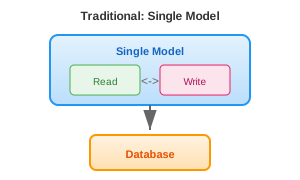
In traditional architectures, the same model handles both reads and writes:
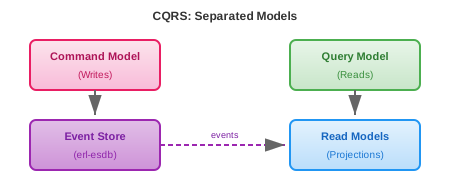
CQRS separates these concerns:
Why CQRS?
Different Optimization Strategies
Reads and writes have fundamentally different characteristics:
| Writes | Reads |
|---|---|
| Validate business rules | No validation needed |
| Must be consistent | Can be eventually consistent |
| Lower volume | Higher volume (often 10-100x) |
| Complex domain logic | Simple queries |
With CQRS, you optimize each path independently:
- Write side: Focus on business logic, invariants, and consistency
- Read side: Focus on query performance, denormalization, and caching
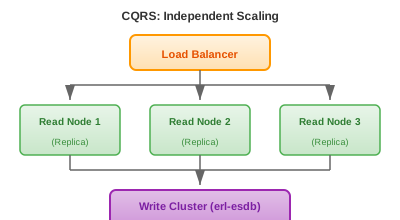
Scalability
Read and write workloads can scale independently:
Multiple Read Models
Different consumers can have different views of the same data:
%% Same events, different read models

%% Order Events Stream
[
    #{event_type => <<"OrderPlaced">>, data => #{...}},
    #{event_type => <<"PaymentReceived">>, data => #{...}},
    #{event_type => <<"OrderShipped">>, data => #{...}}
]

%% Read Model 1: Customer Dashboard (optimized for display)
#{
    order_id => <<"ord-123">>,
    status => <<"Shipped">>,
    status_history => [...],
    tracking_url => <<"https://...">>
}

%% Read Model 2: Warehouse System (optimized for picking)
#{
    order_id => <<"ord-123">>,
    items => [#{sku => ..., location => ..., quantity => ...}],
    priority => high,
    shipping_method => express
}

%% Read Model 3: Analytics (optimized for aggregation)
#{
    date => <<"2024-01-15">>,
    region => <<"EU">>,
    total_orders => 1547,
    total_revenue => 234567,
    avg_order_value => 151.63
}
CQRS with erl-esdb
The Command Side
Commands represent intentions to change state. They are validated and may produce events:
-module(order_commands).
-export([handle/2]).

%% Handle PlaceOrder command
handle({place_order, OrderId, CustomerId, Items}, State) ->
    %% Validate business rules
    case validate_items(Items) of
        {error, Reason} ->
            {error, Reason};
        ok ->
            %% Check inventory
            case check_inventory(Items) of
                {error, out_of_stock} ->
                    {error, items_out_of_stock};
                ok ->
                    %% Generate events
                    Total = calculate_total(Items),
                    Event = #{
                        event_type => <<"OrderPlaced">>,
                        data => #{
                            order_id => OrderId,
                            customer_id => CustomerId,
                            items => Items,
                            total => Total
                        },
                        metadata => #{
                            command => place_order,
                            timestamp => erlang:system_time(millisecond)
                        }
                    },
                    {ok, [Event]}
            end
    end;

%% Handle CancelOrder command
handle({cancel_order, OrderId, Reason}, State) ->
    %% Load current state
    Order = load_order(State, OrderId),
    case Order#order.status of
        shipped ->
            {error, cannot_cancel_shipped_order};
        cancelled ->
            {error, already_cancelled};
        _ ->
            Event = #{
                event_type => <<"OrderCancelled">>,
                data => #{order_id => OrderId, reason => Reason}
            },
            {ok, [Event]}
    end.
The Query Side: Projections
Projections transform events into read models. They run asynchronously and subscribe to event streams:
-module(order_dashboard_projection).
-behaviour(gen_server).

-export([start_link/1, get_order/1, list_customer_orders/1]).
-export([init/1, handle_info/2, handle_call/3]).

%% Read model stored in ETS for fast lookups
-define(TABLE, order_dashboard).

start_link(StoreId) ->
    gen_server:start_link({local, ?MODULE}, ?MODULE, StoreId, []).

init(StoreId) ->
    %% Create ETS table for read model
    ets:new(?TABLE, [named_table, public, {read_concurrency, true}]),

    %% Subscribe to order events
    {ok, SubKey} = erl_esdb_subscriptions:subscribe(
        StoreId,
        event_pattern,
        <<"order-*">>,
        <<"order_dashboard_projection">>
    ),

    %% Join the emitter group to receive events
    erl_esdb_emitter_group:join(StoreId, SubKey, self()),

    {ok, #{store_id => StoreId, sub_key => SubKey}}.

%% Handle events from subscription
handle_info({event, Event}, State) ->
    project_event(Event),
    {noreply, State}.

%% Query interface
get_order(OrderId) ->
    case ets:lookup(?TABLE, {order, OrderId}) of
        [{_, Order}] -> {ok, Order};
        [] -> {error, not_found}
    end.

list_customer_orders(CustomerId) ->
    Pattern = {{customer_order, CustomerId, '_'}, '_'},
    Orders = ets:match_object(?TABLE, Pattern),
    {ok, [Order || {_, Order} <- Orders]}.

%% Project events into read model
project_event(#{event_type := <<"OrderPlaced">>} = Event) ->
    Data = maps:get(data, Event),
    OrderId = maps:get(order_id, Data),
    CustomerId = maps:get(customer_id, Data),

    %% Denormalized read model optimized for display
    ReadModel = #{
        order_id => OrderId,
        customer_id => CustomerId,
        items => maps:get(items, Data),
        total => maps:get(total, Data),
        status => <<"Placed">>,
        status_history => [#{status => <<"Placed">>, at => Event#event.timestamp}],
        placed_at => Event#event.timestamp
    },

    %% Store by order ID
    ets:insert(?TABLE, {{order, OrderId}, ReadModel}),

    %% Index by customer for listing
    ets:insert(?TABLE, {{customer_order, CustomerId, OrderId}, ReadModel});

project_event(#{event_type := <<"OrderShipped">>} = Event) ->
    Data = maps:get(data, Event),
    OrderId = maps:get(order_id, Data),

    %% Update existing read model
    case ets:lookup(?TABLE, {order, OrderId}) of
        [{Key, Order}] ->
            Updated = Order#{
                status => <<"Shipped">>,
                status_history => [
                    #{status => <<"Shipped">>, at => Event#event.timestamp}
                    | maps:get(status_history, Order)
                ],
                tracking_number => maps:get(tracking_number, Data, undefined),
                shipped_at => Event#event.timestamp
            },
            ets:insert(?TABLE, {Key, Updated}),

            %% Update customer index too
            CustomerId = maps:get(customer_id, Order),
            ets:insert(?TABLE, {{customer_order, CustomerId, OrderId}, Updated});
        [] ->
            %% Event for unknown order - log warning
            logger:warning("OrderShipped for unknown order: ~p", [OrderId])
    end;

project_event(_Event) ->
    %% Ignore events we don't care about
    ok.
Multiple Projections
The same events can drive multiple specialized read models:
%% Analytics projection - aggregates for dashboards
-module(order_analytics_projection).

project_event(#{event_type := <<"OrderPlaced">>} = Event) ->
    Data = maps:get(data, Event),
    Date = date_from_timestamp(Event#event.timestamp),
    Total = maps:get(total, Data),
    Region = get_customer_region(maps:get(customer_id, Data)),

    %% Increment daily counters
    ets:update_counter(?ANALYTICS_TABLE, {daily_orders, Date, Region}, 1, {{daily_orders, Date, Region}, 0}),
    ets:update_counter(?ANALYTICS_TABLE, {daily_revenue, Date, Region}, Total, {{daily_revenue, Date, Region}, 0}).

%% Inventory projection - tracks stock levels
-module(inventory_projection).

project_event(#{event_type := <<"OrderPlaced">>} = Event) ->
    Items = maps:get(items, maps:get(data, Event)),
    lists:foreach(fun(#{product_id := ProductId, quantity := Qty}) ->
        %% Decrement reserved stock
        ets:update_counter(?INVENTORY_TABLE, {reserved, ProductId}, Qty, {{reserved, ProductId}, 0})
    end, Items);

project_event(#{event_type := <<"OrderShipped">>} = Event) ->
    Items = maps:get(items, maps:get(data, Event)),
    lists:foreach(fun(#{product_id := ProductId, quantity := Qty}) ->
        %% Move from reserved to shipped
        ets:update_counter(?INVENTORY_TABLE, {reserved, ProductId}, -Qty),
        ets:update_counter(?INVENTORY_TABLE, {shipped, ProductId}, Qty, {{shipped, ProductId}, 0})
    end, Items).
Eventual Consistency
With CQRS, read models are eventually consistent with the write model. This means:
- A command succeeds and events are written
- Projections receive events asynchronously
- Read models are updated
- Queries return the updated data
There's a delay between steps 1 and 4. This is usually milliseconds, but can be longer under load.
Handling Eventual Consistency
In the UI:
%% After successful command, show optimistic update
case order_commands:handle(PlaceOrderCmd, State) of
    {ok, Events} ->
        %% Write events
        {ok, Version} = erl_esdb_streams:append(Store, StreamId, ExpectedVer, Events),

        %% Return success with the data the client needs
        %% Don't query the read model yet - it might not be updated
        {ok, #{
            order_id => OrderId,
            status => <<"Placed">>,
            message => <<"Order placed successfully">>
        }};
    {error, Reason} ->
        {error, Reason}
end.
For critical queries:
%% If consistency is critical, query the event store directly
get_order_status(StoreId, OrderId) ->
    StreamId = <<"order-", OrderId/binary>>,
    {ok, Events} = erl_esdb_streams:read(StoreId, StreamId, 0, 1000, forward),

    %% Derive status from events
    Status = lists:foldl(fun
        (#{event_type := <<"OrderPlaced">>}, _) -> placed;
        (#{event_type := <<"OrderShipped">>}, _) -> shipped;
        (#{event_type := <<"OrderDelivered">>}, _) -> delivered;
        (#{event_type := <<"OrderCancelled">>}, _) -> cancelled;
        (_, Acc) -> Acc
    end, unknown, Events),

    {ok, Status}.
Best Practices
1. Keep Projections Idempotent
Projections may receive the same event multiple times (redelivery, replay). Make them idempotent:
%% Bad: Not idempotent
project_event(#{event_type := <<"ItemAdded">>} = E) ->
    OrderId = maps:get(order_id, maps:get(data, E)),
    ets:update_counter(?TABLE, {item_count, OrderId}, 1).  %% Will double-count on replay

%% Good: Idempotent using event version
project_event(#{event_type := <<"ItemAdded">>} = E) ->
    OrderId = maps:get(order_id, maps:get(data, E)),
    EventVersion = E#event.version,

    case ets:lookup(?TABLE, {last_version, OrderId}) of
        [{_, LastVersion}] when EventVersion =< LastVersion ->
            %% Already processed this event
            ok;
        _ ->
            %% Process and update version
            ets:update_counter(?TABLE, {item_count, OrderId}, 1),
            ets:insert(?TABLE, {{last_version, OrderId}, EventVersion})
    end.
2. Design Read Models for Queries
Don't normalize read models. Denormalize for query performance:
%% Read model for "show customer's recent orders with item details"
%% Everything needed in one lookup
#{
    customer_id => <<"cust-123">>,
    recent_orders => [
        #{
            order_id => <<"ord-456">>,
            placed_at => 1703001234567,
            status => <<"Delivered">>,
            items => [
                #{name => <<"Widget">>, quantity => 2, price => 999}
            ],
            total => 1998
        }
    ]
}
3. Separate Projection Processes
Run projections in separate processes for isolation:
%% In your supervisor
{ok, _} = order_dashboard_projection:start_link(StoreId),
{ok, _} = order_analytics_projection:start_link(StoreId),
{ok, _} = inventory_projection:start_link(StoreId).
If one projection fails or falls behind, others continue working.
Further Reading
- Event Sourcing Guide - Foundation for CQRS
- Subscriptions Guide - Event delivery for projections
- Snapshots Guide - Optimizing projection rebuilds
References
- Martin Fowler: CQRS
- Greg Young: CQRS Documents
- Udi Dahan: Clarified CQRS