Real-time voice and multimodal AI pipelines for Elixir, inspired by pipecat. See the live voice demo to try it out.
Disclaimer: Feline is an experiment in porting pipecat to Elixir using only LLMs (no human-written code). It is not reliable yet — expect rough edges, missing features, and untested paths. Use at your own risk.
Feline reimplements pipecat's core architecture using BEAM/OTP primitives — each processor is a GenServer, pipelines are supervised process trees, and frame priority is handled through selective receive rather than async queues.
Core Concepts
Frames are the universal data unit. Audio, text, transcriptions, LLM responses, control signals — everything flows through the pipeline as a frame. Frames are categorized as:
- System — high priority, processed immediately (e.g.
StartFrame,CancelFrame,InterruptionFrame) - Data — regular content (e.g.
TextFrame,OutputAudioRawFrame,TranscriptionFrame) - Control — lifecycle signals (e.g.
EndFrame,HeartbeatFrame,TTSStartedFrame)
Processors are GenServer processes that receive frames, transform them, and push them downstream (or upstream for errors). Each processor implements the Feline.Processor behaviour:
defmodule MyApp.Uppercaser do
  use Feline.Processor

  @impl true
  def init(_opts), do: {:ok, %{}}

  @impl true
  def handle_frame(%Feline.Frames.TextFrame{text: text} = frame, :downstream, state) do
    {:push, %{frame | text: String.upcase(text)}, :downstream, state}
  end

  def handle_frame(frame, direction, state) do
    {:push, frame, direction, state}
  end
end
Pipelines chain processors together. A Pipeline.Task starts all processors under a DynamicSupervisor, links them in order, and sends a StartFrame to kick things off:
pipeline = Feline.Pipeline.new([
  {Feline.Services.Deepgram.STT, api_key: "...", sample_rate: 16_000},
  {Feline.Services.OpenAI.LLM, api_key: "...", model: "gpt-4.1-mini"},
  {Feline.Services.ElevenLabs.TTS, api_key: "...", voice_id: "..."}
])

Feline.Pipeline.Runner.run(pipeline)
Services are processors with pre-built frame handling for common AI tasks. Implement one callback and the service macro handles the rest:
Feline.Services.LLM— receivesLLMContextFrame, calls yourprocess_context/2, pushesLLMTextFrameFeline.Services.STT— receivesInputAudioRawFrame, calls yourrun_stt/2, pushesTranscriptionFrameFeline.Services.TTS— receivesTextFrame, calls yourrun_tts/2, pushesTTSAudioRawFrame
How It Works
[Source] → [Processor 1] → [Processor 2] → ... → [Sink]
↑ upstream downstream ↓Pipeline.Taskstarts all processors as GenServer processes under aDynamicSupervisor- Processors are linked in order — each knows its
nextandprevPID - Frames flow via message passing:
send(next_pid, {:frame, frame, :downstream}) - System frames use a separate tag
{:system_frame, ...}and are drained from the mailbox before each regular frame via selective receive - Interruptions clear buffered frames; cancellation drops all non-system frames
- The sink forwards frames back to the
Pipeline.Task, which manages lifecycle (EndFrame = done)
Key Differences from Python Pipecat
| Python pipecat | Feline |
|---|---|
asyncio.PriorityQueue | Selective receive on message tags |
isinstance() dispatch | Pattern matching on structs |
prev/next object pointers | PIDs in GenServer state |
asyncio.Task management | OTP DynamicSupervisor |
| Single-threaded concurrency | True parallel BEAM processes |
try/except error handling | ErrorFrame upstream + supervisor restart |
Built-in Services
| Service | Module | Streaming |
|---|---|---|
| OpenAI Chat Completions | Feline.Services.OpenAI.LLM | Feline.Services.OpenAI.StreamingLLM |
| Deepgram STT | Feline.Services.Deepgram.STT | Feline.Services.Deepgram.StreamingSTT |
| ElevenLabs TTS | Feline.Services.ElevenLabs.TTS | Feline.Services.ElevenLabs.StreamingTTS |
Additional Features
- Parallel pipelines —
Feline.Pipeline.Parallelfans out frames to concurrent processor branches - Voice Activity Detection — energy-based VAD processor with configurable thresholds
- Function call handling —
Feline.Processors.FunctionCallHandlerfor LLM tool calls - Context aggregation —
UserContextAggregatorandAssistantContextAggregatorfor managing LLM conversation state - Telemetry —
:telemetryhooks and observer callbacks for frame processing metrics
Live Voice Demo
Talk to an AI agent through your microphone. Requires API keys and sox (brew install sox).
- Add keys to
.envin the project root:
OPENAI_API_KEY=sk-...
DEEPGRAM_API_KEY=...
ELEVENLABS_API_KEY=...
ELEVENLABS_VOICE_ID=...- Run:
mix feline.talk
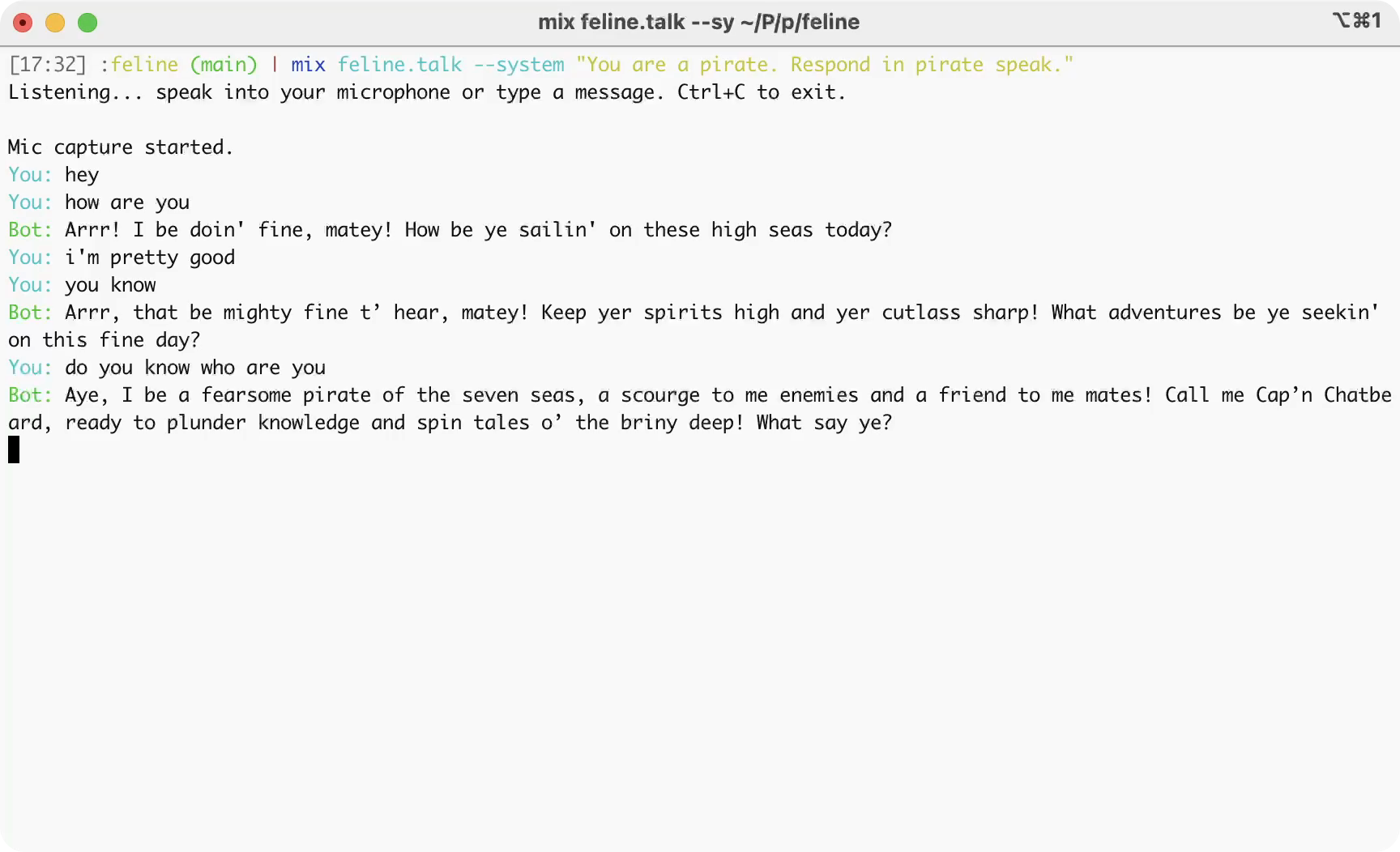
Speak into your mic and the agent responds in real-time — both text and audio. You can also type messages directly in the console.
Customize the system prompt:
mix feline.talk --system "You are a pirate. Respond in pirate speak."
The demo pipeline (source):
Mic (ffmpeg) → VAD → Deepgram STT → Context Aggregation → OpenAI LLM → Sentence Aggregation → ElevenLabs TTS → Speaker (sox)Features working in the demo:
- Streaming speech-to-text and text-to-speech
- Streaming LLM token output (printed to console as it arrives)
- Echo suppression (mic is muted while bot speaks)
Installation
Add feline to your dependencies in mix.exs:
def deps do
  [
    {:feline, "~> 0.1"}
  ]
end