Low-Level API
The low-level API gives you direct control over gnuplot commands. It's the foundation of GnuplotEx and provides maximum flexibility for advanced use cases.
Overview
The low-level API consists of three main functions:
GnuplotEx.plot/1- Execute commands without dataGnuplotEx.plot/2- Execute commands with datasetsGnuplotEx.plot/3- Execute with options or named session
Commands are represented as nested Elixir lists that get serialized to gnuplot syntax.
Command Syntax
Basic Structure
Each command is a list where the first element is typically a gnuplot keyword:
[:set, :terminal, :svg]            # => set terminal svg
[:set, :title, "My Plot"]          # => set title "My Plot"
[:plot, ~c"sin(x)"]                # => plot sin(x)
Type Conversion Rules
| Elixir Type | Example | Gnuplot Output |
|---|---|---|
| Atom | :terminal | terminal |
| String | "My Title" | "My Title" |
| Charlist | ~c"sin(x)" | sin(x) |
| Integer | 800 | 800 |
| Float | 3.14 | 3.14 |
| Range | 0..10 | [0:10] |
| Tuple | {800, 600} | 800,600 |
Strings vs Charlists
This is the most important distinction:
- Strings (
"...") become quoted in gnuplot - use for titles, labels, filenames - Charlists (
~c"...") become unquoted - use for functions, expressions, raw gnuplot syntax
# String: quoted output
[:set, :title, "Sine Wave"]          # => set title "Sine Wave"

# Charlist: unquoted expression
[:plot, ~c"sin(x) * cos(x)"]         # => plot sin(x) * cos(x)

# Mixed usage
[:plot, ~c"sin(x)", :title, "Sine"]  # => plot sin(x) title "Sine"

# Colors require charlists with escaped quotes
[:plot, "-", :linecolor, ~c"rgb \"#E95420\""]
# => plot "-" linecolor rgb "#E95420"
Plotting Functions
Plotting Gnuplot Functions
Use charlists for mathematical expressions:
# Plot a function
GnuplotEx.plot([
  [:set, :terminal, :svg],
  [:set, :output, "/tmp/sine.svg"],
  [:set, :title, "Sine Wave"],
  [:set, :xlabel, "x"],
  [:set, :ylabel, "y"],
  [:set, :grid],
  [:set, :xrange, -10..10],
  [:plot, ~c"sin(x)", :with, :lines, :linewidth, 2]
])
Multiple Functions
Use the plots/1 helper for cleaner multi-function syntax:
GnuplotEx.plot([
  [:set, :terminal, :svg],
  [:set, :output, "/tmp/trig.svg"],
  [:set, :xrange, ~c"[-2*pi:2*pi]"],
  [:set, :yrange, ~c"[-1.5:1.5]"],
  GnuplotEx.plots([
    [~c"sin(x)", :title, "sin", :with, :lines],
    [~c"cos(x)", :title, "cos", :with, :lines],
    [~c"sin(x)*cos(x)", :title, "sin*cos", :with, :lines]
  ])
])
Plotting Data
Basic Data Plot
Pass data as the second argument. Use "-" as placeholder:
data = for x <- 1..50, do: [x, :math.sin(x / 5)]

GnuplotEx.plot([
  [:set, :terminal, :svg],
  [:set, :output, "/tmp/data.svg"],
  [:set, :title, "Data Points"],
  [:set, :grid],
  [:plot, "-", :with, :points, :pointtype, 7, :title, "Data"]
], [data])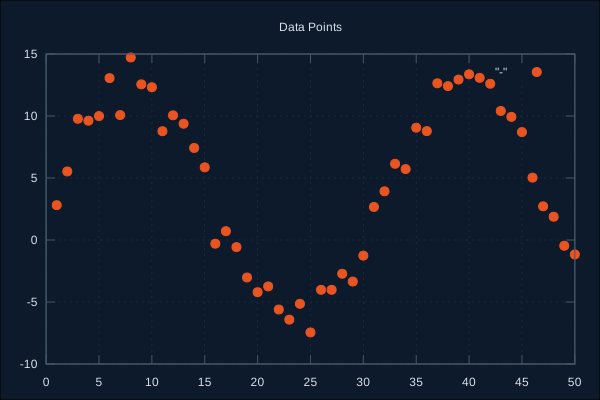
Line Plots with Data
data = for x <- 0..100, do: [x, :math.sin(x / 10) * x / 20]

GnuplotEx.plot([
  [:set, :terminal, :svg],
  [:set, :output, "/tmp/lines.svg"],
  [:set, :title, "Growth with Oscillation"],
  [:set, :xlabel, "Time"],
  [:set, :ylabel, "Value"],
  [:set, :grid],
  [:plot, "-", :with, :lines, :linewidth, 2, :linecolor, ~c"rgb \"#E95420\""]
], [data])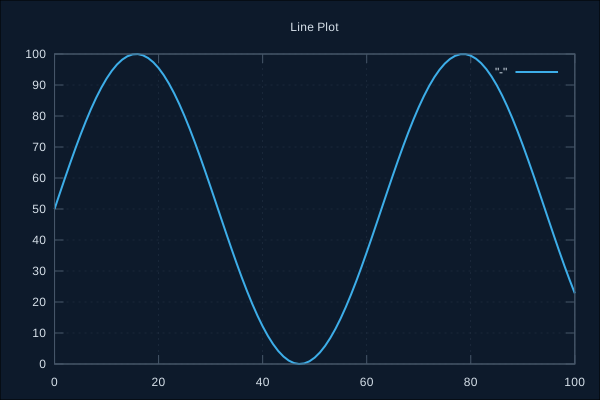
Multiple Datasets
Each "-" corresponds to one dataset in order:
sine_data = for x <- 0..100, do: [x, :math.sin(x / 10)]
cosine_data = for x <- 0..100, do: [x, :math.cos(x / 10)]
combined = for x <- 0..100, do: [x, :math.sin(x / 10) + :math.cos(x / 10)]

GnuplotEx.plot([
  [:set, :terminal, :svg],
  [:set, :output, "/tmp/multi.svg"],
  [:set, :title, "Multiple Datasets"],
  [:set, :grid],
  GnuplotEx.plots([
    ["-", :with, :lines, :title, "sin(x)"],
    ["-", :with, :lines, :title, "cos(x)"],
    ["-", :with, :lines, :title, "sin(x)+cos(x)"]
  ])
], [sine_data, cosine_data, combined])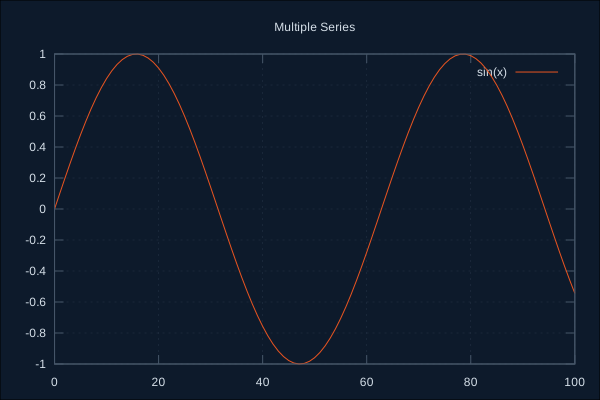
Mixed Functions and Data
Combine gnuplot functions with data in the same plot:
noisy_data = for x <- 0..100 do
  [x, :math.sin(x / 10) + (:rand.uniform() - 0.5) * 0.3]
end

GnuplotEx.plot([
  [:set, :terminal, :svg],
  [:set, :output, "/tmp/mixed.svg"],
  [:set, :title, "Noisy Data vs Ideal"],
  [:set, :grid],
  GnuplotEx.plots([
    ["-", :with, :points, :pointtype, 7, :title, "Measured"],
    [~c"sin(x/10)", :with, :lines, :linewidth, 2, :title, "Ideal"]
  ])
], [noisy_data])
3D Plots
Surface Plots
Use splot for 3D data and splots/1 helper for multiple surfaces:
# Generate grid data
data = for x <- -20..20, y <- -20..20 do
  xf = x / 5
  yf = y / 5
  z = :math.sin(:math.sqrt(xf*xf + yf*yf))
  [xf, yf, z]
end

GnuplotEx.plot([
  [:set, :terminal, :svg, :size, {800, 600}],
  [:set, :output, "/tmp/surface.svg"],
  [:set, :title, "3D Surface"],
  [:set, :xlabel, "X"],
  [:set, :ylabel, "Y"],
  [:set, :zlabel, "Z"],
  [:set, :pm3d],
  [:set, :palette, :defined],
  [:set, :view, {60, 30}],
  [:splot, "-", :with, :pm3d, :notitle]
], [data])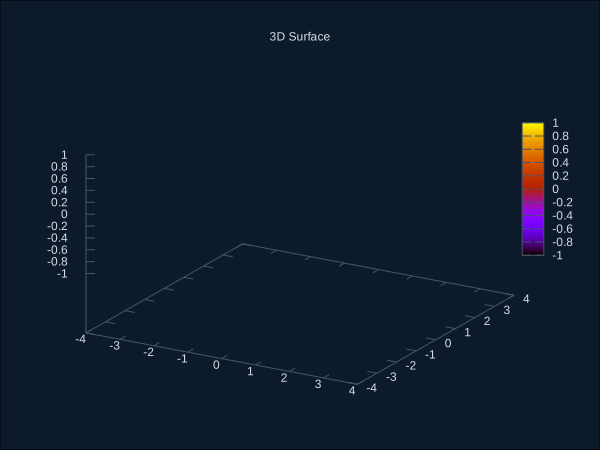
Parametric Surfaces
GnuplotEx.plot([
  [:set, :terminal, :svg, :size, {600, 600}],
  [:set, :output, "/tmp/parametric.svg"],
  [:set, :parametric],
  [:set, :urange, ~c"[0:2*pi]"],
  [:set, :vrange, ~c"[-pi/2:pi/2]"],
  [:set, :isosamples, {30, 30}],
  [:set, :hidden3d],
  [:set, :title, "Sphere"],
  [:splot, ~c"cos(u)*cos(v), sin(u)*cos(v), sin(v)"]
])
Output Formats
Terminal Types
# SVG (vector)
[:set, :terminal, :svg, :size, {800, 600}]

# PNG (raster)
[:set, :terminal, :pngcairo, :size, {800, 600}]

# PDF
[:set, :terminal, :pdfcairo, :size, {6, 4}]

# ASCII art (useful for terminal output)
[:set, :terminal, :dumb, :size, {80, 24}]
File Output
[:set, :output, "/path/to/file.svg"]Advanced Features
Styling
# Line styles (colors as charlists)
[:set, :style, :line, 1, :linecolor, ~c"rgb \"#E95420\"", :linewidth, 2]
[:set, :style, :line, 2, :linecolor, ~c"rgb \"#3daee9\"", :linewidth, 2, :dashtype, 2]

# Point styles
[:plot, "-", :with, :points, :pointtype, 7, :pointsize, 1.5]

# Fill styles
[:set, :style, :fill, :solid, 0.5, :border, -1]
Axes Configuration
# Integer ranges use Elixir Range
[:set, :xrange, 0..100]

# Float ranges use charlists
[:set, :yrange, ~c"[-1.5:1.5]"]

# Logarithmic scale
[:set, :logscale, :x]
[:set, :logscale, :y, 10]

# Tics
[:set, :xtics, 10]
[:set, :ytics, 0.5]
[:set, :mxtics, 5]  # minor tics

# Grid
[:set, :grid, :xtics, :ytics]
Legend (Key)
# Position
[:set, :key, :top, :left]
[:set, :key, :bottom, :right]
[:set, :key, :outside]

# Styling
[:set, :key, :box]
[:set, :key, :font, ",10"]

# Disable
[:unset, :key]
Annotations
# Labels
[:set, :label, "Peak", :at, {5, 0.9}]
[:set, :label, "Valley", :at, {15, -0.9}, :textcolor, ~c"rgb \"red\""]

# Arrows
[:set, :arrow, :from, {0, 0}, :to, {5, 0.9}]
Spec and Dry Mode
Inspecting Commands
Use build_spec/2 to see what will be sent to gnuplot:
commands = [
  [:set, :terminal, :svg],
  [:set, :title, "Test"],
  [:plot, "-", :with, :lines]
]

data = [[1, 1], [2, 4], [3, 9]]

spec = GnuplotEx.build_spec(commands, [data])
IO.puts(spec.script)
# Output:
# set terminal svg;
# set title "Test";
# plot "-" with lines
Dry Mode
Test commands without executing:
{:ok, spec} = GnuplotEx.plot(commands, data, dry: true)
IO.inspect(spec)
Deferred Execution
Build spec now, execute later:
spec = GnuplotEx.build_spec(commands, data)

# ... later ...
{:ok, _} = GnuplotEx.Spec.execute(spec)
Sessions
Named sessions allow multiple independent gnuplot processes:
# Start a named session
{:ok, _pid} = GnuplotEx.Session.start_link(name: :analysis)

# Plot to specific session
GnuplotEx.plot(:analysis, [
  [:set, :terminal, :svg],
  [:set, :output, "/tmp/analysis.svg"],
  [:plot, ~c"sin(x)"]
], [])

# List active sessions
GnuplotEx.sessions()  # => [:analysis]
Error Handling
case GnuplotEx.plot(commands, data) do
  {:ok, script} ->
    IO.puts("Success! Script: #{script}")

  {:error, :gnuplot_not_found} ->
    IO.puts("gnuplot is not installed or not in PATH")

  {:error, {:exit, code, output}} ->
    IO.puts("gnuplot error (code #{code}): #{output}")

  {:error, :timeout} ->
    IO.puts("Command timed out")
end
Complete Example
Putting it all together - a publication-quality plot:
# Define colors as charlists
orange = ~c"rgb \"#E95420\""
blue = ~c"rgb \"#3daee9\""

# Generate sample data with noise
:rand.seed(:exsss, {1, 2, 3})
data = for x <- 0..100 do
  noise = (:rand.uniform() - 0.5) * 0.2
  [x / 10, :math.exp(-x / 50) * :math.sin(x / 5) + noise]
end

# Theoretical curve points
theory = for x <- 0..100 do
  [x / 10, :math.exp(-x / 50) * :math.sin(x / 5)]
end

GnuplotEx.plot([
  # Output settings
  [:set, :terminal, :svg, :size, {700, 450}, :font, "Arial,12"],
  [:set, :output, "/tmp/complete.svg"],

  # Title and labels
  [:set, :title, "Damped Oscillation", :font, ",14"],
  [:set, :xlabel, "Time (s)"],
  [:set, :ylabel, "Amplitude"],

  # Axes (float ranges use charlists)
  [:set, :xrange, 0..10],
  [:set, :yrange, ~c"[-1:1]"],
  [:set, :xtics, 2],
  [:set, :ytics, 0.5],
  [:set, :grid],

  # Legend
  [:set, :key, :top, :right, :box],

  # Plot data and theory
  GnuplotEx.plots([
    ["-", :with, :points, :pointtype, 7, :pointsize, 0.7,
          :linecolor, orange, :title, "Measured"],
    ["-", :with, :lines, :linewidth, 2,
          :linecolor, blue, :title, "Theory"]
  ])
], [data, theory])
Next Steps
- High-Level API - Fluent builder for common plots