View Source Event Functions

Mix.install([
  {:integrator, "~> 0.1.2"},
  {:kino_vega_lite, "~> 0.1.7"}
])
Usage
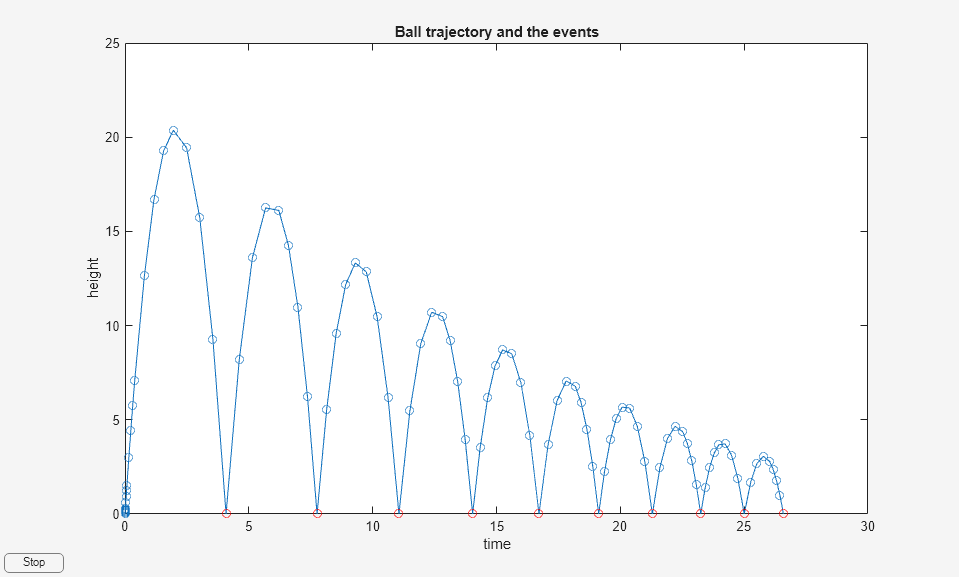
An event function lets you terminate a simulation based on some event (such as a collision). For this example, we're going to mimic the Matlab ballode.m bouncing ball example. See also here.
The equations of a bouncing ball are:
$$ x_0 = x_1 $$
$$ x_1 = - g $$
where $ g = 9.81 m/s^2 $. Let's encode that in an Nx function:
import Nx.Defn

ode_fn = fn _t, x ->
  x0 = x[1]
  x1 = -9.81
  Nx.stack([x0, x1])
end
The follwing event function will detect when $ x_0 $ goes negative, and will return :halt in order to terminate the simulation:
event_fn = fn _t, x ->
  value = Nx.to_number(x[0])
  answer = if value <= 0.0, do: :halt, else: :continue
  {answer, value}
end
Create an empty chart to receive the data:
alias VegaLite, as: VL

chart =
  VL.new(
    width: 600,
    height: 400,
    title: "Bouncing Ball"
  )
  |> VL.mark(:line, point: true, tooltip: true)
  |> VL.encode_field(:x, "t", type: :quantitative)
  |> VL.encode_field(:y, "x", type: :quantitative)
  |> VL.encode_field(:color, "x_value", type: :nominal)
  |> Kino.VegaLite.new()

# |> Kino.render()
This output function will send the values of $ x_0 $ to the chart while the simulation is underway:
output_fn = fn t, x ->
  Enum.zip(t, x)
  |> Enum.map(fn {t, x} ->
    [%{t: Nx.to_number(t), x: Nx.to_number(x[0]), x_value: "x[0]"}]
  end)
  |> List.flatten()
  |> Enum.map(fn point ->
    Kino.VegaLite.push(chart, point)
  end)
end
We need to define a function which will determine what to do when transitions happen, which in our case, are collisions between the ball and the ground. We'll reverse the direction of the ball, and decrease its velocity by 10% (to account for bouncing).
coefficient_of_restitution = -0.9

transition_fn = fn t, x, _multi, opts ->
  x1 = Nx.multiply(coefficient_of_restitution, x[1])
  {:continue, t, Nx.stack([x[0], x1]), opts}
end
There's some recursive code in Integrator.MultiIntegrator that restarts the simulation when terminal
events are encountered.
alias Integrator.MultiIntegrator

t_initial = Nx.tensor(0.0, type: :f64)
t_final = Nx.tensor(30.0, type: :f64)
x_initial = Nx.tensor([0.0, 20.0], type: :f64)
opts = [output_fn: output_fn]

multi_integrator =
  MultiIntegrator.integrate(ode_fn, event_fn, transition_fn, t_initial, t_final, x_initial, opts)
Compare this plot with the version on the Matlab page: