MeshxConsul (MeshxConsul v0.1.0) View Source
Consul service mesh adapter.
MeshxConsul is a service mesh adapter implementing Meshx.ServiceMesh behaviour using HashiCorp Consul as an external service mesh application.
Primary package objectives are to prepare:
- mesh service endpoints used to start user service providers,
- mesh upstream endpoints used to connect user upstream clients.
Features:
- TTL health check workers for mesh services,
- management of long running proxy binary commands used by service mesh data plane,
- automatic TCP address generation for mesh service and upstream endpoints.
MeshxConsul primary purpose is to be used with other Meshx packages: MeshxRpc and MeshxNode. Package can also be used with any other user client/server application running on top of TCP protocol. UDP is not supported.
MeshxConsul using service mesh software (Consul) backed up by proxy application (e.g. Envoy) will enhance user application with features characteristic to mesh environment, especially: mTLS traffic encryption, service ACLs, proxy traffic management features, possibly load balancing and high availability and others. Please refer to Consul documentation for additional details.
Requirements
MeshxConsul requires access to Consul agent (installation instructions). Additionally proxy application supported by Consul to run service mesh data plane is needed. Mainstream proxies supported by Consul: Consul built-in Connect Proxy, Envoy Proxy, HAProxy.
Installation
Add :meshx_consul to application dependencies:
# mix.exs
def deps do
  [{:meshx_consul, "~> 0.1.0"}]
end
Usage
Before using MeshxConsul, Consul agent http(s) API endpoint address and authorization token must be configured.
Example config for Consul agent running on the same host as user application and http API attached to unix domain socket at path "/run/consul/http.sock" with empty Consul authentication token:
# config/config.exs
import Config
config :meshx_consul,
  cli_env: [
    {"CONSUL_HTTP_ADDR", "unix:///run/consul/http.sock"},
    {"CONSUL_HTTP_TOKEN", ""}
  ],
  httpc_opts: [
    ipfamily: :local,
    unix_socket: '/run/consul/http.sock'
  ],
  httpc_headers: [{'X-Consul-Token', ''}]
Consul token must be associated with sufficient Consul ACL privileges to create and delete services on given Consul agent instance. Example Consul agent config compatible with configuration above: example/example_config_consul.hcl.
After starting Erlang node with EPMD disabled, one can start mesh service named here "service1" using MeshxConsul.start/4:
iex --erl "-start_epmd false" -S mix

iex(1)> {:ok, id, address} = MeshxConsul.start("service1")
{:ok, "service1-h11", {:tcp, {127, 0, 0, 1}, 1024}}

# [debug] [service1-h11][stdout]: ==> Consul Connect proxy starting...
# [debug] [service1-h11][stdout]:     Configuration mode: Agent API
#         Sidecar for ID: service1-h11
#         Proxy ID: service1-h11-sidecar-proxy
# [debug] [service1-h11][stdout]: ==> Log data will now stream in as it occurs:
# [debug] [service1-h11][stdout]: [ERROR] proxy.inbound: failed to dial: error="dial tcp 127.0.0.1:1024: connect: connection refused"

iex(2)> MeshxConsul.stop("service1-h11")
:ok
If successful MeshxConsul.start/3 function returns a tuple with service ID and mesh service endpoint address. By default service ID is equal to concatenated service name with host name, here "service1-h11", and address is first available TCP port starting from 1024 on loopback interface, here: 127.0.0.1:1024. Mesh service endpoint is prepared and ready to accept traffic from user service provider. Endpoint is connected to service mesh data plane with sidecar proxy application, which by default is a built-in Consul Connect Proxy. Slightly reformatted terminal stdout log of shell command running Connect Proxy was prefixed on snippet with "#" for better readability.
Last proxy log line reports connection error: [ERROR] proxy.inbound: failed to dial:.... Error message interpretation: health check automatically run by Consul Connect Proxy cannot connect to service at 127.0.0.1:1024. There is no user service connected to this mesh service endpoint yet, so error is as expected.
Consul UI screenshot showing newly started "service-1" "service1-h11" instance:
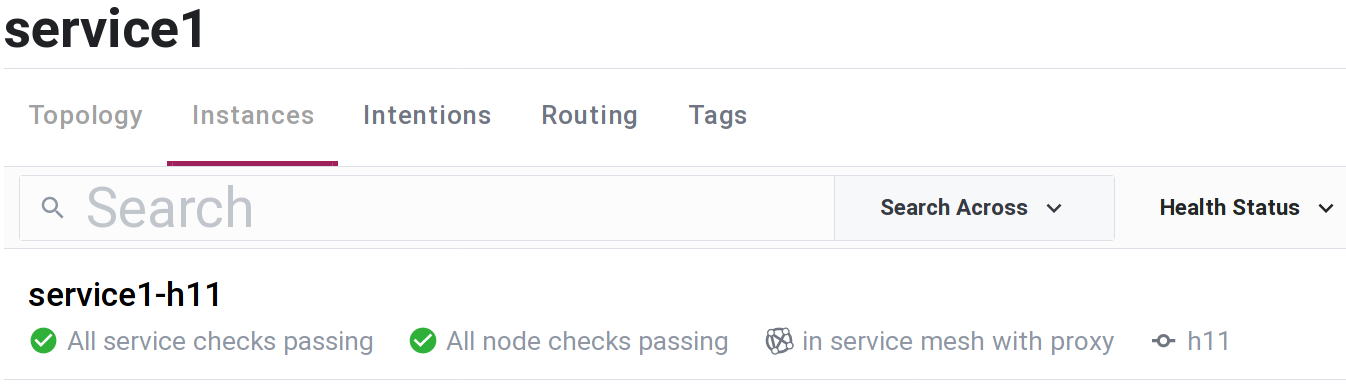
Using single MeshxConsul.start/3 command, "service1-h11" was registered with Consul service registry, health check worker and service sidecar proxy were started.
In next step, user should start service provider and connect it to mesh service endpoint established at 127.0.0.1:1024. Service could be consumed, usually on another node, by using MeshxConsul.connect/3 with attached user upstream client application. As we do not intend to run any service providers here, we stop "service1-h11" with MeshxConsul.stop/1 to perform clean-up: deregister Consul service and stop all auxiliary workers started earlier with MeshxConsul.start/3, including sidecar proxy.
Meshx is shipped with MeshxRpc package optimized for providing RPC services using mesh endpoints managed by MeshxConsul. MeshxRpc documentation provides example showing how to start RPC service connected to endpoint address prepared by MeshxConsul.start/3 and later connect an upstream client to this service.
Another Meshx package leveraging MeshxConsul functionality is MeshxNode. MeshxNode is used to build distributed Elixir/Erlang nodes connected over (mTLS encrypted) service mesh data plane. Please consult MeshxNode documentation for further details.
Configuration options
Consul Agent
MeshxConsul requires Consul Agent API endpoint address and ACL token to manage services and upstreams. Additionally environment variables for command starting proxy binary should be configured here.
List of shell environment variables, command options and http request headers supported by Envoy Proxy: consul.io, Consul Connect Proxy: consul.io.
:cli_env- shell environment variables that will be passed with command starting sidecar service proxy binary. Variables are defined as tuple, first element being variable name and second variable value. Environment variables can be used as alternative to proxy command arguments. Environment variables are preferred over command arguments when passing secrets, eg. Consul ACL token. Example:
Default:cli_env: [ {"CONSUL_HTTP_ADDR", "unix:///run/consul/http.sock"}, {"CONSUL_HTTP_TOKEN", ""} ][].:uri-%URI{}scheme which should be used when accessing Consul agent http(s) API endpoint. Default:%URI{scheme: "http", host: ""}.
MeshxConsul uses :httpc.request/4 function when accessing Consul agent http endpoint; some :httpc configuration is required.
:httpc_opts- (required) option passed directly to:httpc.set_options/1. It specifies options:httpcwill use for subsequent http(s) requests. Example:httpc_opts: [ ipfamily: :local, unix_socket: '/run/consul/http.sock' ]:httpc_headers-:httpchttp request headers used when running:httpc.request/4. Example:
Default: [].httpc_headers: [{'X-Consul-Token', ''}]:httpc_request_http_options-:httpchttp request options, passed as 3rd argument of:httpc.request/4. Default: [].:httpc_request_options-:httpcoptions, passed as 4th argument of:httpc.request/4. Default: [].
Templates
service_template- default value fortemplateargument ofstart/4function. Checkstart/4description below for details. Default: [].upstream_template- default value fortemplateargument ofconnect/3function. Checkconnect/4description below for details. Default: [].
Proxy management
proxy_stdout_fun- 3-arity function invoked when binary proxy command will providestdoutoutput. First function argument is proxy service ID, second argument is output device as atomin [:stdout, :stderr]. Last third argument is message generated by proxy command. Example:
Default: function sending formatted args tofn _service_id, _dev, msg -> IO.inspect(msg) endLogger.debug/2.proxy_stderr_fun- as aboveproxy_stdout_fun, invoked when proxy command generatesstderroutput. Default: function sending formatted args toLogger.error/2.proxy_down_fun- 5-arity function invoked when binary proxy command dies. Function arguments are as follows:
- proxy service ID,
- pid of process which was running proxy command,
- OS pid of process which was running proxy command,
- reason command died,
- number of proxy command restarts so far.
Example:
fn _service_id, _pid, _ospid, reason, _restarts -> IO.inspect(reason) endDefault: function sending formatted args to Logger.error/2.
max_proxy_restarts- when binary proxy command dies it is automatically restarted; option specifies maximum number of allowed command restarts. Default:5.
TCP port generation
tcp_address- option used to specify TCP address and associated ports range that will be used to automatically find new unused TCP port number when preparing mesh service or upstream endpoint withstart/4orconnect/3. It accepts keyword list:[ip: ip, port_range: range].ipspecifies network interface address which will be used by endpoint.ipshould be defined as tuple and in most situations it should point at loopback interface:{127, 0, 0, 1}. TCP traffic passing here is unencrypted, it means that unauthorized users should never have access to this interface. It never should be a public interface, even in private networks.port_rangespecifies range in which available TCP ports will be allocated. Service ports are starting from lower range limit and are increasing, upstream ports are decreasing from upper range limit. Default:[ip: {127, 0, 0, 1}, port_range: 1024..65535].
Templates
MeshxConsul is using customized Mustache template system [wikipedia] to render following items:
- registration data when registering service or upstream with Consul agent,
- binary proxy command when starting sidecar proxy,
- service TTL health check worker ID.
Original Mustache system implementation assumes that rendered templates are defined as strings.
MeshxConsul prefers structured data (maps and lists) as templates, with individual template fields defined as strings and being Mustache rendered.
To allow variables escaping in structured data, $ notation is added to standard Mustache specification. For example (see "int" template key):
hash_params = %{"string_key" => "123abc", "int_key" => 123}
template = %{"string" => "{{string_key}}", "int" => "{{$int_key$}}", "static" => "static_string"}
will be rendered by MeshxConsul Mustache extended version to:
%{"string" => "123abc", "int" => 123, "static" => "static_string"}Link to this section Summary
Functions
Prepares mesh upstream endpoint for new user upstream client connection.
Disconnects mesh upstreams endpoints created earlier with connect/3.
Consul configuration info for service_id.
List services registered on current node.
List upstreams registered with default proxy service.
List upstreams registered with proxy service_id.
Prepares mesh service endpoint when starting new user service provider.
Link to this section Types
Specs
address() ::
  {:tcp, ip :: :inet.ip_address(), port :: :inet.port_number()}
  | {:uds, path :: String.t()}
Mesh endpoint address for user service providers and upstream clients.
Note: UDS (Unix Domain Socket) support should be available in Consul 1.10?, see pull #9981.
Link to this section Functions
connect(upstream_params, template \\ C.upstream_template(), proxy \\ Template.default_proxy())
View SourceSpecs
connect(
  upstream_params :: [upstream :: atom() | String.t() | map()],
  template :: map(),
  proxy ::
    nil
    | {proxy_service_name :: String.t() | atom(),
       proxy_service_id :: String.t() | atom()}
) ::
  {:ok, []}
  | {:ok, [ok: addr :: address(), error: err :: term()]}
  | {:error, :invalid_state}
  | {:error, :service_not_owned}
  | term()
Prepares mesh upstream endpoint for new user upstream client connection.
Basic use
Basic use of connect/3 requires upstream_params argument to be a list of upstream names defined as strings or atoms:
iex(1)> MeshxConsul.connect(["service1", :service2])
{:ok,
[
 ok: {:tcp, {127, 0, 0, 1}, 65535},
 ok: {:tcp, {127, 0, 0, 1}, 65534}
]}
Function returns list of tuples (keyword list), one tuple result per each upstream_params element, preserved ordering. Tuple elements are {:ok, address()} if upstream addition was successful or {:error, reason} if operation failed for given upstream. If upstream is already registered with proxy, function will return {:ok, address()} with mesh upstream endpoint address() fetched from Consul proxy sidecar registration.
Customization
Customization of template function argument requires understanding of Consul upstream service configuration options.
If upstream_params list element is defined as upstream name (atom or string), it is used to create following Mustache hash:
# 1. Generate new mesh upstream endpoint address:
{:tcp, ip, port} = MeshxConsul.Service.GenTcpPort.new(:hi)
# 2. Build Mustache hash:
%{"name" => to_string(upstream_name), "address" => ip, "port" => port}
# Example Mustache hash:
%{"name" => "service1", "address" => "127.0.0.1", "port" => 65535}
If upstream_params element is defined by user as map(), keys "address" and "port" are used to inject automatically generated TCP port address similarly to code on snippet above. Automatic address injection can be cancelled by assigning both "address" and "port" keys some values, "address" must be not empty string and "port" any integer value, eg.: %{"address" => "undefined", "port" => -999_999}. If user provided values for both "address" and "port", they will be fetched from input map and used to build result {:ok, address()} tuple for given upstream.
If Mustache upstream template is not defined as function argument, :upstream_template option value defined in config/config.exs will be used. If both are undefined (nil, empty map or empty list), following built-in upstream Mustache template will be used:
%{
  "DestinationName" => "{{name}}",
  "LocalBindAddress" => "{{address}}",
  "LocalBindPort" => "{{$port$}}"
}
Using Mustache hash from previous snippet, above template would register with proxy sidecar service following upstream:
{
  "DestinationType":"service",
  "DestinationName":"service1",
  "LocalBindAddress":"127.0.0.1",
  "LocalBindPort":65535,
  "MeshGateway":{}
}Note: fields required by Consul in upstream registration template: "DestinationName" (string) and "LocalBindPort" (int).
Last connect/3 function argument proxy specifies service registered with sidecar-proxy as a tuple {proxy_service_name, proxy_service_id}. Sidecar proxy service will be used as parent service for all upstreams in upstream_params. If proxy service name/id is not provided, it will be generated by concatenation of prefix "upstream-" with host name. If proxy service doesn't exist, new service will be started by running MeshxConsul.start({proxy_service_name, proxy_service_id}). If start/4 fails, generated error will cascade to connect/3 and upstreams will not be added to service mesh.
Running MeshxConsul.connect(["service1"]) on host h11 should register following services with Consul agent:
{
"upstream-h11": {
  "ID": "upstream-h11",
  "Service": "upstream-h11",
  "Tags": [],
  "Meta": {},
  "Port": 0,
  "Address": "",
  "Weights": {
    "Passing": 1,
    "Warning": 1
  },
  "EnableTagOverride": false,
  "Datacenter": "my-dc"
},
"upstream-h11-sidecar-proxy": {
  "Kind": "connect-proxy",
  "ID": "upstream-h11-sidecar-proxy",
  "Service": "upstream-h11-sidecar-proxy",
  "Tags": [],
  "Meta": {},
  "Port": 21001,
  "Address": "",
  "Weights": {
    "Passing": 1,
    "Warning": 1
  },
  "EnableTagOverride": false,
  "Proxy": {
    "DestinationServiceName": "upstream-h11",
    "DestinationServiceID": "upstream-h11",
    "LocalServiceAddress": "127.0.0.1",
    "LocalServicePort": 1024,
    "Upstreams": [
      {
        "DestinationType": "service",
        "DestinationName": "service1",
        "LocalBindAddress": "127.0.0.1",
        "LocalBindPort": 65535,
        "MeshGateway": {}
      }
    ],
    "MeshGateway": {},
    "Expose": {}
  },
  "Datacenter": "my-dc"
}
}disconnect(upstreams, proxy_service_id \\ nil, restart_proxy? \\ false)
View SourceSpecs
disconnect(
  upstreams :: [upstream :: atom() | String.t()],
  proxy_service_id :: nil | atom() | String.t(),
  restart_proxy? :: boolean()
) :: {:ok, []} | {:ok, [deleted_upstream_name :: String.t()]} | (err :: term())
Disconnects mesh upstreams endpoints created earlier with connect/3.
Function will deregister upstreams list from proxy_service_id parent sidecar proxy service:
iex(1)> MeshxConsul.connect(["service1", "service2"])
{:ok,
[
 ok: {:tcp, {127, 0, 0, 1}, 65535},
 ok: {:tcp, {127, 0, 0, 1}, 65534}
]}
iex(2)> MeshxConsul.list_upstream
["service1", "service2"]
iex(3)> MeshxConsul.disconnect(["service1", "service2", "service3"])
{:ok, ["service2", "service1"]}
iex(4)> MeshxConsul.list_upstream
[]
Function returns list of disconnected upstreams.
If proxy_service_id is not provided as function argument, default proxy ID will be used: "upstream-" concatenated with host name.
Deregistering upstream from sidecar proxy service doesn't close established connections. Closing existing connections can be done by:
- cold proxy restart: set
restart_proxy?function argument to true, - hot proxy restart if supported by proxy, example script for Envoy: [github].
Specs
info(service_id :: String.t() | atom()) ::
  {:ok, info :: map()} | {:error, error :: term()} | term()
Consul configuration info for service_id.
Function returns result of Consul API GET query at path /agent/service/:service_id.
iex(1)> MeshxConsul.start({"service1", "service1-mynode-myhost"})
{:ok, "service1-mynode-myhost", {:tcp, {127, 0, 0, 1}, 1024}}
iex(2)> MeshxConsul.info("service1-mynode-myhost")
{:ok,
%{
 "Address" => "",
 "ContentHash" => "aaaaaa0000000000",
 "Datacenter" => "my-dc",
 "EnableTagOverride" => false,
 "ID" => "service1-mynode-myhost",
 "Meta" => %{},
 "Port" => 0,
 "Service" => "service1",
 "Tags" => [],
 "Weights" => %{"Passing" => 1, "Warning" => 1}
}}Specs
list() :: [String.t()]
List services registered on current node.
iex(1)> MeshxConsul.start({"service1", "service1-mynode-myhost"})
{:ok, "service1-mynode-myhost", {:tcp, {127, 0, 0, 1}, 1024}}
iex(2)> MeshxConsul.list
["service1-mynode-myhost"]Specs
list_upstream() :: [String.t()]
List upstreams registered with default proxy service.
Default proxy service ID: "upstream-" concatenated with host name.
Specs
List upstreams registered with proxy service_id.
iex(1)> MeshxConsul.connect(["service1", :service2])
{:ok,
[
 ok: {:tcp, {127, 0, 0, 1}, 65535},
 ok: {:tcp, {127, 0, 0, 1}, 65534}
]}
iex(2)> MeshxConsul.list
["upstream-h11"]
iex(3)> MeshxConsul.list_upstream
["service1", "service2"]
iex(4)> MeshxConsul.list_upstream("upstream-h11")
["service1", "service2"]
iex(5)> MeshxConsul.list_upstream("not_existing")
{:error, :service_not_owned}start(params, template \\ C.service_template(), force_registration? \\ false, timeout \\ 5000)
View SourceSpecs
start(
  params ::
    (name :: atom() | String.t())
    | {name :: atom() | String.t(), id :: atom() | String.t()}
    | map(),
  template :: [
    registration: map(),
    ttl: nil | %{id: String.t(), status: String.t(), ttl: pos_integer()},
    proxy: nil | [String.t()]
  ],
  force_registration? :: boolean(),
  timeout :: non_neg_integer()
) ::
  {:ok, service_id :: String.t(), addr :: address()}
  | {:ok, :already_started}
  | {:error, :invalid_state}
  | {:error, :service_not_owned}
  | {:error, :service_alive_timeout}
  | term()
Prepares mesh service endpoint when starting new user service provider.
Basic use
iex(1)> MeshxConsul.start(:service1)
{:ok, "service1-h11", {:tcp, {127, 0, 0, 1}, 1024}}
If successful function returns tuple with registered service ID and mesh service endpoint address(). Service ID by default is service name concatenated with host name. User can start service providing both service name and service ID:
iex(1)> MeshxConsul.start({"service1", "service1-mynode-myhost"})
{:ok, "service1-mynode-myhost", {:tcp, {127, 0, 0, 1}, 1024}}
If service with same service ID was already registered by current node and service is healthy in Consul agent registry, function will return {:ok, :already_started}.
If service with same service ID is registered with Consul agent but registration was not executed by current node function will return by default {:error, :service_not_owned}. User can force service re-registration with current node by setting force_registration? to true. If service was registered by current node but cannot be found in Consul agent registry function will return {:error, :invalid_state}.
If timeout is set greater than 0, start/4 will wait timeout milliseconds for service to have "passing" state in Consul agent after registration. If service is not healthy and alive after timeout function will return {:error, :service_alive_timeout}. If timeout is to 0 this check will be skipped.
Customization
Consul agent documentation suggested reading:
If params function argument defines service as atom, string or {name, id} tuple following Mustache hash is created:
# 1. Generate new mesh service endpoint address:
{:tcp, ip, port} = MeshxConsul.Service.GenTcpPort.new(:lo)
# 2a. Build Mustache hash if name is given:
%{"name" => name, "id" => name <> "-" <> hostname, "address" => ip, "port" => port}
# 2b. Build Mustache hash if {name, id} is given:
%{"name" => name, "id" => id, "address" => ip, "port" => port}
# Example Mustache hash:
%{"name" => "service1", "id" => "service1-my-hostname", "address" => "127.0.0.1", "port" => 1024}
If params argument is defined by user as map(), keys "address" and "port" are used to inject automatically generated TCP port address similarly to code on snippet above. Automatic address injection can be cancelled by assigning both "address" and "port" keys some values, "address" must be not empty string and "port" any integer value, eg.: %{"address" => "undefined", "port" => -999_999}. If user provided values for both "address" and "port", they will be fetched from input map and used to build function result {:ok, service_id, address()} tuple.
If template is not defined as function argument, value of config/config.exs :service_template key will be used.
If user template does not contain all required keys [:registration, :ttl, :proxy], missing keys will be taken from following built-in defaults:
  [
    registration: %{
      "ID" => "{{id}}",
      "Name" => "{{name}}",
      "Checks" => [
        %{
          "Name" => "TTL check",
          "CheckID" => "ttl:{{id}}",
          "TTL" => "10s"
        }
      ],
      "Connect" => %{
        "SidecarService" => %{
          "Proxy" => %{
            "LocalServiceAddress" => "{{address}}",
            "LocalServicePort" => "{{$port$}}"
          }
        }
      }
    },
    ttl: %{
      id: "ttl:{{id}}",
      status: "passing",
      ttl: 5_000
    },
    proxy: ["/bin/sh", "-c", "consul connect proxy -log-level err -sidecar-for {{id}}"]
  ]
Example:
# start service using Envoy Proxy instead of default Consul Connect Proxy:
iex(1)>  MeshxConsul.start("service1", proxy: ["/bin/sh", "-c", "consul connect envoy -sidecar-for {{id}} -- -l error"])
{:ok, "service1-h11", {:tcp, {127, 0, 0, 1}, 1024}}Specs
Stops service service_id started with start/4.
Function reverses actions performed by start/4:
- proxy binary command is terminated,
- TTL health check worker is stopped,
- service is deregistered with Consul agent.
If service was not started by current node function returns: {:error, :service_not_owned}.
iex(1)> MeshxConsul.start(:service1)
{:ok, "service1-h11", {:tcp, {127, 0, 0, 1}, 1024}}
iex(2)> MeshxConsul.stop("service1-h11")
:ok
iex(3)> MeshxConsul.stop("service1-h11")
{:error, :service_not_owned}