Raspberry Pi 3 Model B / B+


This is the base Nerves System configuration for the Raspberry Pi 3 Model B.
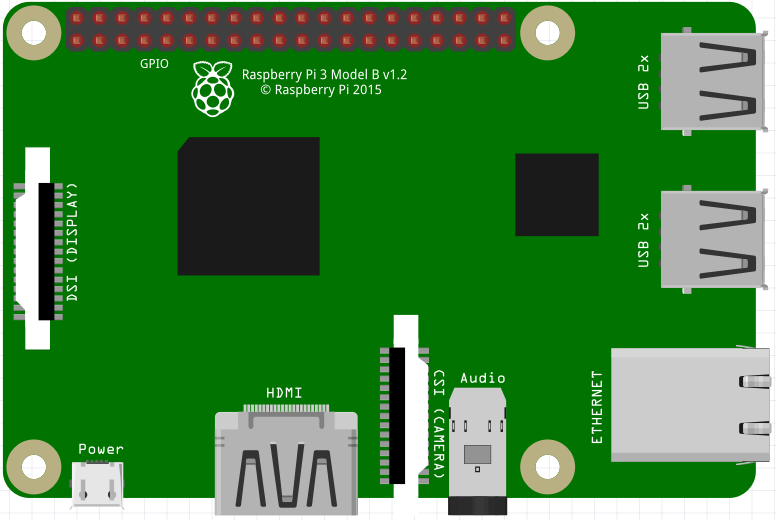
[Image credit](#fritzing)
| Feature | Description |
|---|---|
| CPU | 1.2 GHz quad-core ARMv8 |
| Memory | 1 GB DRAM |
| Storage | MicroSD |
| Linux kernel | 4.9 w/ Raspberry Pi patches |
| IEx terminal | HDMI and USB keyboard (can be changed to UART) |
| GPIO, I2C, SPI | Yes - Elixir ALE |
| ADC | No |
| PWM | Yes, but no Elixir support |
| UART | 1 available - ttyAMA0 |
| Camera | Yes - via rpi-userland |
| Ethernet | Yes |
| WiFi | Yes - Nerves.Network |
| Bluetooth | Not supported yet |
Using
The most common way of using this Nerves System is create a project with mix
nerves.new and to export MIX_TARGET=rpi3. See the Getting started
guide
for more information.
If you need custom modifications to this system for your device, clone this repository and update as described in Making custom systems
If you’re new to Nerves, check out the nerves_init_gadget project for creating a starter project. It will get you started with the basics like bringing up networking, initializing the writable application data partition, and enabling ssh-based firmware updates. It’s easiest to begin by using the wired Ethernet interface ‘eth0’ and DHCP.
Supported WiFi devices
The base image includes drivers for the onboard Raspberry Pi 3 wifi module
(brcmfmac driver).
Linux kernel and RPi firmware/userland
There’s a subtle coupling between the nerves_system_br version and the Linux
kernel version used here. nerves_system_br provides the versions of
rpi-userland and rpi-firmware that get installed. I prefer to match them to
the Linux kernel to avoid any issues. Unfortunately, none of these are tagged by
the Raspberry Pi Foundation so I either attempt to match what’s in Raspbian or
take versions of the repositories that have similar commit times.
Linux kernel configuration
The Linux kernel compiled for Nerves is a stripped down version of the default Raspberry Pi Linux kernel. This is done to remove unnecessary features, select some Nerves-specific features, and to save space. To reproduce the kernel configuration found here, do the following (this is somewhat tedious):
- Start with
arch/arm/configs/bcmrpi_defconfig. This is the kernel configuration used in the official Raspberry Pi images. - Turn off all filesystems except for
ext4,squashfs,tmpfs,proc,sysfs, andvfat. Squashfs only needs ZLIB support. vfatneeds to default toutf8. Enable native language support forascii,utf-8,ISO 8859-1, codepage 437, and codepage 850.- Disable all network drivers and wireless LAN drivers except for Broadcom FullMAC WLAN.
- Disable PPP and SLIP
- Disable the WiFi drivers in the Staging drivers menus
- Disable TV, AM/FM, Media USB adapters, DVB Frontends and Remote controller support in the Multimedia support menus.
- Go to
Device Drivers->Sound card support. DisableUSB sound devicesin ALSA. DisableOpen Sound System. - Go to
Device Drivers->Graphics support. DisableDisplayLink - In
Kernel Features, selectPreemptible Kernel (Low-Latency Desktop), disable the memory allocator for compressed pages. - In
Userspace binary formats, disable support for MISC binaries. - In
Networking support, disable Amateur Radio support, CAN bus subsystem, IrDA subsystem, Bluetooth, WiMAX, Plan 9, and NFC. (TBD - this may be too harsh, please open issues if you’re using any of these and it’s the only reason for you to create a custom system.) - In
Networking options, disable IPsec, SCTP, Asynchronous Transfer Mode, 802.1d Ethernet Bridging, L2TP, VLAN, Appletalk, 6LoWPAN, 802.15.4, DNS Resolver, B.A.T.M.A.N, Open vSwitch, MPLS, and the Packet Generator in Network testing. - In
Networking support->Wireless, enable “use statically compiled regulatory rules database”. Build incfg80211andmac80211. Turn offmac80211mesh networking and LED triggers. Turn offcfg80211wireless extensions compatibility. - In
Kernel hacking, disable KGDB, and Magic SysRq key. - In Device Drivers, disable MTD support. In Block devices, disable everything but Loopback and RAM block device. Disable RAID and LVM.
- In
Enable the block layer, deselect everything but the PC BIOS partition type (i.e., no Mac partition support, etc.). - In
Enable loadable module support, select “Trim unused exported kernel symbols”. NOTE: If you’re having trouble with an out-of-tree kernel module build, try deslecting this!! - In
General Setup, turn offinitramfs/initfdsupport, Kernel .config support, OProfile. - In
Device Drivers -> I2C -> Hardware Bus Supportcompile the module into the kernel and disable everything butBCM2708 BSCsupport. - In
Device Drivers -> SPIcompile in the BCM2835 SPI controller and User mode SPI device driver support. - In
Device Drivers -> StagingdisableSupport for small TFT LCD modules - In
Device Drivers -> Dallas's 1-wire support, disable everything but the GPIO 1-Wire master and the thermometer slave. (NOTE: Why is the thermometer compiled in? This seems historical.) - Disable
Hardware Monitoring support,Sonics Silicon Backplane support - In
Device Drivers -> Character devices -> Serial drivers, disable 8250 and SC16IS7xx support. Disable the RAW driver. - In
Networking support->Network options, disableIP: kernel level autoconfiguration - In
Networking support->Network options->TCP: advanced congestion controldisable everything except forCUBIC TCP. - Disable
Real Time Clock. - Disable everything in
Cryptographic APIandLibrary routinesthat can be disabled. Sometimes you need to make multiple passes. - Disable EEPROM 93CX6 support, PPS support, all GPIO expanders, Speakup core, Media staging drivers, STMicroelectronics STMPE, anything “Wolfson”.
- Disable most ALSA for SoC audio support and codecs. NOTE: We probably should support a few, but I have no clue which ones are most relevant and there are tons of device drivers in the list.
- Disable IIO and UIO.
- Disable NXP PCA9685 PWM driver
Image credit: This image is from the Fritzing parts library.