Nrf24
View SourceElixir library for receiving and sending data through the Nordic nRF24L01+ 2.4GHz wireless transceiver module.
The library wraps Circuits.SPI and Circuits.GPIO to handle common nRF24L01+ configuration (addresses, channels, payload sizes, ACK/CRC, retransmits) and runtime operations (listening for RX and sending TX payloads with CE control). It defaults to Enhanced ShockBurst with auto-acknowledgement (ACK) and CRC enabled.
This README includes wiring guidance, setup instructions, and step-by-step examples for Raspberry Pi and Arduino interoperability. It also includes a brief advanced section for using the low-level Nrf24.Transciever API directly.
Important electrical notes:
- The nRF24L01+ is a 3.3V device. Do not power it from 5V and ensure all logic lines are 3.3V.
- Place a decoupling capacitor (e.g., 10–47 µF electrolytic + 100 nF ceramic) as close as possible to the module’s VCC/GND pins to avoid brownouts and flaky behavior.
Pinout
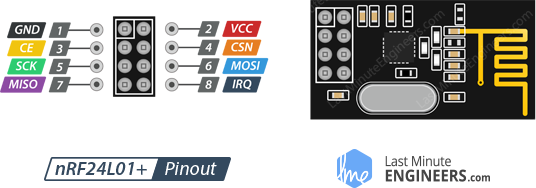
Raspberry Pi wiring
Typical Raspberry Pi (BCM numbering) wiring:
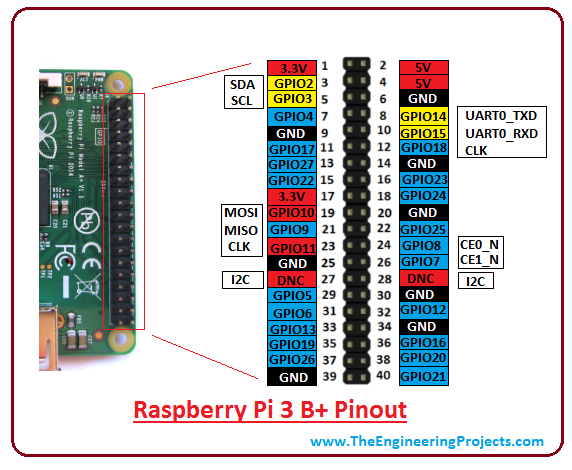
| nRF24L01+ | Raspberry Pi (GPIO) | RPi 3B+ pin no. |
|---|---|---|
| GND | GND | 6 |
| VCC | 3.3V | 1 |
| CE | 17 | 11 |
| CSN | 8 | 24 |
| SCK | 11 | 23 |
| MOSI | 10 | 19 |
| MISO | 9 | 21 |
Notes:
- CE (chip enable) must be a GPIO you control from software (e.g., GPIO17).
- CSN (chip select) can be wired to a GPIO. This library asserts CSN via GPIO during TX payload writes. Using GPIO8 (SPI0 CE0) is common; it is both the default SPI chip-select and an addressable GPIO. If your platform does not allow toggling the hardware CS as a normal GPIO, wire CSN to an alternate free GPIO instead and use that GPIO number as csn_pin.
- SPI signals use SPI0 by default: SCK = GPIO11, MOSI = GPIO10, MISO = GPIO9.
Raspberry Pi 3B+ pinout reference:
Arduino
Wiring
The library was tested with a second nRF24L01+ module connected to an Arduino Nano:
| nRF24L01+ | Arduino |
|---|---|
| GND | GND |
| VCC | +3V3 |
| CE | D9 |
| CSN | D10 |
| SCK | D13 |
| MOSI | D11 |
| MISO | D12 |

Arduino library
Use the RF24 Arduino library and the GettingStarted example for a quick peer to the Elixir side: https://nrf24.github.io/RF24/
Ensure both sides use:
- The same 5-byte address for TX/RX pipe 0 when auto-ack is enabled.
- The same channel and data rate.
- Matching payload sizes (unless using dynamic payloads).
Prerequisites
- Linux SBC (e.g., Raspberry Pi) with SPI enabled.
- Elixir and Mix installed.
- SPI and GPIO accessible to the running user:
- On Raspberry Pi OS:
- Enable SPI: sudo raspi-config → Interface Options → SPI → Enable
- Optional: add your user to groups: sudo usermod -aG spi,gpio $(whoami)
- On Raspberry Pi OS:
- Dependencies: Circuits.SPI, Circuits.GPIO (transitive via this package).
Selecting an SPI bus:
- Circuits.SPI enumerates available buses; on Raspberry Pi you’ll usually see ["spidev0.0", "spidev0.1"].
- spidev0.0 often corresponds to CE0, spidev0.1 to CE1.
- You can list them in IEx: Circuits.SPI.bus_names()
Circuits.SPI basics (relevant to this library):
- SPI is full-duplex: for every bit clocked out, one is clocked in.
- Circuits.SPI.transfer/2 sends a binary and returns {:ok, response_binary}, where the response is exactly the same size as the request.
- To read N bytes from a device register, the host sends a one-byte READ command followed by N dummy bytes (0x00 or 0xFF). The first received byte is typically a STATUS byte, followed by the requested N bytes.
This library opens the SPI bus using Circuits.SPI.open(bus_name) with default options (SPI mode 0). nRF24L01+ requires SPI mode 0 (CPOL=0, CPHA=0).
Installation
Add nrf24 to your deps in mix.exs:
def deps do
  [
    {:nrf24, "~> 2.0.0"}
  ]
end
Fetch deps:
mix deps.get
Quick start
The Nrf24 module is a GenServer that owns the SPI handle and knows your CE/CSN GPIOs. It provides convenience functions for common operations.
Addresses and payload sizes:
- Pipe 0 and 1 use 5-byte addresses (e.g., "1Node", <<0xE7,0xE7,0xE7,0xE7,0xE7>>).
- Pipes 2..5 override only the least-significant byte of pipe 1’s address and take a 1-byte suffix (integer 0..255).
- Payload is 1..32 bytes unless dynamic payloads are enabled (not enabled by default here).
Data rate and channel must match on both peers. The examples below use:
- Channel 0x4C (76 decimal) — free to change, but keep both ends the same.
- Speed :medium (1 Mbps). This setting is commonly robust with the nRF24L01+ modules and wiring found in hobby setups.
Receiving data
{:ok, nrf} =
  Nrf24.start_link(
    bus_name: "spidev0.0",
    ce_pin: 17,   # GPIO17 for CE
    csn_pin: 8,   # GPIO8 for CSN (can be any GPIO you wired to CSN)
    channel: 0x4C,
    crc_length: 2,
    speed: :medium,
    pipes: [
      [pipe_no: 0, address: "1Node", payload_size: 4, auto_ack: true]
    ]
  )

# Put the radio into RX and assert CE
:ok = Nrf24.start_listening(nrf)

# Block up to ~30s waiting for one payload (default timeout in library)
case Nrf24.receive(nrf, 4) do
  {:ok, %{pipe: pipe_no, data: <<a, b, c, d>>}} ->
    IO.puts("Received on pipe #{pipe_no}: #{inspect({a, b, c, d})}")

  {:error, :no_data} ->
    IO.puts("No data received within timeout")

  {:error, reason} ->
    IO.puts("Receive error: #{inspect(reason)}")
end

# Deassert CE and power down
:ok = Nrf24.stop_listening(nrf)
Tips:
- Ensure the sender is using the same channel, data rate, and the receiver’s pipe 0 address matches the sender’s TX/RX_P0 address when auto-ack is enabled.
- The payload_size passed to Nrf24.receive/2 must match the pipe’s configured RX_PW_Px value (unless using dynamic payloads).
Sending data
{:ok, nrf} =
  Nrf24.start_link(
    bus_name: "spidev0.0",
    ce_pin: 17,
    csn_pin: 8,
    channel: 0x4C,
    crc_length: 2,
    speed: :medium
  )

# 4-byte little-endian float as an example payload
data = <<9273.69::float-little-size(32)>>

# Send asynchronously to receiver address (must be 5 bytes)
# When auto-ack is on, TX_ADDR must equal the receiver's RX_ADDR_P0
Nrf24.send(nrf, "2Node", data)
Notes:
- send/3 is asynchronous and returns immediately. The library asserts CE to trigger TX and deasserts it shortly after automatically.
- Max payload is 32 bytes.
- For reliable ACKs, ensure the receiver has pipe 0 enabled with the same 5-byte address and that both peers share channel and data rate.
API overview
Common operations:
# Change RF channel (0..125 typical)
{:ok, _} = Nrf24.set_channel(nrf, 76)

# CRC length: 1 or 2 bytes
{:ok, _} = Nrf24.set_crc_length(nrf, 2)

# Power management
{:ok, _} = Nrf24.power_on(nrf)
{:ok, _} = Nrf24.power_off(nrf)

# RX/TX mode
{:ok, _} = Nrf24.set_receive_mode(nrf)
{:ok, _} = Nrf24.set_transmit_mode(nrf)

# Enable/disable auto-ack per pipe (0..5)
{:ok, _} = Nrf24.ack_on(nrf, 0)
{:ok, _} = Nrf24.ack_off(nrf, 0)

# Enable/disable a pipe
{:ok, _} = Nrf24.enable_pipe(nrf, 0)
{:ok, _} = Nrf24.disable_pipe(nrf, 0)

# Configure a pipe in one go
{:ok, nil} =
  Nrf24.set_pipe(nrf, 1,
    address: "Rcvr1",
    payload_size: 6,
    auto_acknowledgement: true
  )

# Retransmit tuning
{:ok, _} = Nrf24.set_retransmit_delay(nrf, 2)  # 2->750µs (see datasheet mapping)
{:ok, _} = Nrf24.set_retransmit_count(nrf, 15) # up to 15 retries

# Low-level register access
{:ok, _} = Nrf24.write_register(nrf, :rf_ch, 76)
val = Nrf24.read_register(nrf, :rf_ch)
addr_p1 = Nrf24.read_register(nrf, :rx_addr_p1, 5)

# Reset device to a known baseline configuration
{:ok, _} = Nrf24.reset_device(nrf)
Notes on speed:
- The RF data rate setting is library-dependent. The examples use speed: :medium (1 Mbps), which is the most common and robust. Other speed atoms may vary by version. If unsure, prefer :medium.
Advanced: using the low-level Transceiver API
If you want full control or to script SPI operations directly in IEx, use Nrf24.Transciever.
Example (TX) using direct SPI:
alias Circuits.SPI
alias Circuits.GPIO
alias Nrf24.Transciever

# Choose your SPI bus from Circuits.SPI.bus_names()
{:ok, spi} = SPI.open("spidev0.0")

# Configure
Transciever.reset(spi)  # Optional: baseline
Transciever.set_channel(spi, 76)
Transciever.set_crc_length(spi, 2)
# Data rate configuration is library-dependent;
# :medium is a safe default path via Nrf24 GenServer.

# Prepare TX: sets TX mode, programs TX_ADDR and RX_ADDR_P0
# to same 5-byte value, enables ACK on P0, clears IRQ, powers up
Transciever.start_sending(spi, "2Node")

# Send: CSN is toggled via a GPIO you supply, CE toggled via another GPIO
csn_pin = 8
ce_pin = 17
payload = <<"Hi!">>
{:ok, ce} = Transciever.send(spi, payload, csn_pin, ce_pin)

# Finish TX
Transciever.stop_sending(ce)
Example (RX) using direct SPI:
alias Circuits.SPI
alias Nrf24.Transciever

{:ok, spi} = SPI.open("spidev0.0")

Transciever.reset(spi) # Optional
Transciever.set_channel(spi, 76)
Transciever.set_pipe(
  spi,
  0,
  address: "1Node",
  payload_size: 4,
  auto_acknowledgement: true)

# Start listening (CE high while in RX mode)
Transciever.start_listening(spi, 17)

# Poll for a single payload (4 bytes)
case Transciever.receive(spi, 4) do
  {:ok, %{pipe: p, data: <<a, b, c, d>>}} ->
    IO.puts("RX pipe #{p}: #{inspect({a, b, c, d})}")

  {:error, :no_data} ->
    IO.puts("No data available")

  {:error, reason} ->
    IO.puts("RX error: #{inspect(reason)}")
end

# Stop listening (CE low, power down)
Transciever.stop_listening(spi, 17)
Debug/inspection helpers:
- Transciever.print_details/1 prints a concise summary of the radio state (STATUS, addresses, payload widths, CONFIG, EN_AA, EN_RXADDR, RF_CH, RF_SETUP, FIFO_STATUS).
- You can also read any register with Transciever.read_register/3.
Tips and troubleshooting
Power and decoupling:
- Use a stable 3.3V rail capable of sourcing the burst current the radio needs (at least 100 mA headroom recommended).
- If communication is unreliable add capacitors near the module (e.g., 10–47 µF electrolytic and 100 nF ceramic) soldered directly to VCC and GND pins.
Addressing and ACK:
- For auto-ack to work, the sender’s TX_ADDR must equal the receiver’s RX_ADDR_P0.
- Ensure the receiver has the corresponding pipe enabled and payload width configured.
Channel and speed:
- Both peers must use the same channel and RF data rate.
- 1 Mbps is a good default for reliability with basic wiring.
CE/CSN:
- CE must be driven high in RX to receive. In TX, CE high triggers transmission after the payload is written.
- This library asserts CSN via a GPIO when writing the TX payload. If CSN is instead wired strictly to a hardware chip-select line that’s not available as a GPIO, you may need to rework wiring or remove manual CSN control in the code path you use.
SPI bus:
- Verify SPI devices are present: Circuits.SPI.bus_names()
- Ensure SPI is enabled in the OS and the running user has permissions to /dev/spidevX.Y and GPIO.
No data conditions:
- If you get {:error, :no_data}, confirm the peer is actually sending to your address/pipe and that CE is asserted in RX.
- Check STATUS and FIFO registers to diagnose conditions. Using Transciever.print_details/1 on a direct SPI handle can be helpful.
Range and interference:
- Choose a channel away from congested 2.4 GHz bands (e.g., avoid Wi-Fi channels if possible).
- Consider lower data rates for longer range or noisy environments.