



Build LLM agents that write and execute programs. SubAgents combine the reasoning power of LLMs with the computational precision of a sandboxed interpreter.
Quick Start
# Conceptual example - see Getting Started guide for runnable code
{:ok, step} = PtcRunner.SubAgent.run(
  "What's the total value of orders over $100?",
  tools: %{"get_orders" => &MyApp.Orders.list/0},
  signature: "{total :float}",
  llm: my_llm
)

step.return.total  #=> 2450.00
Try it yourself: The Getting Started guide includes fully runnable examples you can copy-paste.
The SubAgent doesn't answer directly - it writes a program that computes the answer:
(->> (tool/get_orders)
     (filter #(> (:amount %) 100))
     (sum-by :amount))
This is Programmatic Tool Calling: instead of the LLM being the computer, it programs the computer.
Why PtcRunner?
LLMs as programmers, not computers. Most agent frameworks treat LLMs as the runtime. PtcRunner inverts this: LLMs generate programs that execute deterministically in a sandbox. Tool results stay in memory — the LLM explores data through code, exposing only relevant findings. This scales to thousands of items without context limits and eliminates hallucinated counts.
Best suited for: Document analysis (agentic RAG), log analysis, data aggregation, multi-source joins — any task where raw data volume would overwhelm an LLM's context window.
Key Features
- Two execution modes: PTC-Lisp for multi-turn agentic workflows with tools, or text mode for direct LLM responses with optional native tool calling
- Signatures: Type contracts (
{sentiment :string, score :float}) that validate outputs and drive auto-retry on mismatch - Context firewall:
_prefixed fields stay in BEAM memory, hidden from LLM prompts - Transactional memory:
defpersists data across turns without bloating context - Composable SubAgents: Nest agents as tools with isolated state and turn budgets
- Recursive agents (RLM): Agents call themselves via
:selftools to subdivide large inputs - Ad-hoc LLM queries:
llm-querycalls an LLM from within PTC-Lisp with signature-validated responses - Observable: Telemetry spans for every turn, LLM call, and tool call with parent-child correlation. JSONL trace logs with Chrome DevTools flame chart export for debugging multi-agent flows (interactive Livebook)
- BEAM-native: Parallel tool calling (
pmap/pcalls), process isolation with timeout and heap limits, fault tolerance
Examples
Parallel tool calling - fetch data concurrently:
;; LLM generates this - executes in parallel automatically
(let [[user orders stats] (pcalls #(tool/get_user {:id data/user_id})
                                   #(tool/get_orders {:id data/user_id})
                                   #(tool/get_stats {:id data/user_id}))]
  {:user user :order_count (count orders) :stats stats})
Context firewall - keep large data out of LLM prompts:
# The LLM sees: %{summary: "Found 3 urgent emails"}
# Elixir gets: %{summary: "...", _email_ids: [101, 102, 103]}
signature: "{summary :string, _email_ids [:int]}"
Ad-hoc LLM judgment from code - the LLM writes programs that call other LLMs, with typed responses and parallel execution:
;; LLM generates this - each llm-query runs in parallel via pmap
(pmap (fn [item]
        (tool/llm-query {:prompt "Rate urgency: {{desc}}"
                         :signature "{urgent :bool, reason :string}"
                         :desc (:description item)}))
      data/items)
The agent decides what to ask and how to structure the response — at runtime, from within the generated program. Enable with llm_query: true. See the LLM Agent Livebook for a full example.
Compile SubAgents - LLM writes the orchestration logic once, execute deterministically:
# Orchestrator with SubAgentTools + pure Elixir functions
{:ok, compiled} = SubAgent.compile(orchestrator, llm: my_llm)

# LLM generated: (loop [joke initial, i 1] (if (tool/check ...) (return ...) (recur ...)))

# Execute with zero orchestration cost - only child SubAgents call the LLM
compiled.execute.(%{topic: "cats"}, llm: my_llm)
See the Joke Workflow Livebook for a complete example.
Text Mode
Not every task needs PTC-Lisp. Text mode (output: :text) uses the LLM provider's native tool calling API — ideal for smaller models or straightforward tasks:
# Plain text — no signature, raw string response
{:ok, step} = SubAgent.run(
  "Summarize this article: {{text}}",
  context: %{text: article},
  output: :text,
  llm: my_llm
)
step.return  #=> "The article discusses..."

# Structured JSON — signature validates the response
{:ok, step} = SubAgent.run(
  "Classify the sentiment of: {{text}}",
  context: %{text: "I love this product!"},
  output: :text,
  signature: "() -> {sentiment :string, score :float}",
  llm: my_llm
)
step.return  #=> %{"sentiment" => "positive", "score" => 0.95}
Text mode also supports tools. Define tools as arity-1 functions that receive a map of arguments:
defmodule Calculator do
  @doc "Add two numbers"
  @spec add(%{a: integer(), b: integer()}) :: integer()
  def add(%{"a" => a, "b" => b}), do: a + b

  @doc "Multiply two numbers"
  @spec multiply(%{a: integer(), b: integer()}) :: integer()
  def multiply(%{"a" => a, "b" => b}), do: a * b
end
PtcRunner auto-extracts the @doc and @spec into tool descriptions and JSON Schema for the LLM provider's native tool calling API — just pass bare function references:
{:ok, step} = SubAgent.run(
  "What is (3 + 4) * 5?",
  output: :text,
  signature: "() -> {result :int}",
  tools: %{
    "add" => &Calculator.add/1,
    "multiply" => &Calculator.multiply/1
  },
  llm: my_llm
)
step.return["result"]  #=> 35
For full control (or anonymous functions), pass an explicit signature string instead. See the Text Mode guide for all four variants (plain text, JSON, tool+text, tool+JSON).
Signatures and JSON Schema
Signatures are compact type contracts that validate SubAgent inputs and outputs:
"(query :string, limit :int) -> {total :float, items [{id :int, name :string}]}"Under the hood, PtcRunner converts signatures to JSON Schema in two places:
| Where | When | Purpose |
|---|---|---|
| Tool definitions | Text mode with tools | Tool signatures → JSON Schema parameters sent to the LLM provider's native tool calling API |
| Structured output | Text mode with complex return type | Return signature → JSON Schema passed to the LLM callback for provider-specific structured output (e.g., OpenAI response_format) |
In PTC-Lisp mode, signatures stay in their compact form — the LLM sees them in the prompt and PtcRunner validates the result directly. JSON Schema is only generated when interfacing with LLM provider APIs that require it.
Auto-extraction from @spec means you can define tools as regular Elixir functions and skip writing signatures by hand. For full control, pass an explicit signature string:
"search" => {&MyApp.search/2, signature: "(query :string, limit :int) -> [{id :int}]"}See Signature Syntax for the full type reference.
Meta Planner
The meta planner decomposes a mission into a dependency graph of tasks, assigns each to a specialized SubAgent, and executes them in parallel phases. The Trace Viewer provides interactive visualization of the full execution — from the high-level DAG down to individual agent turns with thinking, programs, and tool output.
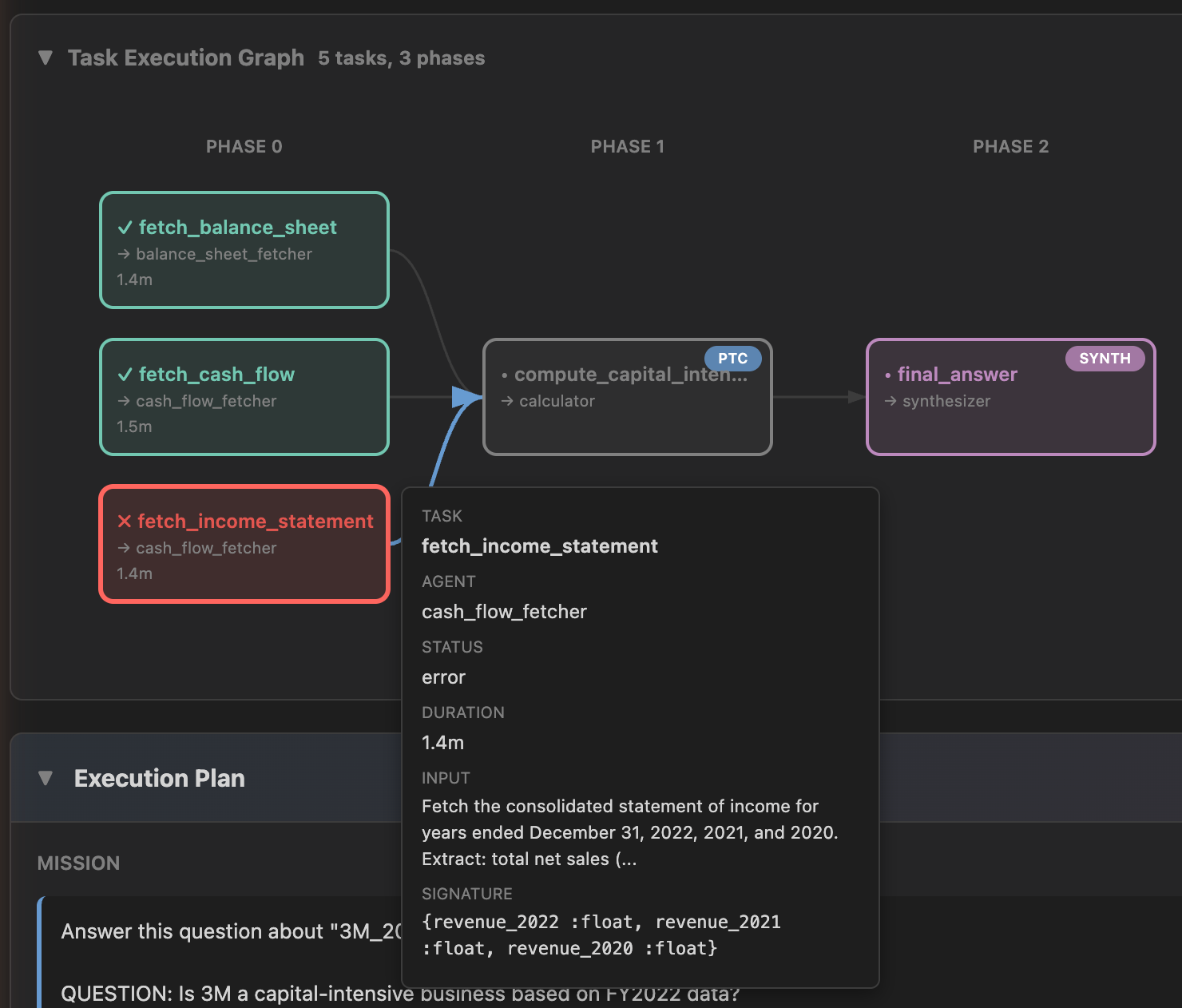
mix ptc.viewer --trace-dir path/to/traces
Installation
def deps do
  [
    {:ptc_runner, "~> 0.9.0"},
    {:req_llm, "~> 1.2"}  # optional — enables built-in LLM adapter
  ]
end
With req_llm installed, create LLM callbacks with zero configuration:
llm = PtcRunner.LLM.callback("openrouter:anthropic/claude-haiku-4.5")

# or with prompt caching
llm = PtcRunner.LLM.callback("bedrock:haiku", cache: true)
PtcRunner.LLM.callback/2 routes by model prefix (openrouter:, bedrock:, anthropic:, ollama:, etc.) and handles structured output, tool calling, and prompt caching. See the LLM Setup guide for all providers, streaming, custom adapters, and framework integration.
Documentation
Guides
- Getting Started - Build your first SubAgent
- LLM Setup - Providers, streaming, custom adapters, framework integration
- Core Concepts - Context, memory, and the firewall convention
- Patterns - Chaining, orchestration, and composition
- Testing - Mocking LLMs and integration testing
- Troubleshooting - Common issues and solutions
Reference
- Signature Syntax - Input/output type contracts
- PTC-Lisp Specification - The language SubAgents write
- Benchmark Evaluation - LLM accuracy by model
Interactive
mix ptc.repl- Interactive REPL for testing PTC-Lisp expressions- Playground Livebook - Try PTC-Lisp interactively
- LLM Agent Livebook - Build an agent end-to-end
- Examples - Runnable example applications including PageIndex (agentic RAG over PDFs using MetaPlanner)
- Blog - Articles and updates
Low-Level API
For direct program execution without the agentic loop:
{:ok, step} = PtcRunner.Lisp.run(
  "(->> data/items (filter :active) (count))",
  context: %{items: items}
)
step.return  #=> 3
Programs run in isolated BEAM processes with resource limits (1s timeout, 10MB heap).
See PtcRunner.Lisp module docs for options.
License
MIT