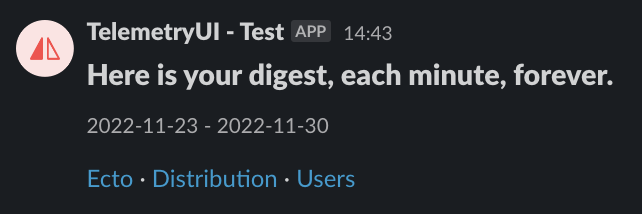
telemetry_ui has amodule to send shareable links to external resources. The only resource implemented for now is Slack.
To schedule a weekly digest, we rely on Oban to have a safe, unique and schedulable queue across our system.
Requirements
You will need to install it before continuing this guide.
You will also need to have a valid Slack hook URL.
Usage
We can now add a Cron config with custom arguments to publish our digest on Slack:
telemetry_ui_digest_args = %{
  time_diff: [7, "day"],
  share_url: "http://localhost:4004/metrics",
  pages: ["Ecto", "Phoenix"],
  metric_images: [
    %{"page" => "Ecto", "description" => "Requests average duration"}
  ],
  apparence: %{
    header: "Here is your digest, each minute.",
    icon_emoji: ":smile:",
    username: "TelemetryUI - Hook"
  },
  slack_hook_url: "https://hooks.slack.com/services/T0000000/B000000000/u20000000000"
}

config :my_app, Oban,
  repo: MyApp.Repo,
  plugins: [
    Oban.Plugins.Pruner,
    {Oban.Plugins.Cron,
     crontab: [
       {"@weekly", TelemetryUI.Digest.Worker, args: telemetry_ui_digest_args}
     ]}
  ],
  queues: [default: 10]
Here is the kind of result you should see in Slack: