Background styling attributes.
Backgrounds are decorative. They paint behind an element's content but do not affect layout, sizing, or child measurement.
Use:
color/1for solid fillsgradient/2andgradient/3for linear gradientsimage/1andimage/2for background images
Background Images
Background.image/2 decorates an existing element frame. It does not create
an image element and it does not derive size from the source image. Use
Emerge.UI.image/2 when the image itself is the content element.
Background image fit modes are:
:cover- fill the frame and crop if needed:contain- fit entirely inside the frame without cropping:repeat- tile on both axes:repeat_x- tile on the X axis only:repeat_y- tile on the Y axis only
Emerge.UI.image_fit/1 only applies to Emerge.UI.image/2 and only accepts
:contain and :cover. Background images additionally support the repeat
modes above.
Backgrounds follow the element shape, so rounded corners from
Emerge.UI.Border.rounded/1 and Emerge.UI.Border.rounded_each/4 also clip
background painting.
For color helpers, see Emerge.UI.Color. Background.image/2 accepts the
same source forms as Emerge.UI.image/2.
Examples
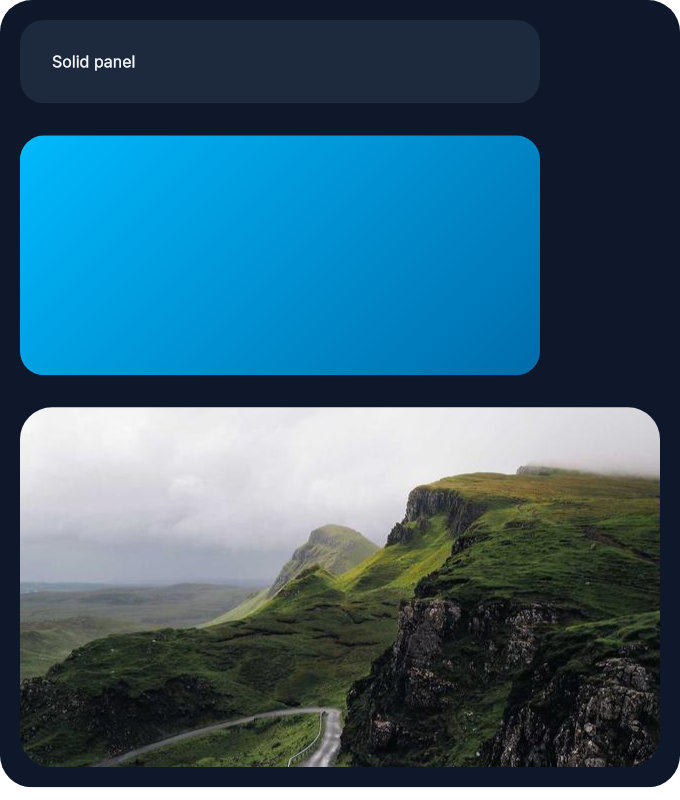
This column shows the three main background styles side by side: a solid panel, a decorative gradient block, and an image-backed hero surface.
column(
  [
    padding(10),
    spacing(16),
    Background.color(color(:slate, 900)),
    Border.rounded(16)
  ],
  [
    el(
      [
        width(px(260)),
        padding(16),
        Background.color(color(:slate, 800)),
        Border.rounded(12),
        Font.color(color(:slate, 50))
      ],
      text("Solid panel")
    ),
    el(
      [
        width(px(260)),
        height(px(120)),
        Background.gradient(color(:sky, 400), color(:sky, 700), 45),
        Border.rounded(12)
      ],
      none()
    ),
    el(
      [
        width(px(320)),
        height(px(180)),
        Background.image("sample_assets/static.jpg"),
        Border.rounded(16)
      ],
      none()
    )
  ]
)
Rendered result:
Summary
Functions
Set a solid background color.
Set a linear background gradient.
Set a background image on the element frame.
Tile a background image on both axes.
Tile a background image on the X axis.
Tile a background image on the Y axis.
Set a background image that fits without cropping.
Types
@type color_value() :: Emerge.UI.Color.color() | Emerge.UI.Color.t()
@type fit() :: :contain | :cover | :repeat | :repeat_x | :repeat_y
@type gradient_background() :: {:gradient, color_value(), color_value(), number()}
@type image_background() :: {:image, Emerge.UI.image_source(), fit()}
@type image_options() :: keyword()
@type t() :: {:background, color_value() | gradient_background() | image_background()}
Functions
@spec color(color_value()) :: t()
Set a solid background color.
Accepts plain named colors like :black and normalized color tuples from
Emerge.UI.Color.
Example
This creates a small status pill with a solid green fill and white text.
el(
  [
    padding(12),
    Background.color(color(:emerald, 600)),
    Border.rounded(8),
    Font.color(color(:white))
  ],
  text("Saved")
)@spec gradient(color_value(), color_value(), number()) :: t()
Set a linear background gradient.
gradient/2 defaults to an angle of 0 degrees. gradient/3 accepts an
explicit angle in degrees.
Example
This creates a decorative block where the gradient is the main visual content.
el(
  [
    width(px(320)),
    height(px(160)),
    Background.gradient(color(:violet, 500), color(:fuchsia, 700), 30),
    Border.rounded(18)
  ],
  none()
)@spec image(Emerge.UI.image_source(), image_options()) :: t()
Set a background image on the element frame.
Accepts any source supported by Emerge.UI.image_source(). The default fit is
:cover.
Unlike Emerge.UI.image/2, this is decorative and does not create a content
image element. Background images also support tiling via :repeat,
:repeat_x, and :repeat_y.
Example
This shows the difference between the default :cover behavior and an
uncropped :contain background image.
column([spacing(12)], [
  el(
    [
      width(px(320)),
      height(px(180)),
      Background.image("images/hero.jpg"),
      Border.rounded(16)
    ],
    none()
  ),
  el(
    [
      width(px(320)),
      height(px(120)),
      Background.image("images/logo.png", fit: :contain),
      Border.rounded(16)
    ],
    none()
  )
])@spec tiled(Emerge.UI.image_source()) :: t()
Tile a background image on both axes.
Sugar for image(source, fit: :repeat).
Example
This repeats a small pattern image in both directions to create a textured surface.
el(
  [
    width(px(240)),
    height(px(120)),
    Background.tiled("images/pattern.svg"),
    Border.rounded(12)
  ],
  none()
)@spec tiled_x(Emerge.UI.image_source()) :: t()
Tile a background image on the X axis.
Sugar for image(source, fit: :repeat_x).
Example
This repeats a decorative pattern across the width while keeping the height bounded by the host element.
el(
  [
    width(px(240)),
    height(px(80)),
    Background.tiled_x("images/pattern.svg"),
    Border.rounded(12)
  ],
  none()
)@spec tiled_y(Emerge.UI.image_source()) :: t()
Tile a background image on the Y axis.
Sugar for image(source, fit: :repeat_y).
Example
This repeats a decorative pattern down the height while keeping the width bounded by the host element.
el(
  [
    width(px(120)),
    height(px(200)),
    Background.tiled_y("images/pattern.svg"),
    Border.rounded(12)
  ],
  none()
)@spec uncropped(Emerge.UI.image_source()) :: t()
Set a background image that fits without cropping.
Sugar for image(source, fit: :contain).
Example
This is useful for logos or illustrations that should remain fully visible inside the frame.
el(
  [
    width(px(220)),
    height(px(120)),
    Background.uncropped("images/logo.png"),
    Border.rounded(12)
  ],
  none()
)