Padding and child-gap helpers.
Emerge layouts are spaced with padding and spacing rather than margins.
Use:
padding/1,padding_xy/2, andpadding_each/4to add inner space between an element frame and its contentspacing/1andspacing_xy/2to add gaps between children in layout containersspace_evenly/0to turn the remaining room in a row or column into equal gaps between children
Padding
Padding lives inside the element. It pushes content and child layout inward from the element edges.
This is the usual way to create gutters inside cards, buttons, pills, and
panels. Padding works together with helpers such as Emerge.UI.Background
and Emerge.UI.Border when you want the frame to remain visible around the
content.
Child Gaps
Spacing lives between siblings, not around the outside of a container. In Emerge there are no margins, so container padding creates the outer gutter while spacing separates the items inside it.
spacing/1 applies the same gap everywhere the layout kind consumes spacing.
spacing_xy/2 lets layouts consume horizontal and vertical gaps separately.
Layout Behavior
Layout containers consume spacing like this:
row/2uses horizontal spacingcolumn/2andtext_column/2use vertical spacingwrapped_row/2uses horizontal spacing within each line and vertical spacing between wrapped lines
Wrapped rows also measure each line from the resolved child frames on that line. If a child grows taller after reflow, the line height and total wrapped row height grow with it, and later siblings are pushed down accordingly.
Even Distribution
space_evenly/0 is for rows and columns with definite room on their main
axis.
- on
row/2, the row needs definite width, such aswidth(px(...))orwidth(fill())inside a bounded parent - on
column/2, the column needs definite height, such asheight(px(...))orheight(fill())inside a bounded parent - when active,
space_evenly/0derives equal gaps from the remaining room between children - it does not add extra gap before the first child or after the last child
- it replaces fixed main-axis spacing while active, so
spacing/1orspacing_xy/2no longer controls those gaps
Examples
Padding creates inner gutters:
el(
  [
    width(px(360)),
    padding_xy(16, 12),
    Background.color(color(:slate, 900)),
    Border.rounded(12),
    Font.color(color(:slate, 50))
  ],
  row([width(fill()), spacing(12), center_y()], [
    el(
      [
        padding_each(4, 8, 4, 8),
        Background.color(color(:slate, 100)),
        Border.rounded(999),
        Border.width(1),
        Border.color(color(:slate, 300)),
        Font.size(12),
        Font.color(color(:slate, 800))
      ],
      text("Stable")
    ),
    column([spacing(4)], [
      el([Font.color(color(:slate, 50))], text("Release branch")),
      el(
        [Font.size(12), Font.color(color(:slate, 300))],
        text("Padding creates the card gutter")
      )
    ])
  ])
)
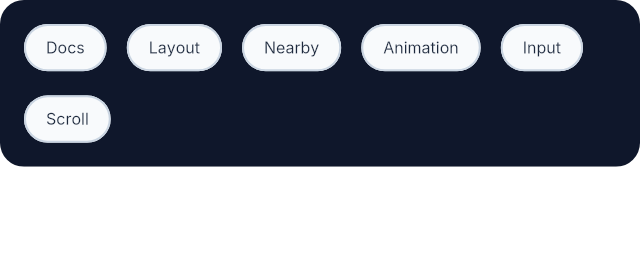
spacing_xy/2 separates wrapped content in both axes:
wrapped_row(
  [
    width(px(320)),
    padding(12),
    spacing_xy(10, 12),
    Background.color(color(:slate, 900)),
    Border.rounded(12)
  ],
  [
    el(
      [
        padding_xy(10, 6),
        Background.color(color(:slate, 50)),
        Border.rounded(999),
        Border.width(1),
        Border.color(color(:slate, 300)),
        Font.color(color(:slate, 800))
      ],
      text("Docs")
    ),
    el(
      [
        padding_xy(10, 6),
        Background.color(color(:slate, 50)),
        Border.rounded(999),
        Border.width(1),
        Border.color(color(:slate, 300)),
        Font.color(color(:slate, 800))
      ],
      text("Layout")
    ),
    el(
      [
        padding_xy(10, 6),
        Background.color(color(:slate, 50)),
        Border.rounded(999),
        Border.width(1),
        Border.color(color(:slate, 300)),
        Font.color(color(:slate, 800))
      ],
      text("Nearby")
    ),
    el(
      [
        padding_xy(10, 6),
        Background.color(color(:slate, 50)),
        Border.rounded(999),
        Border.width(1),
        Border.color(color(:slate, 300)),
        Font.color(color(:slate, 800))
      ],
      text("Animation")
    ),
    el(
      [
        padding_xy(10, 6),
        Background.color(color(:slate, 50)),
        Border.rounded(999),
        Border.width(1),
        Border.color(color(:slate, 300)),
        Font.color(color(:slate, 800))
      ],
      text("Input")
    ),
    el(
      [
        padding_xy(10, 6),
        Background.color(color(:slate, 50)),
        Border.rounded(999),
        Border.width(1),
        Border.color(color(:slate, 300)),
        Font.color(color(:slate, 800))
      ],
      text("Scroll")
    )
  ]
)
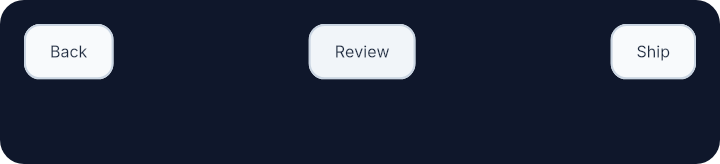
space_evenly/0 turns remaining width into equal gaps between children:
row(
  [
    width(px(360)),
    height(fill()),
    padding(12),
    space_evenly(),
    Background.color(color(:slate, 900)),
    Border.rounded(12)
  ],
  [
    Input.button(
      [
        padding_xy(12, 8),
        Background.color(color(:slate, 50)),
        Border.rounded(8),
        Border.width(1),
        Border.color(color(:slate, 300)),
        Font.color(color(:slate, 800))
      ],
      text("Back")
    ),
    Input.button(
      [
        padding_xy(12, 8),
        Background.color(color(:slate, 100)),
        Border.rounded(8),
        Border.width(1),
        Border.color(color(:slate, 300)),
        Font.color(color(:slate, 800))
      ],
      text("Review")
    ),
    Input.button(
      [
        padding_xy(12, 8),
        Background.color(color(:slate, 50)),
        Border.rounded(8),
        Border.width(1),
        Border.color(color(:slate, 300)),
        Font.color(color(:slate, 800))
      ],
      text("Ship")
    )
  ]
)
Summary
Functions
Set the same padding on all four sides.
Set padding per edge as top, right, bottom, left.
Set horizontal and vertical padding.
Turn remaining main-axis room into equal gaps between children.
Set the gap between adjacent children.
Set horizontal and vertical spacing separately.
Types
@type padding_attr() :: {:padding, number() | edge_values()}
@type space_evenly_attr() :: {:space_evenly, true}
@type spacing_attr() :: {:spacing, number()}
@type t() :: padding_attr() | spacing_attr() | spacing_xy_attr() | space_evenly_attr()
Functions
@spec padding(number()) :: padding_attr()
Set the same padding on all four sides.
Use this when an element needs a uniform inner gutter around its content.
Example
This card uses one padding value to keep the text away from the frame.
el(
  [
    padding(16),
    Background.color(color(:slate, 900)),
    Border.rounded(12),
    Font.color(color(:white))
  ],
  text("Build passed")
)@spec padding_each(number(), number(), number(), number()) :: padding_attr()
Set padding per edge as top, right, bottom, left.
Use this when a layout needs asymmetric insets, such as a header with extra room on one side or a panel whose top and bottom spacing differ.
Example
This header uses extra right padding to make room for a trailing affordance.
el(
  [
    padding_each(10, 18, 10, 12),
    Background.color(color(:white)),
    Border.rounded(10),
    Border.width(1),
    Border.color(color(:slate, 200))
  ],
  text("Project settings")
)@spec padding_xy(number(), number()) :: padding_attr()
Set horizontal and vertical padding.
The first argument is horizontal padding and the second is vertical padding. This is useful when controls need wider left and right insets than top and bottom insets.
Example
This pill uses wider horizontal padding so the label has more breathing room.
el(
  [
    padding_xy(14, 8),
    Background.color(color(:sky, 600)),
    Border.rounded(999),
    Font.color(color(:white))
  ],
  text("Deploy")
)@spec space_evenly() :: space_evenly_attr()
Turn remaining main-axis room into equal gaps between children.
space_evenly/0 only takes effect on rows and columns that have definite room
on their main axis. It creates equal gaps between consecutive children, with
no extra outer gap before the first child or after the last child.
When active, fixed main-axis spacing no longer controls those gaps.
Example
This row has a definite width, so the leftover room becomes equal gaps between the three actions.
row([width(px(360)), space_evenly()], [
  Input.button(
    [padding_xy(12, 8), Background.color(color(:sky, 500)), Border.rounded(8)],
    text("Back")
  ),
  Input.button(
    [padding_xy(12, 8), Background.color(color(:slate, 700)), Border.rounded(8), Font.color(color(:white))],
    text("Review")
  ),
  Input.button(
    [padding_xy(12, 8), Background.color(color(:emerald, 500)), Border.rounded(8)],
    text("Ship")
  )
])@spec spacing(number()) :: spacing_attr()
Set the gap between adjacent children.
spacing/1 is the common single-value gap helper for rows, columns, wrapped
rows, and text columns.
Example
This column keeps a steady 10px rhythm between stacked actions.
column([spacing(10)], [
  Input.button([padding(10), Background.color(color(:sky, 500))], text("Save")),
  Input.button([padding(10), Background.color(color(:slate, 300))], text("Duplicate")),
  Input.button([padding(10), Background.color(color(:rose, 500))], text("Delete"))
])@spec spacing_xy(number(), number()) :: spacing_xy_attr()
Set horizontal and vertical spacing separately.
Layouts consume these values differently:
row/2uses the horizontal valuecolumn/2andtext_column/2use the vertical valuewrapped_row/2uses horizontal spacing within a line and vertical spacing between wrapped lines
Example
This wrapped row keeps tags 10px apart on the same line and 12px apart
when they wrap onto a new line.
wrapped_row([width(px(280)), spacing_xy(10, 12)], [
  el([padding_xy(10, 6), Background.color(color(:white)), Border.rounded(999)], text("Docs")),
  el([padding_xy(10, 6), Background.color(color(:white)), Border.rounded(999)], text("Layout")),
  el([padding_xy(10, 6), Background.color(color(:white)), Border.rounded(999)], text("Nearby")),
  el([padding_xy(10, 6), Background.color(color(:white)), Border.rounded(999)], text("Animation")),
  el([padding_xy(10, 6), Background.color(color(:white)), Border.rounded(999)], text("Input"))
])